
Mazda CX-5 Service & Repair Manual: Starter Interlock Switch Inspection [Skyactiv G 2.0]
CAUTION:
-
Do not reuse the starter interlock switch if it is removed from the vehicle even once. Replace with a new starter interlock switch when installing.
1. Disconnect the negative battery cable..
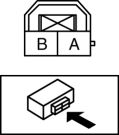
2. Disconnect the starter interlock switch connector.
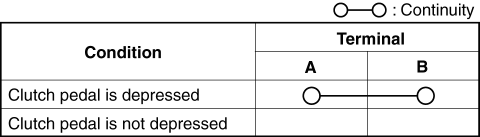
3. Verify that the continuity is as indicated in the table using a tester.
-
If the continuity is not as indicated in the table, replace the starter interlock switch.
.
 Shift Pressure Control (Line Pressure Control) [Fw6 A EL, Fw6 Ax EL]
Outline
The TCM drives the pressure control solenoid and adjusts the pressure based
on the accelerator pedal depression amount, vehicle speed, ATF temperature,
and gear shift signal. As a ...
 Starter Interlock Switch Removal/Installation [C66 M R]
1. Disconnect the negative battery cable..
2. Disconnect the starter interlock switch connector.
3. Remove the starter interlock using the following procedure:
a. Detach hook A in the direction ...
Other materials:
Before Service Precaution
WARNING:
Fuel vapor is hazardous. It can very easily ignite, causing serious injury
and damage. Always keep sparks and flames away from fuel.
Fuel line spills and leakage from the pressurized fuel system are dangerous.
Fuel can ignite and cause serious injury or death and damag ...
Power Outer Mirror Inspection
Mirror Glass Adjustment
1. Disconnect the negative battery cable..
2. Remove the following parts:
a. Inner garnish.
b. Front door trim.
c. Power outer mirror.
3. Apply battery positive voltage and connect the ground to the power outer mirror
terminals and inspect the power outer mirror ...
Plug Hole Plate Removal/Installation
CAUTION:
If the rubber on only one side of the plug hole plate front is lifted up,
it could damage the adapter at the location shown in the figure. When removing
the plug hole plate, lift up the rubbers at the same time.
Removal
1. Pull up the front part of the plug hole p ...
