
Mazda CX-5 Service & Repair Manual: Brake Fluid Pressure Sensor Inspection
1. Switch the ignition to off.
2. Remove the clips.
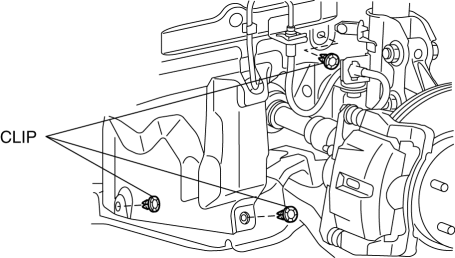
3. Set the splash shield out of the way.
4. Disconnect the brake pipe from the LF brake hose.
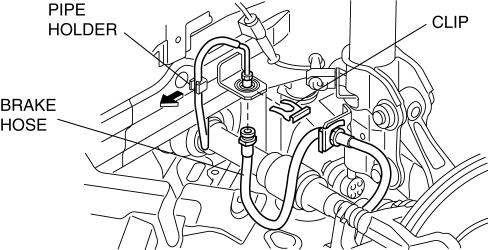
5. Remove the clip.
6. Remove the LF brake hose from the bracket.
7. Detach the brake pipe from the pipe holder.
8. Install the SST
to the brake pipe as shown in the figure.
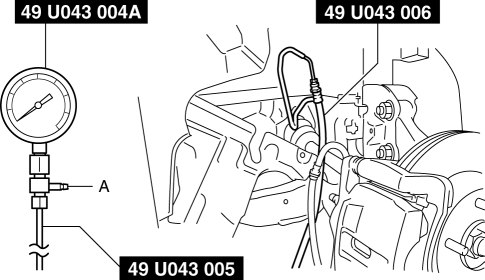
9. Bleed the brake line and the SSTs
of air. Bleed the air form the SSTs
using bleeder screw A.
10. Connect the M-MDS to the DLC-2.
11. Select the “BRK_F_P_R” PID.
12. Start the engine.
13. Depress the brake pedal, and confirm that the fluid pressure value of the SST
(Gauge) and the value shown on the M-MDS are equal
-
If the fluid pressures are different, replace the DSC HU/CM..
14. After the inspection, remove the SSTs
, install the brake hose, clamp, and brake pipe to the original positions, and then bleed the air from the brake line..
 Brake Fluid Pressure Sensor
Purpose/Function
The brake fluid pressure sensor detects the fluid pressure from the master
cylinder and transmits it to the DSC HU/CM.
Construction
The brake fluid pressure sen ...
 Brake Hose (Front) Removal/Installation
1. Remove in the order indicated in the table.
2. Install in the reverse order of removal.
3. After installation, add brake fluid, bleed the air, and inspect for fluid
leakage..
...
Other materials:
Blind Spot Monitoring (Bsm) Off Indicator Light
Purpose
The BSM OFF indicator light informs the driver that the Blind Spot Monitoring
(BSM) system is turned off or there is a malfunction in the system.
Function
The instrument cluster illuminates the BSM OFF indicator light based on the
BSM system off signal sent via a CA ...
Decoration Panel Removal/Installation
CAUTION:
Affix protective tape to the position shown in the figure.
1. Disconnect the negative battery cable..
2. Open the glove compartment.
3. Insert a tape-wrapped flathead screwdriver in the position indicated by the
arrow (1) in the figure and detach clip A.
4. ...
Power Brake Unit Removal/Installation
CAUTION:
Once the brake switch clearance has automatically been adjusted, it cannot
be adjusted again. Therefore, replace the switch with a new one when replacing
the power brake unit or performing any procedure that changes the pedal stroke.
1. Remove the battery and battery tra ...
