
Mazda CX-5 Service & Repair Manual: Speaker Grille Removal/Installation
Center Speaker Grille
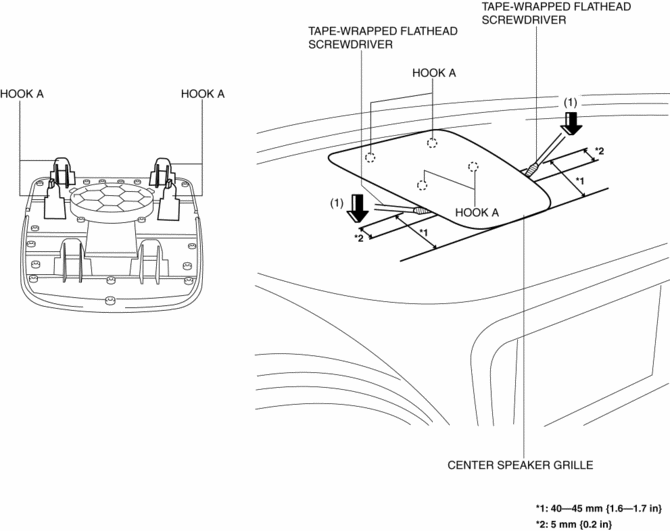
1. Insert a tape-wrapped flathead screwdriver into shown in the figure and remove hooks A in the direction of arrow (1).
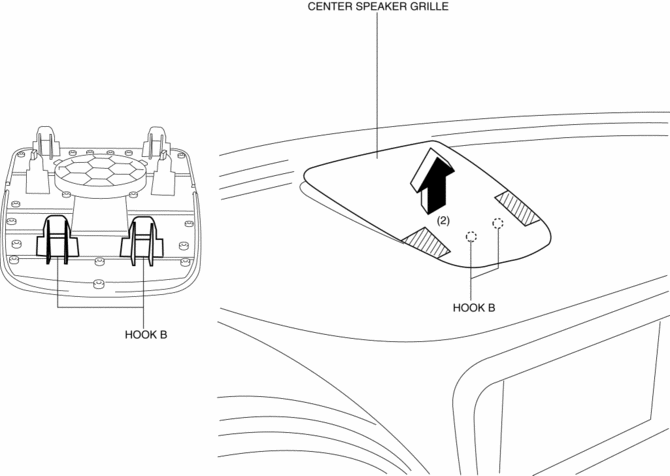
2. Take the shaded area shown in the figure, and remove the center speaker grille in the direction of arrow (2) while detaching hooks B.
3. Install in the reverse order of removal.
Side Speaker Grille
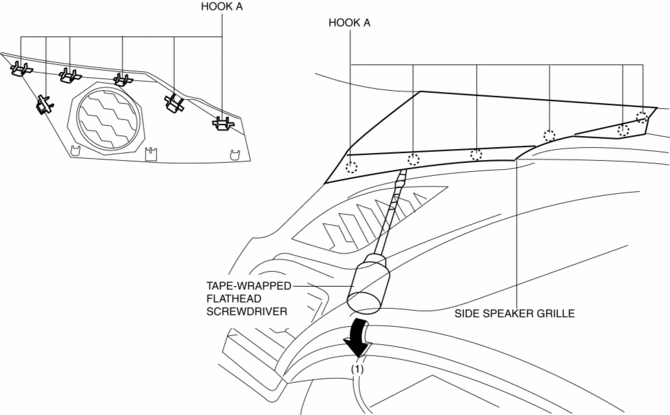
1. Insert a tape-wrapped flathead screwdriver into the service hole and remove hooks A in the direction of arrow (1).
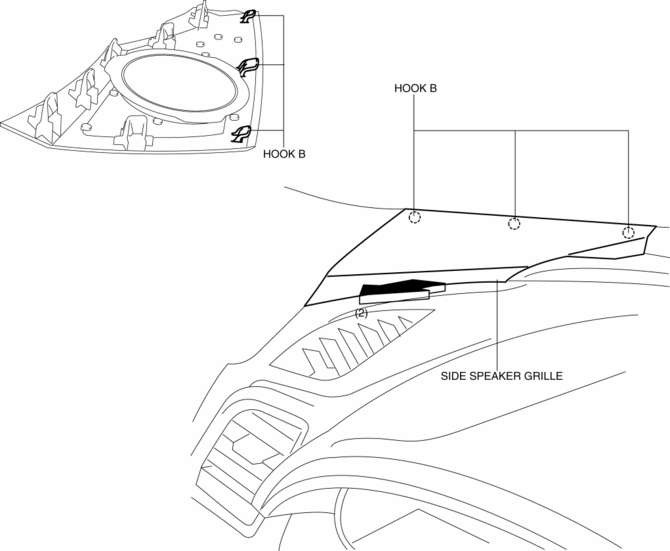
2. Pull the side speaker grille in the direction of the arrow (2), and remove the side speaker grille while detaching hooks B.
3. Install in the reverse order of removal.
 Sirius Satellite Radio Unit Removal/Installation
CAUTION:
The audio unit communicates with the SIRIUS satellite radio unit and records
the presence/non-presence of the SIRIUS satellite radio unit when the ignition
is switched to ACC or ...
 Speaker [With Bose®]
Purpose
Converts the audio signal from the audio unit to sound.
High quality sound is provided for the driver and passengers.
Function
Full-range speakers, which can output ...
Other materials:
Engine Mount Disassembly/Assembly
No.1 Engine Mount (2WD)
1. Remove the front under cover No.2..
2. Remove in the order indicated in the table.
3. Install in the reverse order of removal.
1
No.1 engine mount rubber
(See No.1 engine mount rubber removal note (2WD).)
(See No.1 engine mount inst ...
Clock Inspection
1. Disconnect the negative battery cable..
2. Remove the following parts:
a. Shift lever knob (MTX).
b. Front console box.
c. Shift panel.
d. Upper panel.
e. Rear console.
f. Side wall.
g. Decoration panel.
h. Front console.
i. Glove compartment.
j. Climate control unit.
3. C ...
Radiator
Purpose, Function
The radiator disperses the engine coolant heat flowing internally by receiving
against the vehicle while it is driven or air flow produced by the cooling fan.
Construction
The radiator is installed to the front of the engine compartment.
Four mounting ...
