
Mazda CX-5 Service & Repair Manual: Shroud Side Member Removal [Panel Replacement]
Symbol Mark

Removal Procedure
1. Drill the 3 locations indicated by (A) shown in the figure.
2. Drill the 8 locations indicated by (B) and 2 locations indicated by (C) shown in the figure.
NOTE:
-
When drilling the 3 locations indicated by (A) and 2 locations indicated by (C) shown in the figure, do not drill a hole all the way through or there could be a problem when installing the new part.
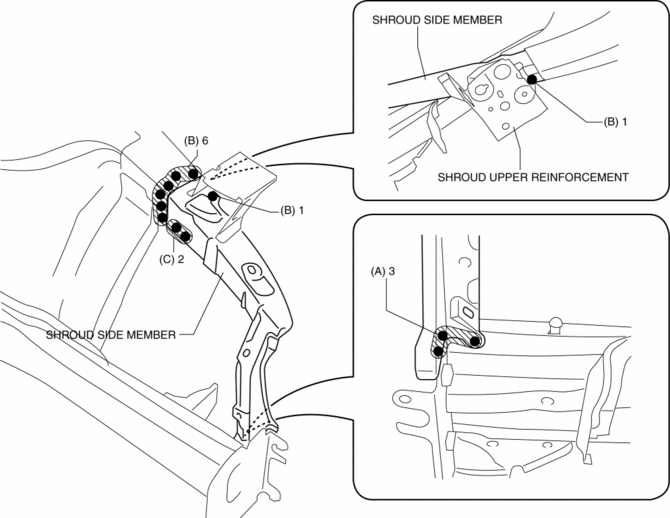
3. Remove the shroud side member.
 Shroud Side Member Installation [Panel Replacement]
Symbol Mark
Installation Procedure
1. When installing new parts, measure and adjust the body as necessary to conform
with standard dimensions.
2. Drill holes for the plug welding before inst ...
 Shroud Upper Member Removal/Installation
1. Disconnect the negative battery cable..
2. Remove the following parts:
a. Seal board upper.
b. Front bumper.
c. Front combination light.
3. Remove bolts.
4. Remove the shroud upper ...
Other materials:
Shift Lock System [Fw6 A EL, Fw6 Ax EL]
Purpose, Function
The shift-lock system operates when the ignition is switched to ON and the
brake pedal is not depressed, and inhibits the selector lever from being shifted
from the P position to other positions.
If the shift-lock cannot be released by the normal operation, it ...
High Mount Brake Light Removal/Installation
1. Disconnect the negative battery cable..
2. Remove the liftgate upper trim..
3. Remove the rear spoiler..
4. Disconnect the connector.
5. While pressing the high-mount brake light tab in the direction of arrow (1)
shown in the figure, press the high-mount brake light in the direction ...
Clutch Pedal Inspection [C66 M R]
NOTE:
For the clutch pedal inspection, note the following and measure each inspection
location.
Measure the center of the upper surface of the pedal pad for each inspection.
If the distance from the pedal pad to the floor covering is measured,
measure the short ...
