
Mazda CX-5 Service & Repair Manual: Oil Seal (Coupling Component) Replacement
1. Drain the differential oil into a container.
2. Remove the coupling component..
3. Remove the oil seal from the differential carrier using a screwdriver or similar tool.
4. Apply differential oil to the new oil seal lip.
5. Install the new oil seal to the differential carrier using the SST
.
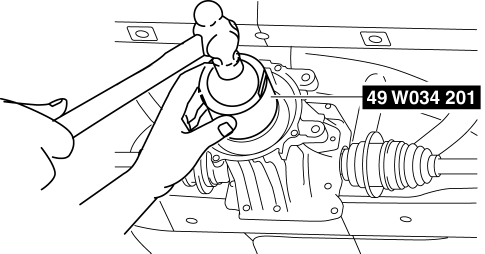
6. Install the coupling component..
7. Add the specified differential oil from the filler plug..
 Oil Seal (Control Valve Body) Replacement [Fw6 A EL, Fw6 Ax EL]
1. Disconnect the negative battery cable..
2. Remove the air cleaner component..
3. Disconnect the control valve body connector.
CAUTION:
Make sure that your hand does not touch the ...
 Oil Seal (Differential) Replacement [C66 M R]
1. Remove the front under cover No.2..
2. Drain the manual transaxle oil..
3. Disconnect the drive shaft (LH) from the MTX..
4. Disconnect the drive shaft (RH) from the MTX..
5. Remove the oil ...
Other materials:
Bsm Indicator Light Flashes While Not Under Bsm Indicator Light Flashing Conditions
(No Combination Switch Operation (Turn Signal Switch)) [Blind Spot Monitoring (Bsm)]
Description
BSM indicator light flashes while not under BSM indicator light-flashing
conditions (no combination switch operation (turn signal switch)
The BSM indicator light flashes despite not satisfying the BSM indicator
light flashing ...
Shift Lock System [Fw6 A EL, Fw6 Ax EL]
Purpose, Function
The shift-lock system operates when the ignition is switched to ON and the
brake pedal is not depressed, and inhibits the selector lever from being shifted
from the P position to other positions.
If the shift-lock cannot be released by the normal operation, it ...
Exhaust Gas Purification System
Purpose, Outline
Purifies contaminants (HC, CO, NOx) in the exhaust gas by utilizing the chemical
reactions of the three-way catalytic converter.
System Diagram
Structure
The exhaust gas purification system consists of the following parts:
Par ...
