
Mazda CX-5 Service & Repair Manual: Low Fuel Warning Light
Purpose
-
The low fuel warning light warns the driver that the remaining fuel level is low.
Function
-
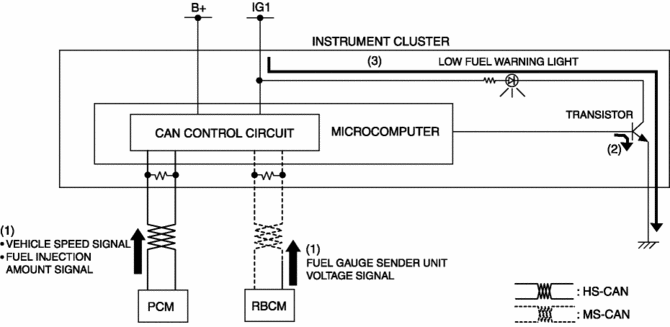
The instrument cluster calculates the fuel quantity based on the following CAN signals, and if a remaining fuel amount of approx. 10 L {2.6 US gal, 2.2 Imp gal} (fuel gauge displays remaining two segments) is detected, the low fuel warning light illuminates.
-
Fuel gauge sender unit voltage signal sent from rear body control module (RBCM)
-
Fuel injection amount signal, vehicle speed signal sent from PCM
Construction
-
The instrument cluster microcomputer controls the low fuel warning light illumination on/off based on the remaining fuel amount calculation that is calculated by the instrument cluster.
-
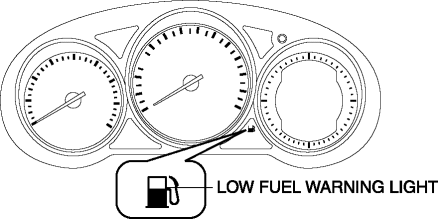
The low fuel warning light is set in the instrument cluster.
Operation
-
When the ignition is switched ON (engine off or on) the instrument cluster receives (1) the fuel gauge sender unit voltage signal from the rear body control module (RBCM), and the fuel injection amount signal from the PCM.
-
The instrument cluster turns the transistor on (2) if the calculated remaining fuel amount based on each signal is approx. 10 L {2.6 US gal, 2.2 Imp gal}.
-
When the transistor turns on, a ground circuit with the low fuel warning light is established and the low fuel warning light illuminates (3).
Fail-safe
-
Function not equipped.
 Low Engine Coolant Temperature Indicator Light (Blue)/High Engine Coolant Temperature
Warning Light (Red)
Low Engine Coolant Temperature Indicator Light (Blue)/High Engine Coolant Temperature
Warning Light (Red)
Purpose
Low engine coolant temperature indicator light (blue)
The low engine coolant temperature indicator light (blue) notifies the driver
that the engine coolant temperature is low and va ...
 Master Warning Light
Purpose
The master warning light warns the driver that any of the following malfunctions
is occurring.
Brake switch malfunction
Engine oil solenoid valve malfunction
...
Other materials:
Start Stop Unit Removal/Installation
CAUTION:
If configuration is not performed when the start stop unit is replaced with
a new one, the vehicle specification information is not stored in the start
stop unit and the system will not operate normally.
When performing configuration, it is necessary to read the vehicl ...
Fuel Injector Relay
Purpose, Function
Supplies power to the PCM for the fuel injector and spill valve control solenoid
valve operation.
Construction
The fuel injector relay is installed in the relay and fuse block.
Operation
When the ignition is switched ON, the battery voltage ...
Drive Belt
Purpose, Function
The drive belt transmits rotation force of the crankshaft pulley to the pulley
for the auxiliary parts.
Construction
The drive belt is installed to the front of the engine.
A V-ribbed belt has been adopted for the drive belt.
The wat ...
