
Mazda CX-5 Service & Repair Manual: Front Fog Lights Indicator Light
Purpose
-
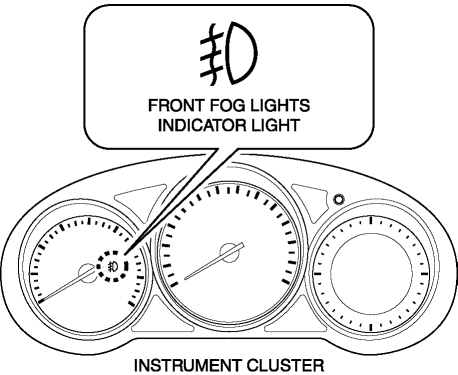
Notifies the user that the front fog lights are illuminated.
Function
-
Illuminates when the front fog light illumination conditions are met.
Construction
-
Displayed in the instrument cluster.
Operation
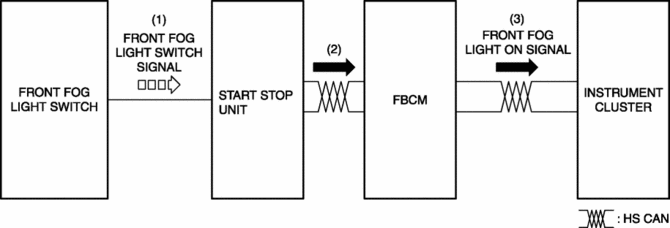
1. With the light switch in the TNS, HEAD, or HI position, a front fog light switch signal is input to the start stop unit when the front fog light switch is operated to the on position.
2. The start stop unit sends the front fog light switch signal to the front body control module (FBCM).
3. The front body control module (FBCM) sends the front fog light switch signal to the instrument cluster as a front fog light illumination signal.
4. The instrument cluster illuminates the front fog light indicator light when it receives the front fog light illumination signal.
Fail-safe
-
Function not equipped.
 Front Fog Light Removal/Installation
1. Disconnect the negative battery cable..
2. Remove the screws and bolt.
3. Pull up the front under cover No.1 and remove the mudguard screw shown in
the figure.
4. Disconnect the con ...
 Headlight Aiming
NOTE:
Perform headlight aiming if any of the following work is performed.
Front combination light replacement
Work that can affect vehicle height such as suspension rep ...
Other materials:
Auto Leveling Sensor
Purpose
Detects the vehicle height and outputs it to the AFS control module.
Function
Changes the detected vehicle height into a voltage value and outputs it to
the AFS control module.
Construction
Installed to the rear cross member.
Consists of link No. 1 ...
Oil Strainer
Purpose, Function
The oil strainer suctions the engine oil in the oil pan using the oil pump
vacuum. The engine oil is filtered by the internal filter at that time.
Construction
The oil strainer is installed on the suction port of the oil pump.
The oil strain ...
Hazard Warning Switch Removal/Installation
1. Disconnect the negative battery cable..
2. Remove the decoration panel..
3. While pressing the hazard warning switch tab in the direction of the arrow
(1) shown in the figure, press the hazard warning switch in the direction of the
arrow (2) shown in the figure to detach the hazard warnin ...
