
Mazda CX-5 Service & Repair Manual: Front Door Key Cylinder Removal/Installation
1. Disconnect the negative battery cable..
2. Remove the service hole cover.
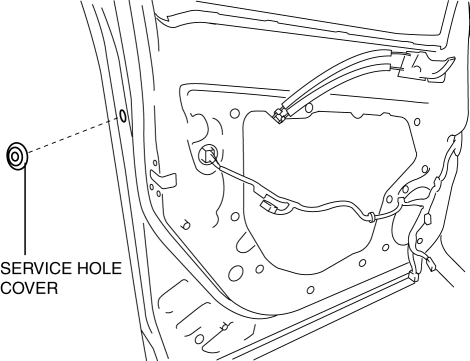
3. Detach the screw from the front door key cylinder.
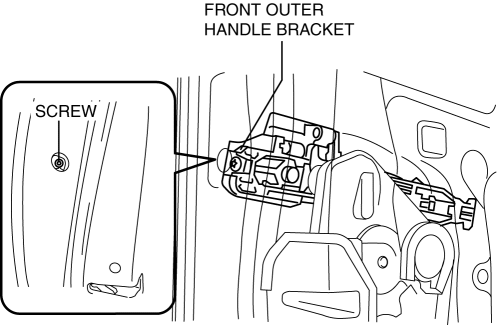
NOTE:
-
The screw cannot be removed because the front outer handle bracket has a stopper which prevents the screw from falling.
4. While pressing the outer handle bracket tab in the direction of arrow (1) shown in the figure, pull the front door key cylinder in the direction of arrow (2) to detach the outer handle bracket and the front door key cylinder.
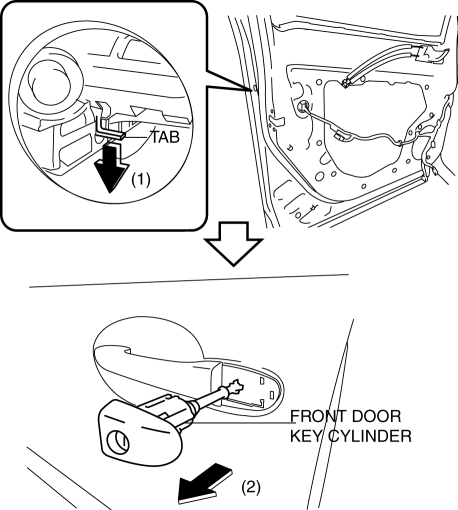
5. Remove the front door key cylinder from the outer handle bracket.
6. Insert a tape-wrapped flathead screwdriver into the position shown in the figure.
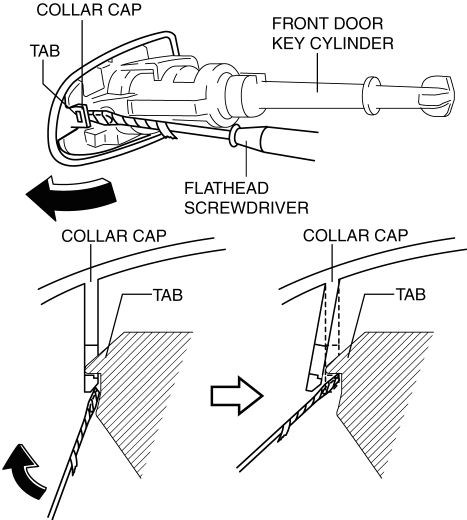
7. Move the tape-wrapped flathead screwdriver in the direction of the arrow shown in the figure to lift up the collar cap, and detach the collar cap from the front door key cylinder tab.
8. Remove the collar cap from the front door key cylinder.
9. Install in the reverse order of removal.

 Front Door Key Cylinder Switch Inspection
1. Perform the front door glass preparation..
2. Disconnect the negative battery cable..
3. Remove the following parts:
a. Inner garnish.
b. Front door trim.
c. Front door key cylinder.
d. ...
Other materials:
Sunroof Switch Inspection
1. Disconnect the negative battery cable..
2. Remove the front map light..
3. Verify that the continuity between the sunroof switch terminals is as indicated
in the table.
If not as indicated in the table, replace the sunroof switch.
...
Blind Spot Monitoring (Bsm) Warning Alarm
Purpose
The Blind Spot Monitoring (BSM) warning alarm warns the driver of a possible
accident.
Function
If the instrument cluster receives a warning sound request signal from the
BSM control module (RH), it sounds the BSM warning alarm using the buzzer in
the instrument ...
Antenna Feeder No.3 Inspection
1. Disconnect the negative battery cable..
2. Remove the following parts:
a. Front scuff plate.
b. Rear scuff plate.
c. B-pillar lower trim.
d. Front seat belt adjusting cover.
e. Front seat belt upper anchor installation bolt.
f. B-pillar upper trim.
g. Rear seat cushion.
h. Trunk ...
