
Mazda CX-5 Service & Repair Manual: Underbody Dimensions [Dimensions]
NOTE:
-
The following figure is a bottom view.
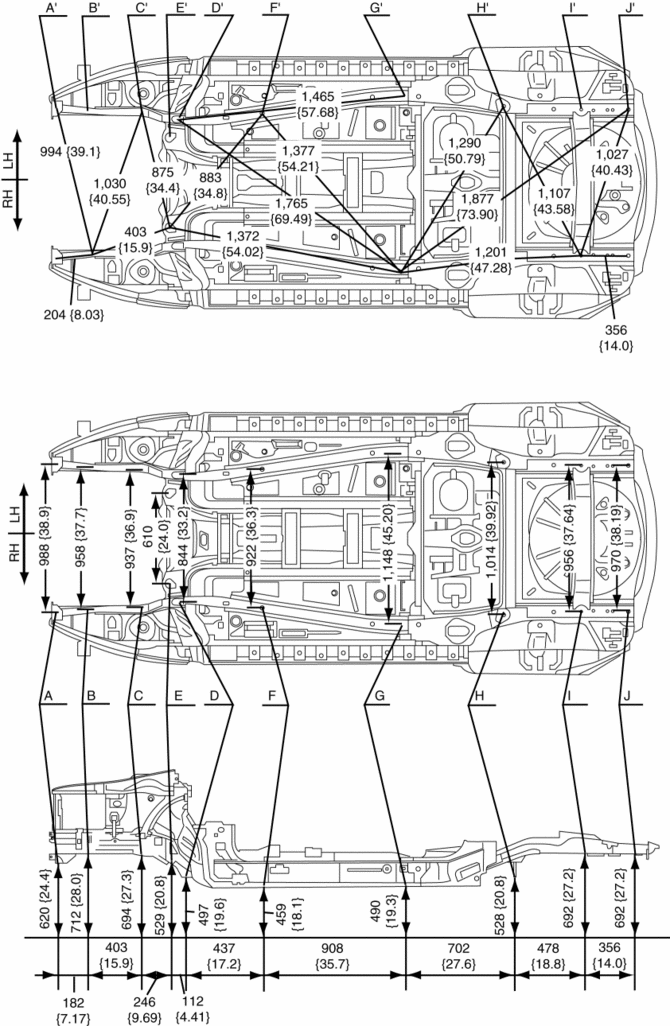
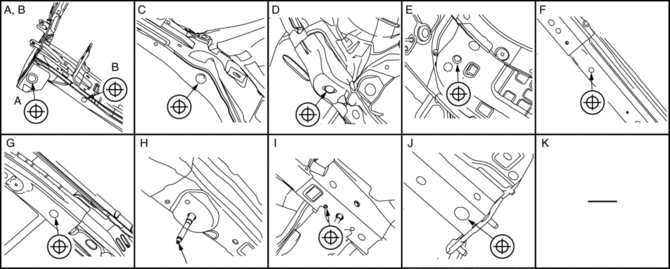
|
Point symbol |
Designation |
Hole diameter or bolt or nut size mm {in} |
|
A |
Front crossmember installation hole |
?24 {0.94} |
|
B |
Front side frame datum hole |
?16 {0.63} |
|
C |
Front crossmember installation hole |
?22.5 {0.886} |
|
D |
Front crossmember installation hole |
?19 {0.75} |
|
E |
Front crossmember installation hole |
?22 {0.87} |
|
F |
Front B frame datum hole |
?16 {0.63} |
|
G |
Front B frame datum hole |
?25 {0.98} |
|
H |
Rear crossmember mounting bolt |
M12 |
|
I |
Rear side frame datum hole |
?10 {0.39} |
|
J |
Rear side frame datum hole |
?30 {1.2} |
 Splash Shield Removal/Installation
Front
Front splash shield No.1
1. Set the mudguard aside..
2. Remove fasteners A.
3. Remove the front splash shield No.1.
4. Install in the reverse order of removal.
Front splash shield ...
 Upper Cowl Side Reinforcement Installation [Panel Replacement]
Symbol Mark
Installation Procedure
1. When installing new parts, measure and adjust the body as necessary to conform
with standard dimensions.
2. Drill holes for the plug welding before inst ...
Other materials:
Rear Washer Nozzle Removal/Installation
1. Disconnect the negative battery cable..
2. Remove the liftgate upper trim..
3. Remove the rear spoiler..
4. Disconnect the rear washer hose from the rear washer nozzle..
5. While pressing tabs of the rear washer nozzle in the direction of the arrows
(1) shown in the figure, pull the rea ...
Engine Coolant Replacement
WARNING:
Never remove the cooling system cap or loosen the radiator drain plug while
the engine is running, or when the engine and radiator are hot. Scalding engine
coolant and steam may shoot out and cause serious injury. It may also damage
the engine and cooling system.
Tu ...
Control Valve Body [Fw6 A EL, Fw6 Ax EL]
Purpose/Function
A direct linear solenoid has been adopted for the solenoid valve which contributes
to improved shift response, drive feel and reduced shift shock by the improved
precision of the hydraulic pressure control.
Construction
The control valve body consists of in ...
