
Mazda CX-5 Service & Repair Manual: Front Bumper Reinforcement Removal/Installation
1. Disconnect the negative battery cable..
2. Remove the following parts:
a. Seal board upper.
b. Front bumper.
c. Front combination light.
d. Set plate.
e. Energy-absorbing form.
f. Front under cover No.1.
g. Bumper stiffener lower.
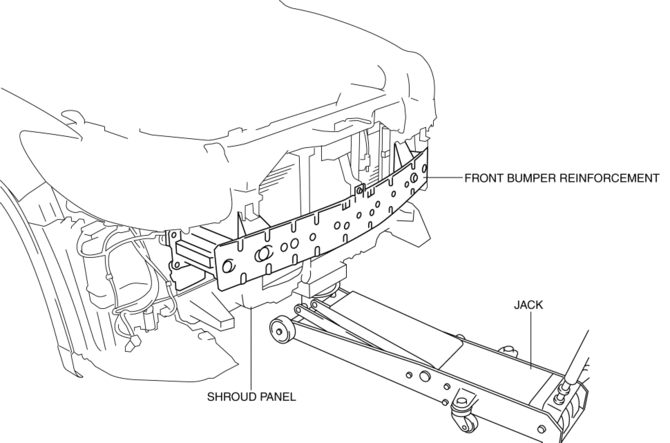
3. Support the shroud panel using a jack.
CAUTION:
-
Because the shroud panel is installed to the bumper reinforcement, support the shroud panel using a jack before removing the bumper reinforcement so as not to apply excessive force to the shroud panel.
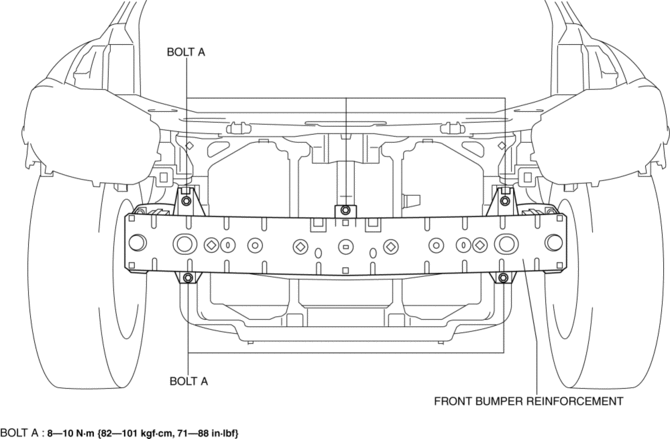
4. Remove bolts A.
5. Remove bolts B.
CAUTION:
-
Removing the front bumper reinforcement without supporting it could cause the front bumper reinforcement to fall and cause serious injury. Always perform the procedure with at least another person to prevent the front bumper reinforcement from falling.
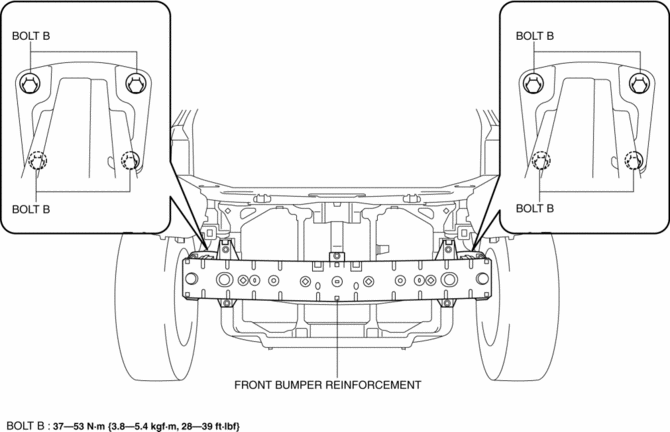
6. Remove the front bumper reinforcement.
7. Install in the reverse order of removal.
8. Adjust the headlight aiming..
 Front Bumper Disassembly/Assembly
1. Disassemble in the order indicated in the table.
1
Rivet
2
Grille bracket
3
Front bumper retainer
...
 Front Bumper Removal/Installation
CAUTION:
Affix the protective tape to the position (vehicle body side) shown in the
figure to prevent scratches and damage.
1. Disconnect the negative battery cable..
2. Remov ...
Other materials:
Washer Motor Inspection
1. Disconnect the negative battery cable..
2. Set the front over fender aside..
3. Set the mudguard (RH) aside..
4. Remove the front bumper..
5. Disconnect the washer motor connector from the washer motor.
6. Disconnect the windshield washer hose from the washer motor.
7. Disconnect the ...
Full Auto Air Conditioner [Full Auto Air Conditioner]
Outline
The climate control unit performs the following controls based on the signals
from each switch/dial and the sensor.
Airflow temperature control
Airflow volume control
Airflow mode control
Air intake control
A/C compressor con ...
Fuel System
Purpose, Outline
A multiple hole type fuel injector has been adopted which provides higher
fuel injection accuracy for improved fuel efficiency and output.
Piston movement-compression by the 4-head cam inside the high pressure fuel
pump heightens the fuel pressure, achieving imp ...
