
Mazda CX-5 Service & Repair Manual: Evaporator Temperature Sensor Inspection [Manual Air Conditioner]
NOTE:
-
Inspect the evaporator temperature sensor when it is installed to the A/C unit.
1. Set the fan speed at MAX HI.
2. Set the temperature control at MAX COLD.
3. Set the RECIRCULATE mode.
4. Turn the A/C switch off.
5. Close all doors and windows.
6. Wait for 5 min
.
7. Disconnect the evaporator temperature sensor connector.
8. Measure the temperature at the blower inlet.
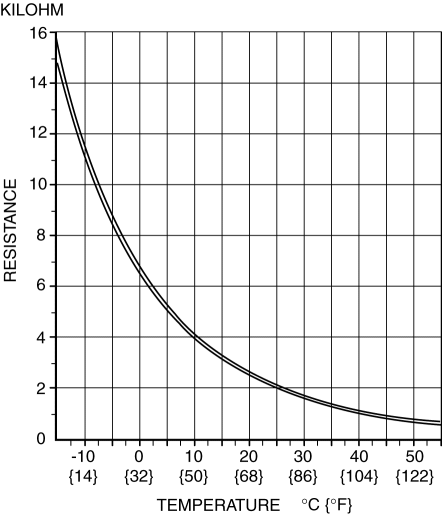
9. Measure the resistance between the evaporator temperature sensor terminals.
-
If the resistance is not as shown in the graph, replace the evaporator temperature sensor.
 Evaporator Temperature Sensor Inspection [Full Auto Air Conditioner]
NOTE:
Inspect the evaporator temperature sensor when it is installed to the A/C
unit.
1. Set the fan speed at MAX HI.
2. Set the temperature control at MAX COLD.
3. Set the RECIRC ...
 Evaporator Temperature Sensor [Full Auto Air Conditioner]
Purpose
The evaporator temperature sensor detects the airflow temperature passing
through the evaporator.
Function
The evaporator temperature sensor converts the detected temper ...
Other materials:
Shift Pressure Control (Learning Control) [Fw6 A EL, Fw6 Ax EL]
Outline
The TCM optimizes the hydraulic pressure for clutch engagement and disengagement
through learning correction of the clutch engagement pressure.
NOTE:
The clutch engagement pressure learning value stored in the TCM is not cleared
even if the negative battery termina ...
Front Side Frame (Partial Cutting) Installation [Panel Replacement]
Symbol Mark
Installation Procedure
CAUTION:
The cut and joint area indicates the maximum size range of the installation
position.
1. Drill holes for the plug welding before installing the new parts.
2. When installing the new parts, trial-fit new and existing parts, and then ...
Drive Plate Removal/Installation [Fw6 A EL, Fw6 Ax EL]
1. Remove the transaxle..
2. Remove in the order indicated in the table.
1
Drive plate installation bolts
(See Drive Plate Installation Bolts Removal Note.)
(See Drive Plate Installation Bolts Installation Note.)
2
Backing plate
...
