
Mazda CX-5 Service & Repair Manual: B Pillar Lower Trim Removal/Installation
1. Remove the front scuff plate..
2. Remove the rear scuff plate..
3. Partially peel back the seaming welt.
4. Take the shaded area shown in the figure, and pull the B-pillar lower trim in the direction of the arrow in the order of (1), (2) while detaching hooks A, pins B.
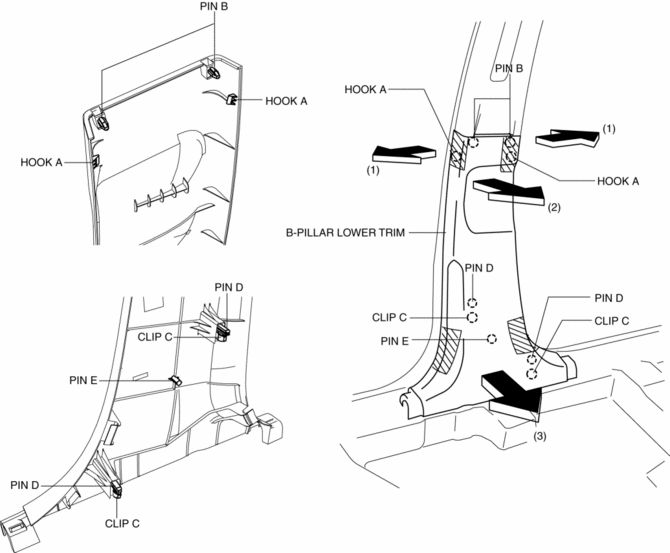
5. Take the shaded area shown in the figure, and pull the B-pillar lower trim in the direction of the arrow (3) while detaching the clips C, pin D, pin E.
6. Install in the reverse order of removal.
 Anticorrosion, Sound Insulation, And Vibration Insulation
Body Sealing
Apply body sealer where necessary.
For locations where application of body sealer is difficult after installation,
apply it before installation.
Application of ...
 B Pillar Upper Trim Removal/Installation
1. Remove the following parts:
a. Front scuff plate.
b. Rear scuff plate.
c. B-pillar lower trim.
d. Adjuster anchor cover.
e. Upper anchor installation bolts on the front seat belt.
2. Pa ...
Other materials:
Air Intake Actuator [Manual Air Conditioner]
Purpose
The air intake actuator moves the air intake door in the blower unit to switch
the air intake port.
Function
The air intake actuator drives the motor based on the signal from the climate
control unit and moves the air intake door to the FRESH or REC position.
...
Customer Assistance (Mexico)
Your complete and permanent satisfaction is our business. We are here to serve
you. All Authorized Mazda Dealers have the knowledge and the tools to keep your
Mazda vehicle in top condition.
If you have any questions or recommendations for improvement regarding the service
of your Mazda vehic ...
Bsm Indicator Light Flashes While Not Under Bsm Indicator Light Flashing Conditions
(No Combination Switch Operation (Turn Signal Switch)) [Blind Spot Monitoring (Bsm)]
Description
BSM indicator light flashes while not under BSM indicator light-flashing
conditions (no combination switch operation (turn signal switch)
The BSM indicator light flashes despite not satisfying the BSM indicator
light flashing ...
