
Mazda CX-5 Service & Repair Manual: Auto Leveling Sensor Inspection
1. Disconnect the negative battery cable..
2. Remove the auto leveling sensor..
3. Prepare three dry cell batteries (1.5 V
).
4. Connect the three dry cell batteries in a series.
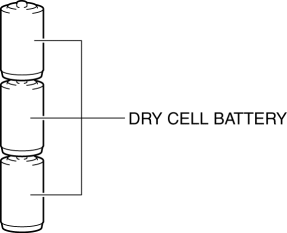
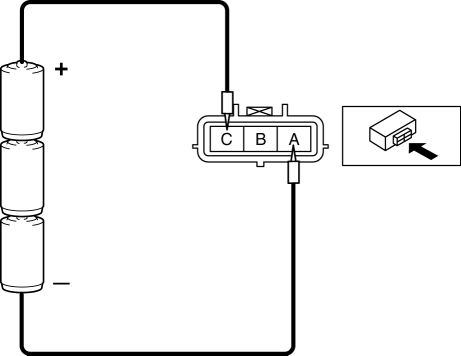
5. Connect the positive pole of the dry cell battery to auto leveling sensor terminal C, and the negative pole to terminal A.
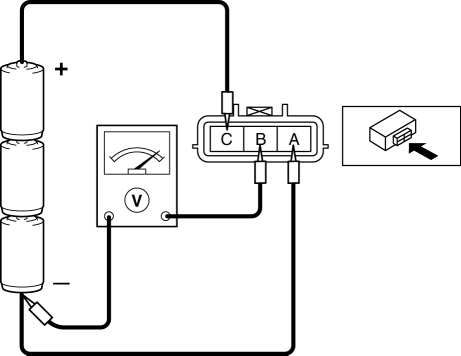
6. Connect the tester as shown in the figure with approx. 4.5 V
of voltage applied between auto leveling sensor terminals A and C, and measure the voltage at auto leveling sensor terminal B.
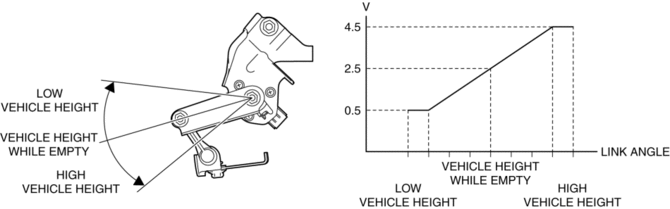
7. When slowly moving the auto leveling sensor link up and down, verify that the voltage fluctuates linearly between 0.5—4.5 V
as shown in the figure.
-
If the voltage cannot be verified as indicated in the graph, replace the auto leveling sensor.
 Auto Leveling Sensor
Purpose
Detects the vehicle height and outputs it to the AFS control module.
Function
Changes the detected vehicle height into a voltage value and outputs it to
the AFS control ...
 Auto Leveling Sensor Removal/Installation
1. Disconnect the negative battery cable..
2. Disconnect the connector.
3. Remove the bolts.
4. Remove the auto leveling sensor.
5. Install in the reverse order of removal.
6. Pe ...
Other materials:
Keyless Antenna [Advanced Keyless Entry System]
Purpose
Outputs a request signal and specifies the remote transmitter location.
Function
The keyless antenna outputs request signals to the inside and outside of
the vehicle based on the signals from the LF control unit.
Construction, Operation
The antennas for re ...
Windshield Washer Nozzle Adjustment
CAUTION:
If the nozzle is adjusted by inserting a stick-like object into the nozzle,
it could deform the injection nozzle and the washer fluid may not spray normally.
When adjusting the nozzle, do not insert objects into the injection nozzle.
1. Insert a tape-wrapped precision fl ...
Sirius Satellite Radio Unit Removal/Installation
CAUTION:
The audio unit communicates with the SIRIUS satellite radio unit and records
the presence/non-presence of the SIRIUS satellite radio unit when the ignition
is switched to ACC or ON (engine off or on) after connecting the negative battery
cable.
If the commander ...
