
Mazda CX-5 Service & Repair Manual: Wiper Bracket Removal [Panel Replacement]
Symbol Mark

Installation Procedure
1. When installing new parts, measure and adjust the body as necessary to conform with standard dimensions.
2. Drill holes for the plug welding before installing the new parts.
3. After temporarily installing new parts, make sure the related parts fit properly.
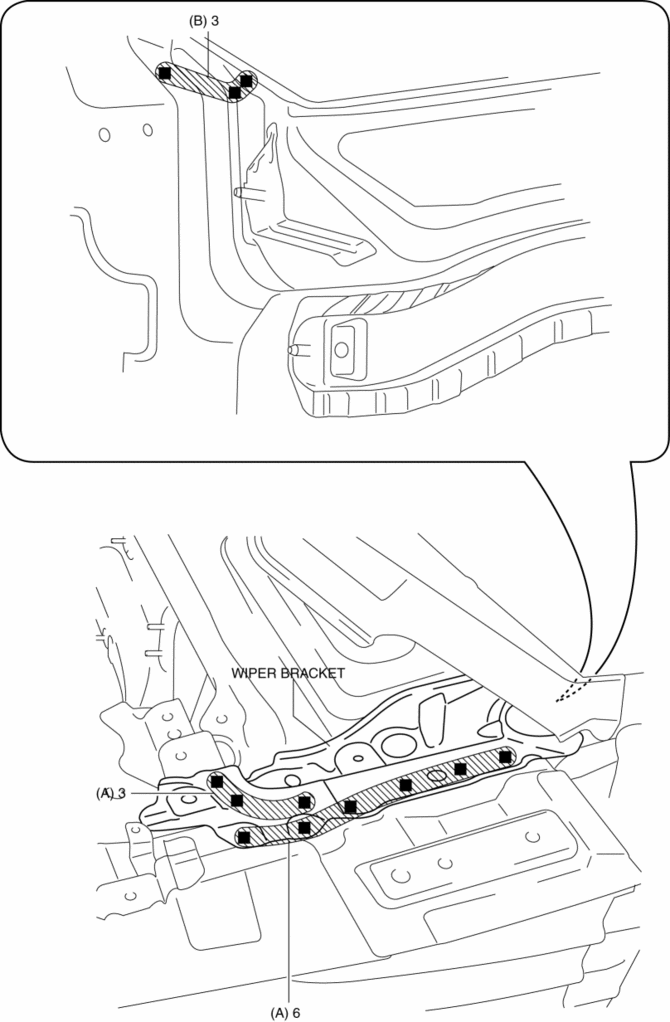
4. Plug weld the 9 locations indicated by (A) shown in the figure.
5. Plug weld the 3 locations indicated by (B) from the inside shown in the figure, then install the wiper bracket.
 Windshield Wiper System
Outline
Equipped with continuous (low/high), auto-stop, one-touch wiper, intermittent
wiper (without auto wiper system), auto wiper (with auto wiper system), and
synchronized washer and w ...
 Rain Sensor
Outline
The rain sensor detects the amount of rainfall and calculates the wiper operation
speed, and outputs a windshield wiper control signal to the front body control
module (FBCM) to p ...
Other materials:
Power Window Main Switch Inspection
1. Disconnect the negative battery cable..
2. Remove the following parts:
a. Inner garnish. (driver's side).
b. Front door trim. (driver's side).
c. Power window main switch.
3. Connect the power window main switch connector.
4. Connect the negative battery cable..
5. Measure t ...
Throttle Body
Purpose, Function
Opens/closes the throttle valve to adjust the amount of air supplied to the
cylinder.
Opens/closes the throttle valve according to the control signal from the
PCM.
Construction
The throttle body is installed to the intake manifold.
Th ...
Instrument Cluster
Outline
The instrument cluster centrally controls the speedometer, tachometer, odometer/tachometer,
fuel gauge, warning/indicator lights, trip computer, warning sounds and panel
lights.
Function
The instrument cluster displays the following information to notify the user
...
