
Mazda CX-5 Service & Repair Manual: Vanity Mirror Illumination Bulb Removal/Installation
1. Disconnect the negative battery cable..
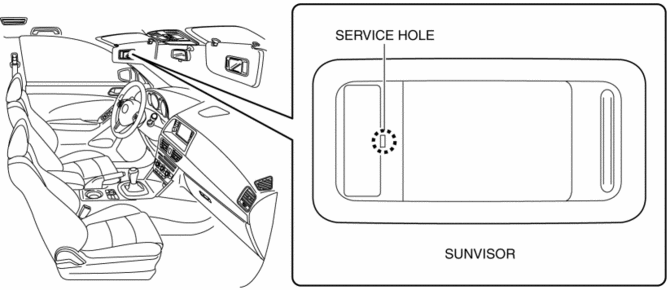
2. Insert a tape-wrapped flathead screwdriver into the service hole in the position shown in the figure.
3. Move a flathead screwdriver in the direction of the arrow (1) shown in the figure and detach the lens tab and sunvisor.
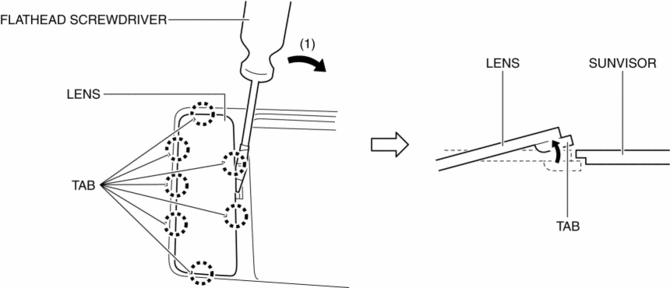
4. Detach all the lens tab and sunvisor and remove the lens from the sunvisor.
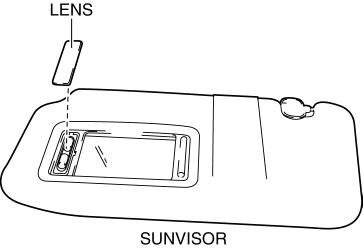
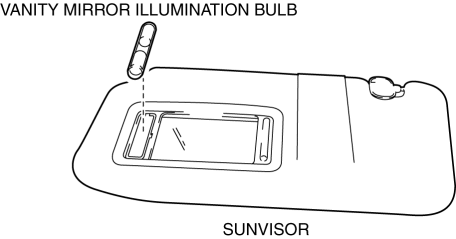
5. Remove the vanity mirror illumination bulb.
6. Install in the reverse order of removal.
 Rearview Mirror Removal/Installation
1. Remove the screw.
2. Pull the rearview mirror in the direction of the arrow (1) shown in the figure
3. Install in the reverse order of removal. ...
 Vanity Mirror Illumination Inspection
1. Disconnect the negative battery cable..
2. Remove the sunvisor..
3. Verify that the continuity between the vanity mirror illumination terminals
is as indicated in the table.
I ...
Other materials:
Seat Belt Precautions
Seat belts help to decrease the possibility of severe injury during accidents
and sudden stops. Mazda recommends that the driver and all passengers always wear
seat belts.
All of the seat belt retractors are designed to keep the lap/shoulder belts out
of the way when not in use.
The driver&# ...
Brake System/ABS Warning Light
Purpose/Function
The brake system/ABS warning light is built into the instrument cluster.
If a malfunction is detected in the system with the parking brake released,
the warning light illuminates to notify the driver.
Construction/Operation
When the DSC system and CAN l ...
Air Bag System Warning Alarm [Two Step Deployment Control System]
Purpose
The air bag system warning alarm notifies the driver that a malfunction occurred
in the air bag system instead of the air bag system warning light.
Function
If a malfunction occurs in the air bag system while the air bag system warning
light cannot illuminate, the a ...
