
Mazda CX-5 Owners Manual: Specifications
Specifications
Engine

Electrical System

CAUTION
When cleaning the iridium plugs, do not use a wire brush. The fine particulate coating on the iridium alloy and platinum tips could be damaged.
Lubricant Quality
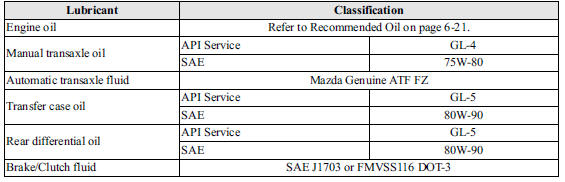
NOTE
Refer to Introduction on for owner's responsibility in protecting your investment.
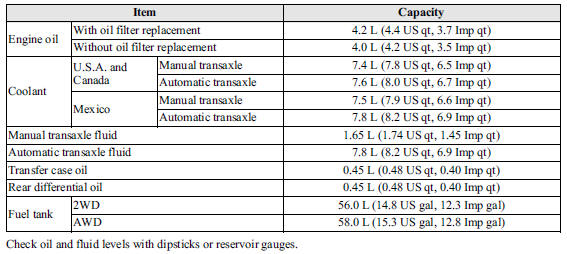
Capacities
(Approximate Quantities)
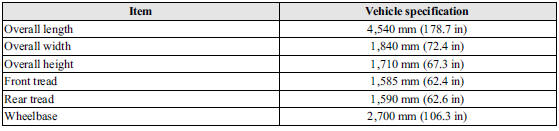
Dimensions
Weights
2WD

AWD

Air Conditioner

Light Bulbs
Exterior light
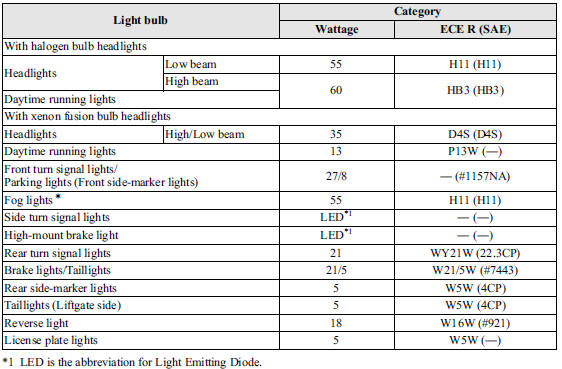
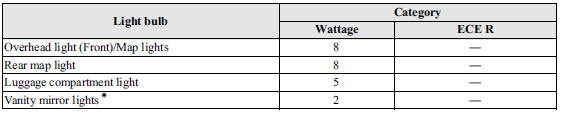
Interior light
Tires
NOTE
The tires have been optimally matched with the chassis of your vehicle.
When replacing tires, Mazda recommends that you replace tires of the same type originally fitted to your vehicle. For details, contact an Authorized Mazda Dealer.
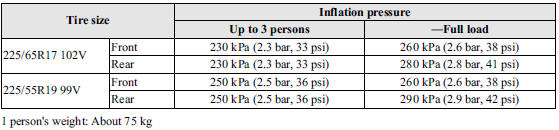
Check the tire pressure label for tire size and inflation pressure.
Refer to Tire Inflation Pressure 6.
After adjusting the tire pressure, initialization of the tire pressure monitoring system is necessary to make the system operates normally.
Refer to Tire Pressure Monitoring System Initialization 3.
Standard tire
(U.S.A. and Canada)

(Mexico)
Temporary spare tire
(U.S.A. and Canada)

(Mexico)

 Identification Numbers
Vehicle Information Labels
Vehicle Identification Number
The vehicle identification number legally identifies your vehicle. The number
is on a plate attached to the left top side of the dashboard ...
 Personalization Features
Personalization Features
...
Other materials:
Blind Spot Monitoring (Bsm) Bracket Removal/Installation
1. Disconnect the negative battery cable..
2. Remove the following parts:
a. Rear combination lights.
b. Rear bumper.
c. BSM control module.
3. Remove the nuts.
4. While pressing the clip tabs in the direction of the arrows (1) shown in the
figure, press the clip in the direction o ...
Auto Light Off System
Purpose
The auto light-Off system turns off the TNS or headlights automatically.
The front body control module (FBCM) performs auto light-Off system fail-safe..
Function
The auto light-Off system controls the front body control module (FBCM).
The front body contro ...
Seat Warmer Control Unit Inspection
WARNING:
Handling a front seat (with built-in side air bag) improperly can accidentally
operate (deploy) the air bag, which may seriously injure you. Read the service
warnings/cautions before handling a front seat (with built-in side air bag)..
CAUTION:
After removing a f ...
