
Mazda CX-5 Owners Manual: Personalization Features
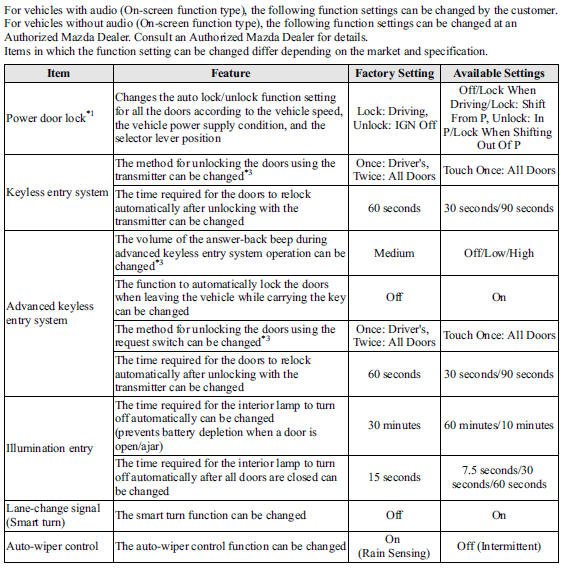
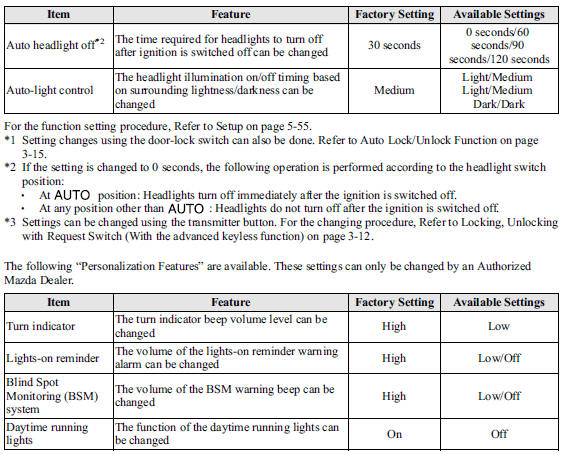
Personalization Features
 Specifications
Specifications
Engine
Electrical System
CAUTION
When cleaning the iridium plugs, do not use a wire brush. The fine particulate
coating on the iridium alloy and platinum tips could be damage ...

Other materials:
Liftgate Light Removal/Installation
NOTE:
Fogging or condensation on the inside of the liftgate light may occur, however,
it is a natural phenomenon occurring as a result of a temperature difference
between the interior and exterior of the liftgate lights and has no effect on
the light performance. Fogging or condensa ...
Throttle Body Inspection
Resistance Inspection
1. Disconnect the negative battery cable..
2. Disconnect the throttle body connector.
3. Measure the resistance between throttle body terminals E and F.
Throttle body resistance
1.38 ohms [20°C {68 °F}]
If not as specified, replace the throttle ...
Clutch Pedal Position (CPP) Switch Inspection [Skyactiv G 2.0]
Continuity Inspection
1. Verify that the CPP switch is installed properly..
2. Disconnect the negative battery cable..
3. Disconnect the CPP switch connector.
4. Verify that the continuity between CPP switch terminals A and B when the clutch
pedal is depressed and when it is released is acc ...
