
Mazda CX-5 Service & Repair Manual: Side Air Bag Module [Standard Deployment Control System]
Purpose
-
When a side air bag module receives an impact from a lateral collision, the operation (deployment) of the air bag mediates the impact to the chest, stomach, and waist of the driver and front passenger.
Function
-
When a side air bag module receives an impact from a lateral collision, the air bag is operated (deployed) by the operation signal sent from the SAS control module.
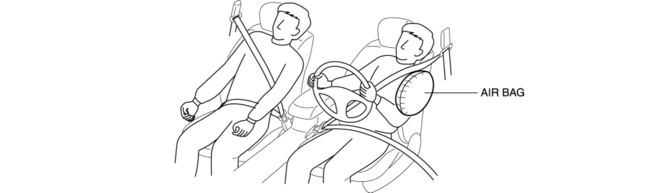
Construction
-
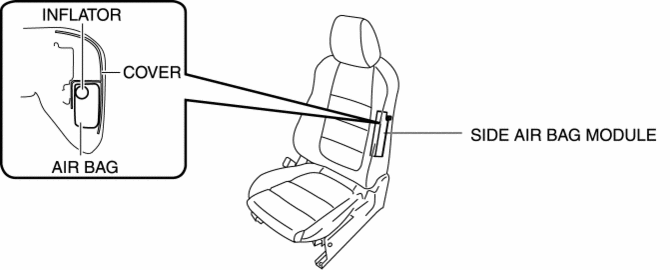
The side air bag modules are installed on the door side of the front seat backs.
-
The side air bag module consists of the inflator and air bag.
Operation
-
The side air bag module operates (deploys) the air bag by activating the internal inflator.
-
The inflator operates (deploys) in the following order:
1. When an operation (deployment) signal is received from the SAS control module, the initiator built into the inflator is ignited which ignites the booster charge.
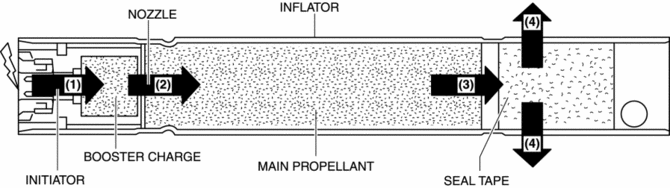
2. The high temperature gas flows into the combustion chamber from the nozzle to ignite the main propellant.
3. The seal tape is broken by the internal pressure in the combustion chamber, and the gas is sprayed out of the inflator through the diffuser (diffusion devise).
4. When the side air bag module operates (deploys), the air bag operates (deploys) while breaking open the seat back trim by the force of gas generated from the inflator.
Fail-safe
-
Function not equipped.
 Side Air Bag Module Removal/Installation [Standard Deployment Control System]
WARNING:
Handling the air bag module improperly can accidentally operate (deploy)
the air bag module, which may seriously injure you. Read the air bag system
service warnings and caution ...
 Side Air Bag Sensor No. 1 Removal/Installation [Standard Deployment Control
System]
Side Air Bag Sensor No. 1 Removal/Installation [Standard Deployment Control
System]
WARNING:
Handling the side air bag sensor improperly can accidentally operate (deploy)
the air bag module, which may seriously injure you. Read the air bag system
service warnings and ca ...
Other materials:
Propeller Shaft Removal/Installation
CAUTION:
If the constant velocity joint is bent during propeller shaft removal/installation
or transportation after servicing, the constant velocity joint boot may contact
the metallic cover and the boot may be damaged. Insert a rag between the boot
and the metallic cover before ser ...
One Way Clutch [Fw6 A EL, Fw6 Ax EL]
Purpose/Function
The one-way clutch operates in 1GR and suppresses the counterclockwise rotation
of the front internal gear (as viewed from torque converter side).
Construction
The one-way clutch consists of a mechanical diode-type one-way clutch, inner
plate, and outer pla ...
Coil Antenna
Purpose
Sends the ID data programmed to the electronic transmission device (transponder)
in the remote transmitter to the start stop unit.
Function
A magnetic field occurs around the push button start.
Construction, Operation
The coil antenna built into the push b ...
