
Mazda CX-5 Service & Repair Manual: Rear Upper Arm Removal/Installation [2 Wd]
WARNING:
-
Verify that the crossmember is securely supported by a jack. If the rear crossmember falls off, it can cause serious injury or death, and damage to the vehicle.
CAUTION:
-
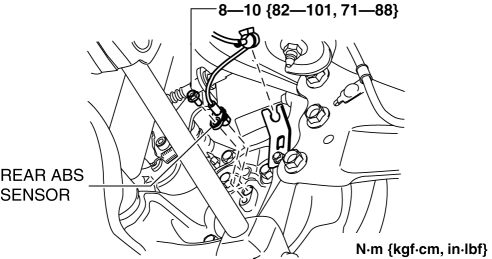
Performing the following procedures without first removing the rear ABS wheel-speed sensor may possibly cause an open circuit in the harness if it is pulled by mistake. Before performing the following procedures, disconnect the rear ABS wheel-speed sensor (axle side) and fix it to an appropriate place where the sensor will not be pulled by mistake while servicing the vehicle.
NOTE:
-
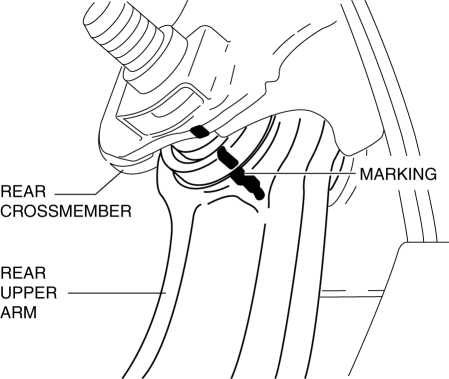
Mark the position before removing the rear upper arm.
-
Align the rear crossmember and rear upper arm markings when installing the rear upper arm.
-
Tighten the rear upper arm inner bolt completely before installing the rear crossmember component to the vehicle.
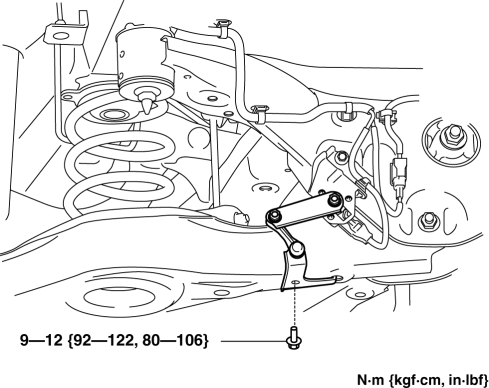
1. Disconnect the auto leveling sensor link. (With auto leveling sensor).
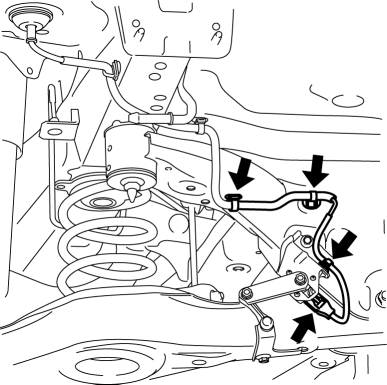
2. Disconnect the wiring harness clips and connector installed to the rear crossmember. (With auto leveling sensor)
3. Disconnect the rear ABS wheel-speed sensor wiring harness installed to the hub support and set it aside..
4. Remove the TWC..
5. Remove the rear coil spring..
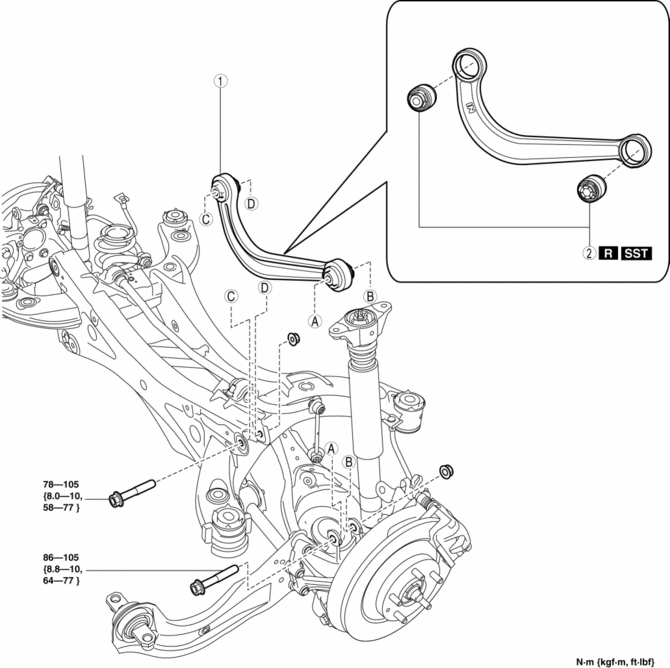
6. Remove in the order indicated in the table.
7. Install in the reverse order of removal.
8. Inspect the wheel alignment and adjust it if necessary..
|
1 |
Rear upper arm (See Rear Upper Arm Removal Note.) (See Rear Upper Arm Installation Note.) |
|
2 |
Rear upper arm bushing (See Rear Upper Arm Bushing Removal Note.) (See Rear Upper Arm Bushing Installation Note.) |
Rear Upper Arm Removal Note
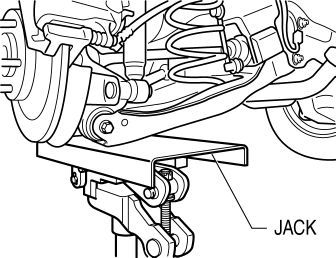
1. Jack up the vehicle to the unloaded condition, and support the rear trailing link component using a jack.
2. Align the rear crossmember component and rear upper arm and mark them.
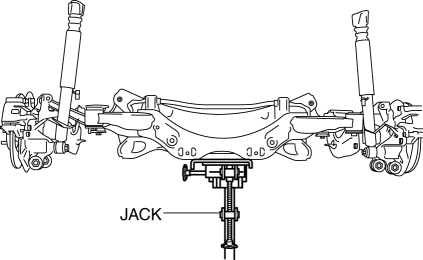
3. Support the rear crossmember component with a jack and remove the rear crossmember installation nuts.
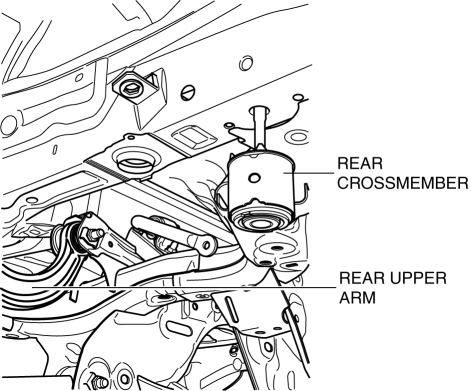
4. Press down on the rear crossmember component slowly until the rear upper arm inside installation bolts can be removed using a jack.
5. Remove the rear upper arm.
Rear Upper Arm Bushing Removal Note
1. Mark the rear upper arm as shown in the figure.
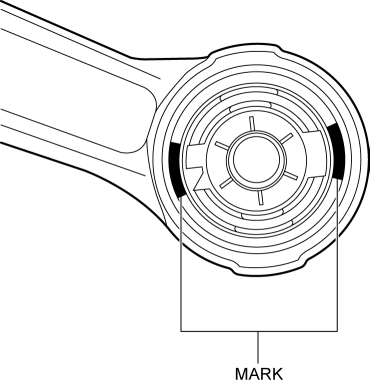
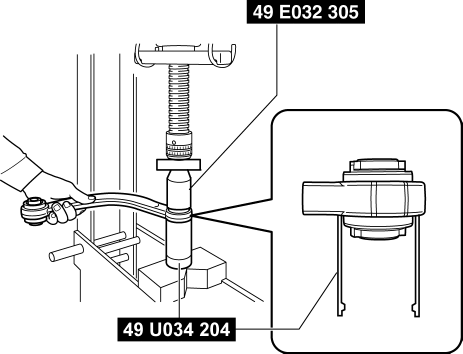
2. Press the rear upper arm bushing out using the SSTs
.
CAUTION:
-
Set using the SST
(49 U034 204)
as shown in the figure to prevent damaging the rear upper arm and rear upper arm bushing and remove the rear upper arm bushing.
Rear Upper Arm Bushing Installation Note
1. Mark the new rear upper arm bushing as shown in the figure.
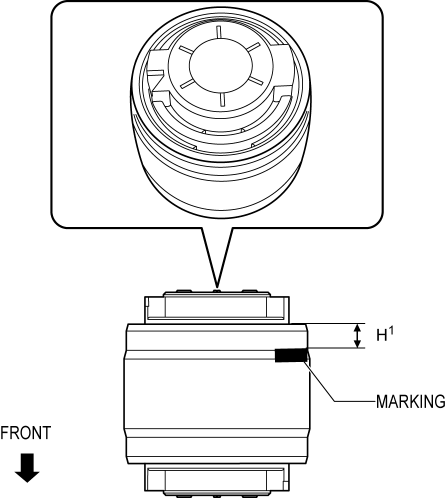
H1: 6.0 mm {0.24 in}
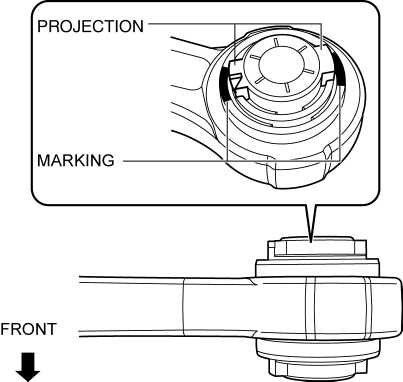
2. Align the projection of a new rear upper arm bushing with the marks placed during removal.
3. Press fit the rear upper arm bushing until the marks placed in Step 1 cannot be seen using the SSTs.
CAUTION:
-
Set using the SST
(49 U034 204)
as shown in the figure to prevent damaging the rear upper arm and rear upper arm bushing and install the rear upper arm bushing.
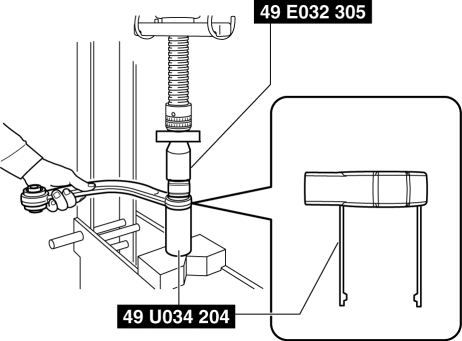
NOTE:
-
Be careful when press-fitting the rear upper arm bushing because the bushing height of the inner and outer sides differs.
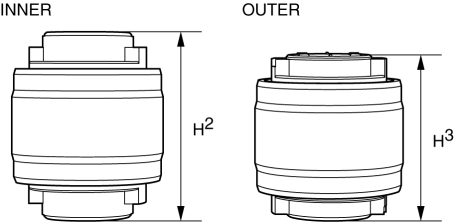
H2: 49.5 mm {1.95 in} H3: 44.5 mm {1.75 in}
4. After installing the rear upper arm bushing, verify that it is installed to the position shown in the figure.
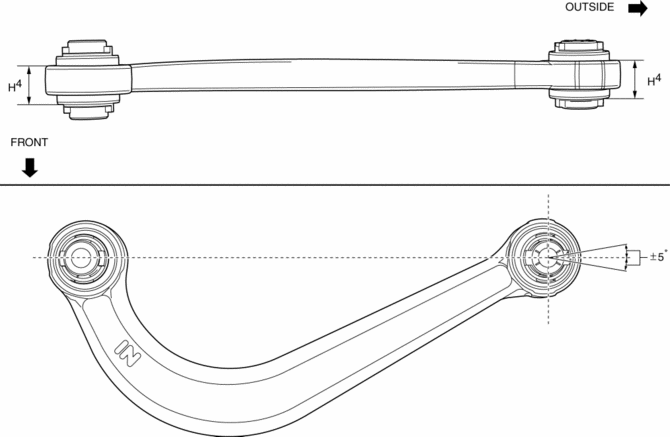
H4: 24.0±0.6 mm {0.945±0.02 in}
Rear Upper Arm Installation Note
1. Place alignment mark on the new rear upper arm in the same positions as the removed rear upper arm.
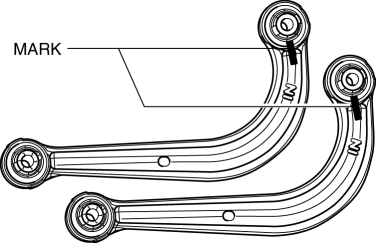
2. Install the rear upper arm.
3. Lift up the rear crossmember component using a jack and install the rear crossmember installation nuts.
-
Tightening torque
-
91—111 N·m {9.3—11 kgf·m, 68—81 ft·lbf}
 Rear Suspension
Outline
E-type multi-link rear suspension has been adopted.
The longitudinal span of the rear crossmember was extended and the longitudinal
offset of the rear lateral link ...
 Rear Upper Arm Removal/Installation [Awd]
WARNING:
Verify that the crossmember is securely supported by a jack. If the rear
crossmember falls off, it can cause serious injury or death, and damage to the
vehicle.
CAUTIO ...
Other materials:
Liftgate Latch And Lock Actuator Inspection
The following actuator and switch are integrated with the liftgate latch
and lock actuator.
From the actuator/switch name and operation in the following table, select
the actuator or switch to be inspected, and perform the inspection following
the inspection procedure desc ...
Wheel Hub, Steering Knuckle Inspection
Wheel Bearing Excessive Play Inspection
1. Install the magnetic base and dial gauge as shown in the figure and measure
the wheel bearing axial excessive play.
If it exceeds the maximum specification, replace the wheel hub bearing.
Front wheel bearing maximum play
0 ...
Fuel Injection Control System
Outline
Performs optimum fuel injection according to engine operation conditions.
The PCM determines the engine operation conditions based on the signals from
each input device and drives the fuel injectors at the optimal fuel injection
time (fuel injection amount) and the fuel ...
