
Mazda CX-5 Service & Repair Manual: Rear Turn Light Bulb Removal/Installation
1. Disconnect the negative battery cable..
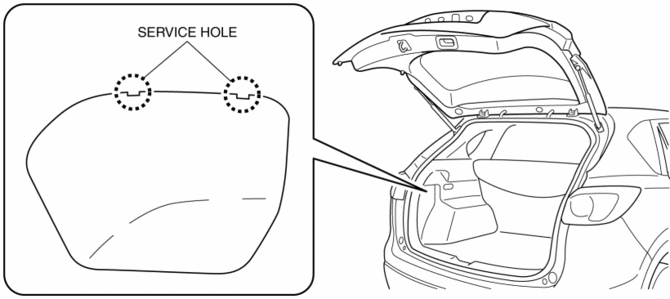
2. Insert a tape-wrapped flathead screwdriver into the service hole in the position shown in the figure.
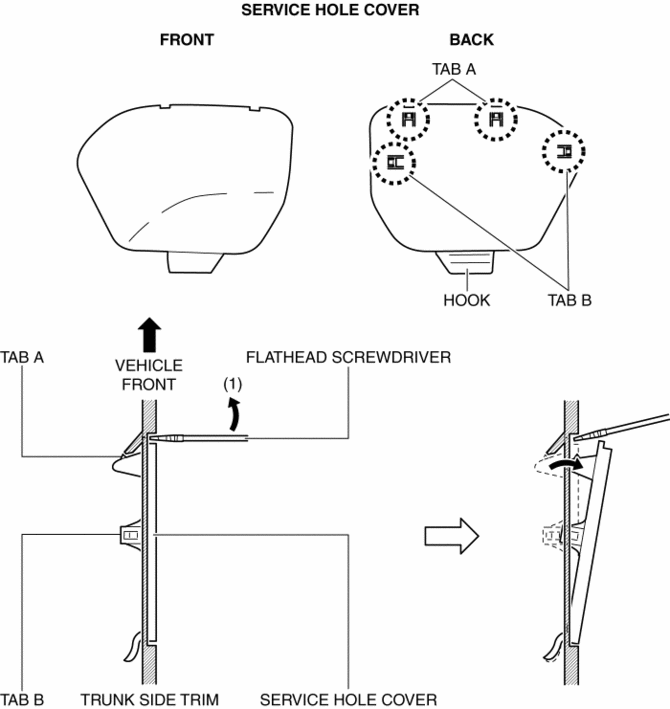
3. Move the flathead screwdriver in the direction of the arrow (1) shown in the figure, pull out the service hole cover, and detach the service hole cover tab and trunk side trim.
4. Pull out the service hole cover in the direction of the arrow (2) shown in the figure and pull out the service hole cover hook from the trunk side trim.
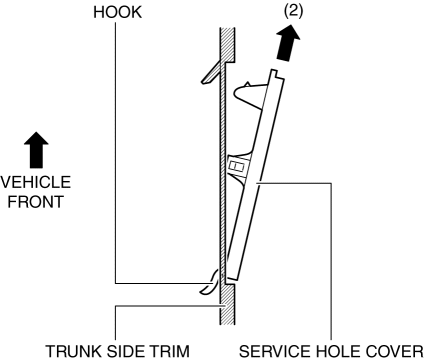
5. Remove the service hole cover.
6. Rotate the socket in the direction of the arrow (3) shown in the figure and remove it from the rear combination light in the direction of the arrow (4) shown in the figure.
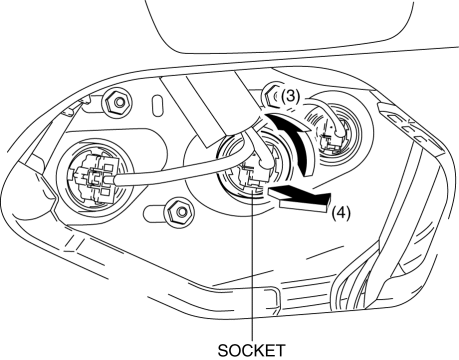
7. Remove the rear turn light bulb.
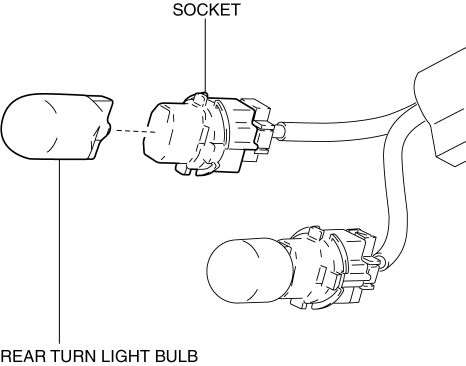
8. Install in the reverse order of removal.
 Parking/Front Turn Light Bulb Removal/Installation
Halogen Type
1. Disconnect the negative battery cable..
2. Rotate the socket in the direction of the arrow (1) shown in the figure and
remove it from the front combination light in the direction ...
 Side Turn Light
Purpose
The side turn lights are used to signal vehicles/people at the side of the
vehicle that the vehicle is going to make a right or left turn.
Function
The side turn lights ...
Other materials:
Evaporative Emission (Evap) Control System
Purpose, Outline
Prevents release of evaporative gas into the atmosphere.
The intake manifold vacuum introduces evaporative gas to the intake manifold
via the charcoal canister and the purge solenoid valve.
System Diagram
U.S.A. and CANADA
Except U.S.A. and CANADA
...
Cruise Main Indicator Light (Amber)
Purpose/Function
Illuminates while the cruise control system is in standby mode to inform
the driver that the cruise control system is on standby.
Construction
Built into the instrument cluster.
Operation
Illuminates while the cruise control system is on sta ...
Power Steering Malfunction Indicator Light
Purpose
The power steering malfunction indicator light warns the driver that there
is a malfunction with the electric power steering (EPS) system.
Function
If there is a malfunction in the EPS system, the power steering malfunction
indicator light illuminates.
If th ...
