
Mazda CX-5 Service & Repair Manual: Rear Seat Center Armrest Removal/Installation
1. Operate the push knob (RH) and lower the rear seat back (RH).
2. Remove screw A.
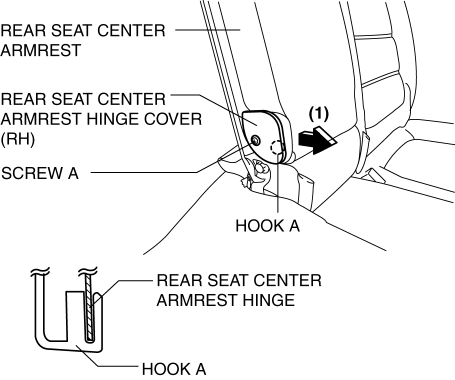
3. Remove the rear seat center armrest hinge cover (RH) in the direction of the arrow (1) shown in the figure while setting hook A aside.
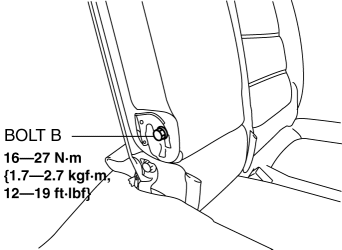
4. Remove bolt B.
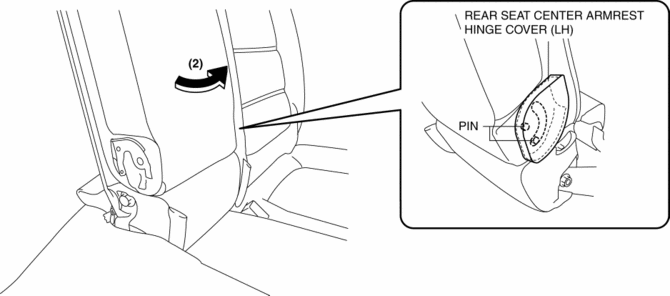
5. Remove the rear seat center armrest in the direction of the arrow (2) shown in the figure while setting the pins aside.
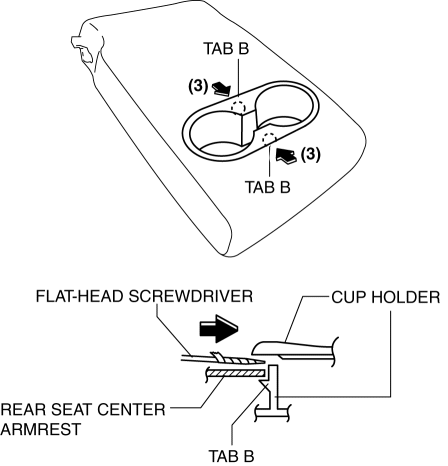
6. Using a flathead screwdriver wrapped in protective tape, insert it in the gap between the cup holder and the rear seat center armrest in the direction of the arrow (3) shown in the figure, and disengage tabs B.
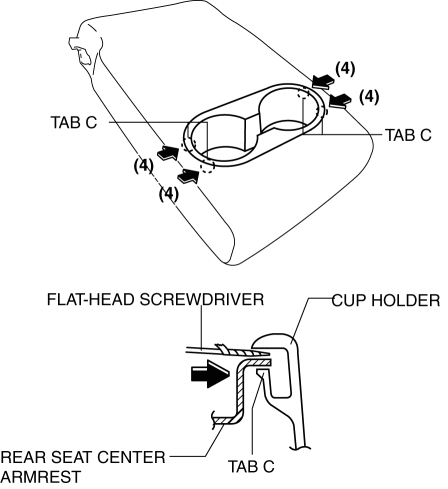
7. Using a flathead screwdriver wrapped in protective tape, insert it in the gap between the cup holder and the rear seat center armrest in the direction of the arrow (4) shown in the figure, and disengage tabs C.
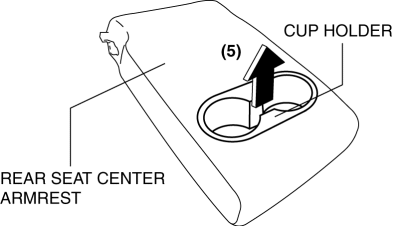
8. Remove the cup holder in the direction of the arrow (5) shown in the figure.
9. Install in the reverse order of removal.
 Rear Seat Back Trim Removal/Installation
6:4 Split Type
1. Remove the trunk board..
2. Remove the rear seat back..
3. Remove the headrest.
4. Remove the rear seat back frame..
5. Remove the C rings in the order of (1), (2), (3), and ...
 Rear Seat Cushion Removal/Installation
CAUTION:
When removing or putting in the rear seat cushion, contact with the surrounding
areas of the vehicle could cause scratches and damage. When removing or putting
in the rear seat ...
Other materials:
Accelerator Pedal Removal/Installation
1. Disconnect the negative battery cable..
2. Remove in the order indicated in the table.
1
APP sensor connector
2
Accelerator pedal
3. Install in the reverse order of removal. ...
Electric Power Steering (Eps) Motor
Purpose, Function
The EPS motor is driven by the control current from the EPS CM (control module)
and generates assist torque to manual steering mechanism.
Construction
The EPS motor is installed to the steering column with an integrated EPS
CM.
The EPS motor is a b ...
Automatic Transaxle Fluid (ATF) Adjustment [Fw6 A EL, Fw6 Ax EL]
CAUTION:
Only adjust the ATF level when the ATF temperature is 45—55 °C {113—131 °F}.
If the ATF level is incorrect, it could damage the transaxle.
Do not add ATF over the specification. Otherwise, the transaxle performance
could be reduced and ATF could leak.
1. Re ...
