
Mazda CX-5 Service & Repair Manual: Rear Seat Back Removal/Installation
CAUTION:
-
When removing or putting in the rear seat, contact with the surrounding areas of the vehicle could cause scratches and damage. When removing or putting in the rear seat, always use two or more persons to perform the work and be careful not to scratch or damage the rear seat and the surrounding area of the vehicle.
-
When performing the procedure with a rear seat back removed from the vehicle, perform the procedure on a clean cloth so as not to damage or soil the seat.
NOTE:
-
When removing the rear seat back from the vehicle or putting it back in, it can be performed smoothly by removing the headrest.
6:4 Split Type
1. Remove the trunk board..
2. Press the push knob to fold the rear seat back.
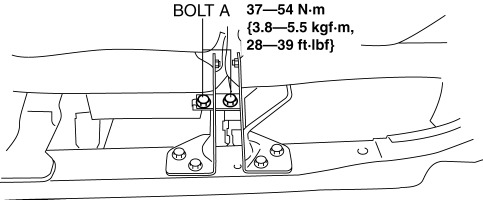
3. Remove bolts A.
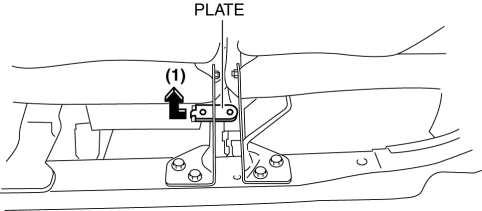
4. Remove the plate in the direction of the arrow (1) shown in the figure.
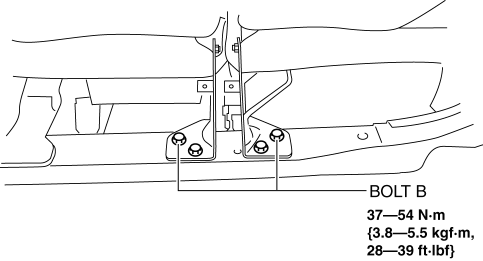
5. Remove bolts B.
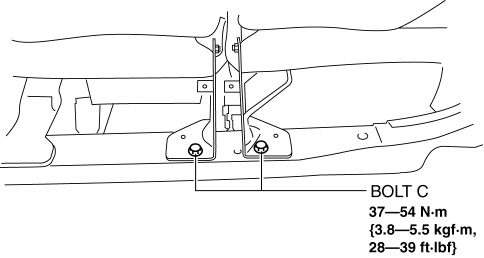
6. Remove bolts C.
7. Remove bolt D.
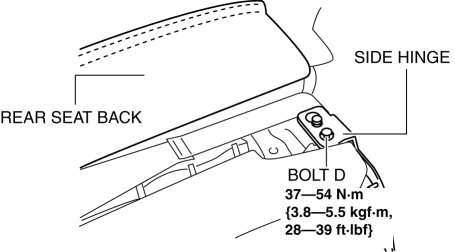
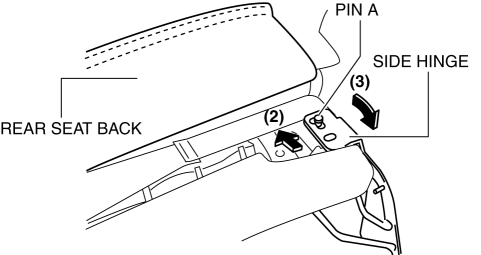
8. After moving the rear seat in the direction of the arrow (2) shown in the figure, remove pin B while moving the side hinge in the direction of the arrow (3).
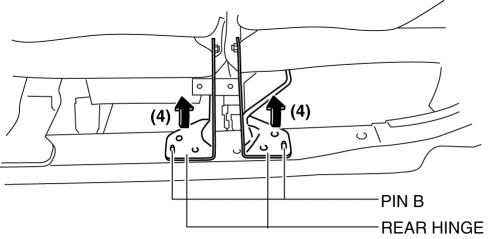
9. Move the rear hinge in the direction of the arrow (4) shown in the figure and set pin A aside.
10. Remove the rear seat back.
4:2:4 Split Type
1. Remove the trunk board..
2. Remove the rear seat..
3. Remove bolts A.
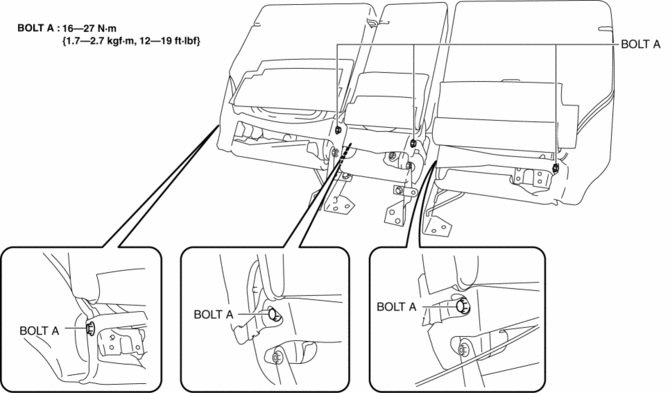
4. Remove the rear seat back.
5. Install in the reverse order of removal.
 Rear Seat Back Frame Removal/Installation
CAUTION:
When performing the procedure with a rear seat removed from the vehicle,
perform the procedure on a clean cloth so as not to damage or soil the seat.
6:4 Split Type
1. Remov ...
 Rear Seat Back Striker Removal/Installation
1. Disconnect the negative battery cable..
2. Press the push knob to fold the rear seat back.
3. Remove the following parts:
a. Trunk board.
b. Trunk end trim.
c. Rear scuff plate.
d. Trun ...
Other materials:
Brake
Brake System
Foot Brake
Your Mazda has power-assisted brakes that adjust automatically through normal
use.
Should power-assist fail, you can stop by applying greater force than normal
to the brake pedal. But the distance required to stop will be greater than usual.
WARNING
Do not coast wi ...
Catalytic Converter
Purpose, Function
Purifies contaminants in the exhaust gas by utilizing the chemical reactions
of the three-way catalytic converter.
A WU-TWC and a TWC have been adopted.
WU-TWC
The three-way catalyst is integrated with the exhaust manifold.
Because the c ...
Remote Transmitter Battery Voltage Inspection
NOTE:
Because the remote transmitter battery power cannot be determined using the
battery itself, determine by the remote transmitter battery low warning operation
conditions.
Operation procedure for remote transmitter battery low warning
1. Place the remote transmitter inside t ...
