
Mazda CX-5 Service & Repair Manual: Rear Buckle Removal/Installation
1. Switch the ignition to off.
2. Disconnect the negative battery cable and wait for 1 min or more
..
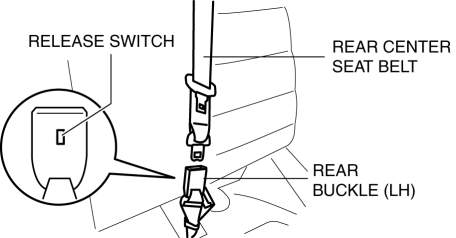
3. Press the release switch, then disconnect the rear center seat belt and rear buckle.
4. Fold down the rear seat back.
5. Remove the trunk board..
6. Remove the bolt.
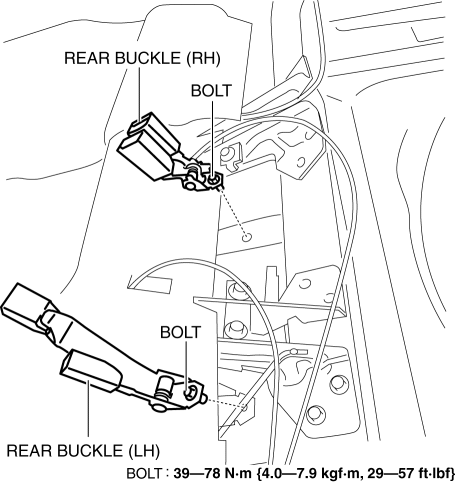
7. Remove the rear buckle (RH) and rear buckle (LH).
8. Install in the reverse order of removal..
Rear Buckle Installation Note
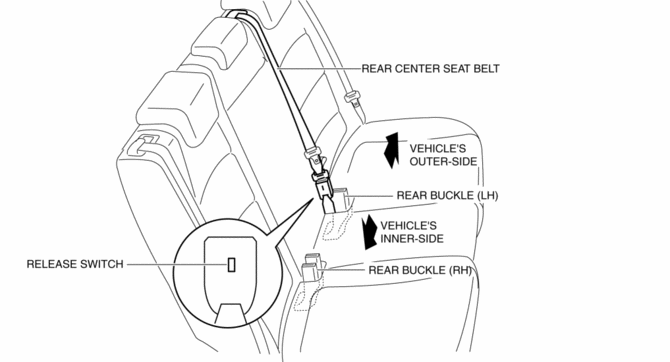
1. After installing the rear center seat belt, place the release switch of the rear buckle so that it faces the vehicle’s inner-side as shown in the figure.
 Pre Tensioner Seat Belt [Two Step Deployment Control System]
Purpose
The pre-tensioner seat belt retracts and tightens the seat belt webbing to
protect the front passengers during a collision.
Function
The pre-tensioner seat belts operate ...
 Rear Seat Belt Removal/Installation
CAUTION:
The ELR (emergency locking retractor) has a spring that will unwind if the
retractor cover is removed. The spring cannot be rewound by hand. If this occurs,
the ELR will not wor ...
Other materials:
Shroud Upper Reinforcement Installation [Panel Replacement]
Symbol Mark
Installation Procedure
1. When installing new parts, measure and adjust the body as necessary to conform
with standard dimensions.
2. Drill holes for the plug welding before installing the new parts.
3. After temporarily installing new parts, make sure the related parts fit p ...
Panel Light
Purpose
The panel light adjusts the instrument cluster and steering switch illumination
brightness.
Function
The instrument cluster adjusts the brightness of the following illumination
lights when a TNS illumination signal sent via CAN transmission from the front
body co ...
Basic System
Outline
Integrated A/C unit adopted.
Sub-cooling system to multi-flow condenser adopted.
Structural View
Ventilation system
Refrigerant system
Flow Diagram
Ventilation system
A/C unit
Inside the vehicle
Display
CENTER ...
