
Mazda CX-5 Service & Repair Manual: Push Button Start Removal/Installation
1. Disconnect the negative battery cable..
2. Remove the meter hood..
3. While pressing the push button start tab in the direction of the arrow (1) shown in the figure, push out the push button start in the direction of the arrow (2) shown in the figure to detach the push button start tab from the meter hood.
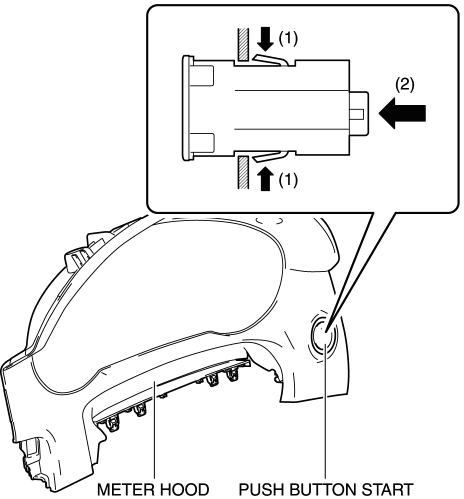
4. Remove the push button start.
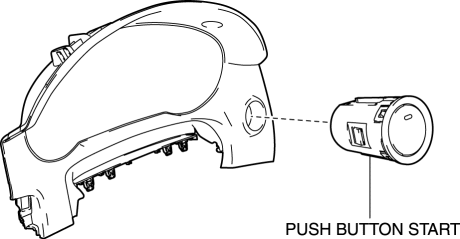
5. Install in the reverse order of removal.
 Push Button Start Inspection
1. Remove the push button start..
2. Verify that the continuity between the push button start terminals is as indicated
in the table.
If the continuity can be verified as indicated ...
 Sae Standards
In accordance with new regulations, SAE (Society of Automotive Engineers)
standard names and abbreviations are now used in this manual. The table below
lists the names and abbreviations th ...
Other materials:
Wheel Hub, Steering Knuckle Removal/Installation
CAUTION:
Performing the following procedures without first removing the ABS wheel-speed
sensor may possibly cause an open circuit in the wiring harness if it is pulled
by mistake. Before performing the following procedures, disconnect the ABS wheel-speed
sensor connector (axle sid ...
Hydraulic Pressure Control System Outline [Fw6 A EL, Fw6 Ax EL]
Outline
The hydraulic control mechanism consists of an oil cooler which maintains
the hydraulic pressure at the optimum temperature, a control valve body and
each shift valve which perform adjustment and circuit switching of the hydraulic
pressure based on the control content calcula ...
Auto Light System
Outline
The auto light system automatically turns the TNS and headlights on/off according
to the illumination level above and in front of the vehicle.
The auto light system is controlled by the front body control module (FBCM).
The front body control module (FBCM) performs ...
