
Mazda CX-5 Service & Repair Manual: Power Window Subswitch Removal/Installation
1. Disconnect the negative battery cable..
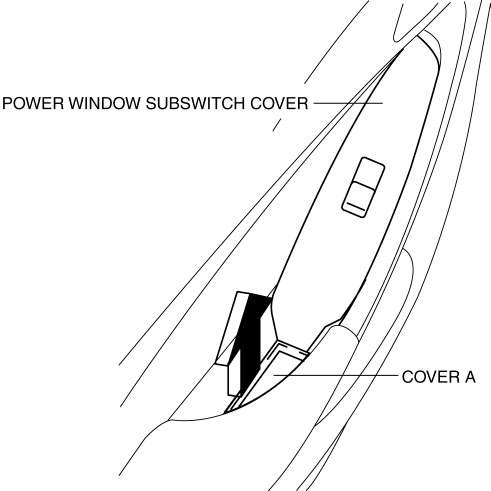
2. Remove the cover A.
3. Insert a tape-wrapped fastener remover shown in the figure and remove the tab B in the direction of arrow (1).
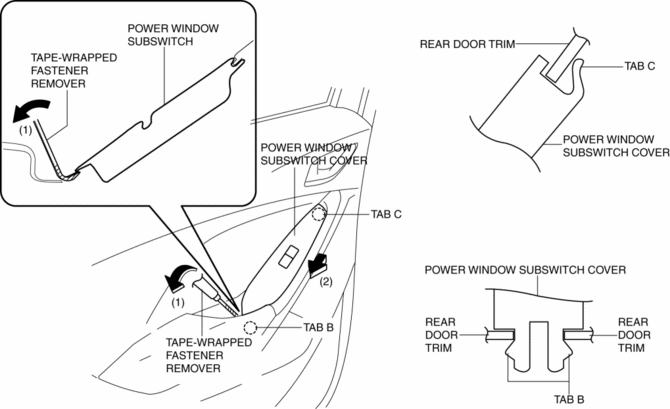
4. Slide the power window subswitch cover in the direction of the arrow (2) shown in the figure and remove the tab C.
5. Disconnect the power window subswitch connector.
6. Pull the edge of power window subswitch cover in the direction of arrow (3) and detach the tab D.
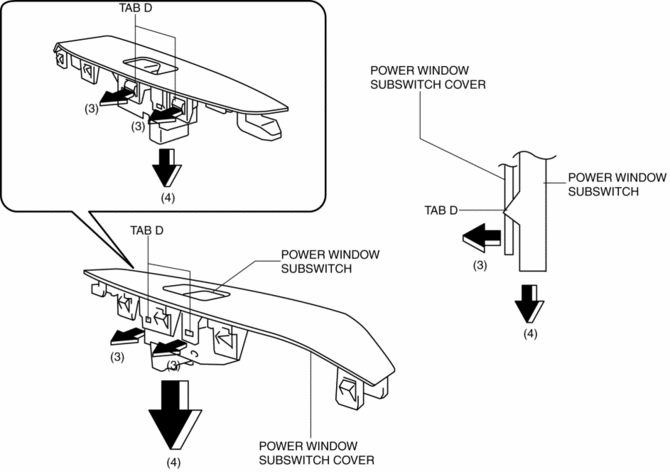
7. Remove the power window subswitch in the direction of arrow (4) shown in the figure.
8. Install in the reverse order of removal.
 Power Window Subswitch Inspection
1. Disconnect the negative battery cable..
2. Remove the power window subswitch..
3. Verify that the continuity between the power window subswitch terminals is
as indicated in the table.
...
 Power Window System
Outline
A power window system that enables automatic opening/closing of the door
glass has been adopted.
The driver's side door glass can be opened/closed automatically or manual ...
Other materials:
Instrument Cluster Configuration (Using Read/Write Function)
NOTE:
When performing configuration, it is necessary to read the vehicle specification
information from the instrument cluster before replacing it. Connect the M-MDS
to the vehicle and perform vehicle identification before removing the instrument
cluster. The vehicle specification i ...
Ultra High Tension Steel [Construction]
Characteristics of Ultra High-Tensile Steel Plates
Ultra high-tensile steel plates have enhanced tensile strength compared to
previous high-tensile steel plates.
Because the strength is maintained even though the plates are thin-walled,
the ultra high-tensile steel plates ar ...
Oil Control Valve (OCV) Inspection [Skyactiv G 2.0]
Coil Resistance Inspection
1. Disconnect the negative battery cable..
2. Remove the plug hole plate..
3. Disconnect the OCV connector.
4. Measure the resistance between terminals A and B using an ohmmeter.
OCV coil resistance
6.9—7.5 ohms [20°C {68°F}]
If ...
