
Mazda CX-5 Service & Repair Manual: Map Light Removal/Installation
Front Map Light
1. Disconnect the negative battery cable..
2. Open the sunglasses holder.
3. Remove the screws from the front map light.
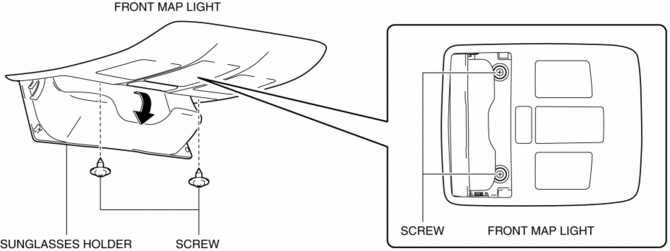
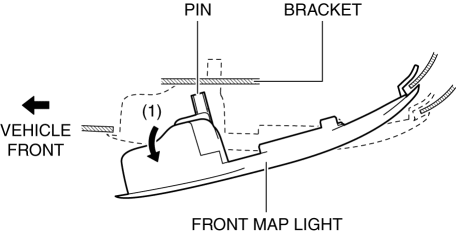
4. Move the front map light in the direction of the arrow (1) shown in the figure and pull out the pin from the bracket.
CAUTION:
-
Be careful not to pull the connector out strongly when removing the front map light. Otherwise, the contact surface of the wiring harness secured to the headliner will come off and the wiring harness could be pulled out. If the front map light is installed with the wiring harness pulled out, the wiring harness could get caught between the headliner and front map light bracket resulting in an open or short circuit in the wiring harness.
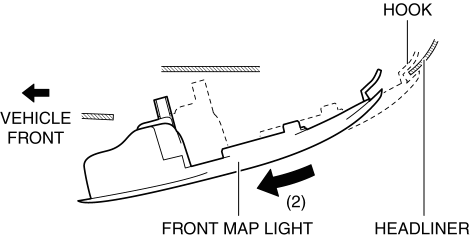
5. Move the front map light in the direction of the arrow (2) shown in the figure and pull out the front map light from the headliner.
6. Disconnect the connector.
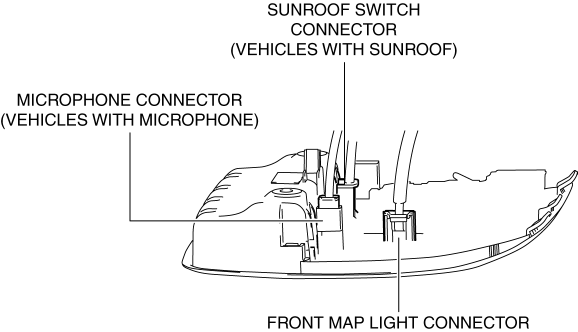
7. Remove the front map light.
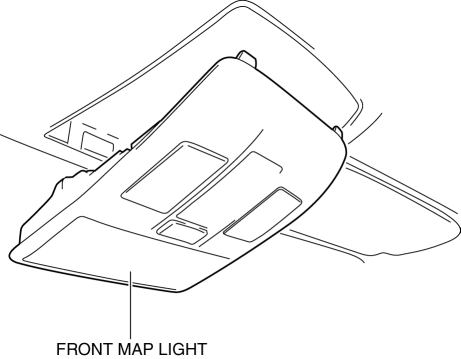
8. Install in the reverse order of removal.
Rear Map Light
1. Disconnect the negative battery cable..
2. Remove the following parts:
a. Sunroof seaming welt (vehicles with sunroof).
b. A-pillar trim.
c. Sunvisor.
d. Front scuff plate.
e. Rear scuff plate.
f. B-pillar lower trim.
g. Adjust anchor cover.
h. Upper anchor installation bolt on the seat belt.
i. B-pillar upper trim.
j. Assist handle.
k. Trunk board.
l. Trunk end trim.
m. Trunk side trim.
n. D-pillar trim.
o. C-pillar trim.
p. Headliner.
3. Disconnect the connector.
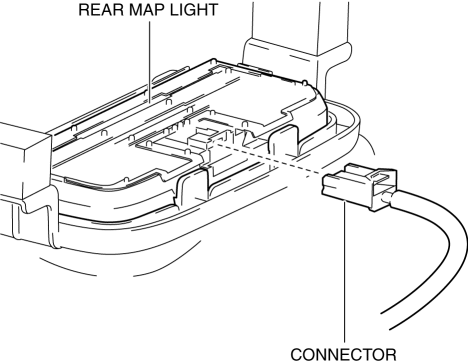
4. Move the bracket in the direction of the arrow (1) shown in the figure, press the rear map light in the direction of the arrow (2) shown in the figure, and detach the rear map light tab and bracket.
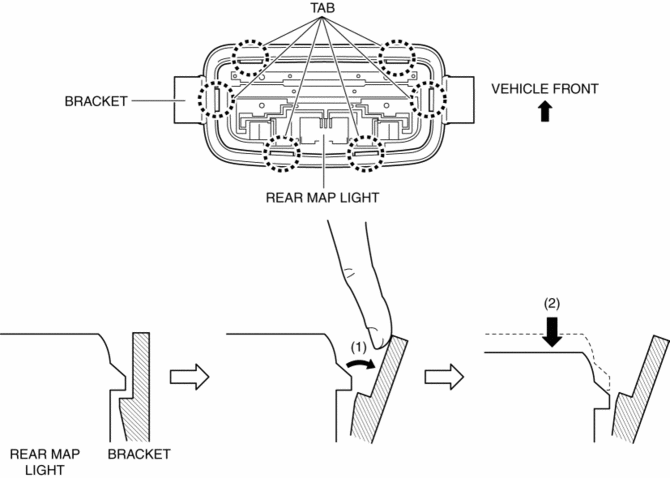
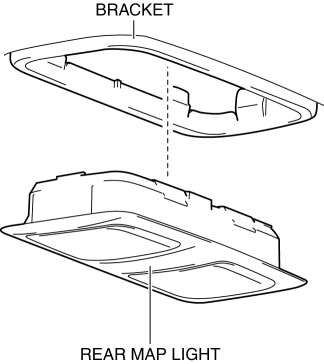
5. Detach all the rear map light tabs and bracket and remove the rear map light from the bracket.
CAUTION:
-
If the rear map light is removed from the bracket, the rear map light may fall off and be damaged. When removing the rear map light from the bracket, hold the rear map light on the lens side with a hand during servicing.
6. Install in the reverse order of removal.
 Map Light Inspection
Front Map Light
1. Disconnect the negative battery cable..
2. Remove the front map light..
3. Verify that the continuity between the front map light terminals is as indicated
in the table.
...
 Rear Map Light
Purpose
The rear map lights shine light at the center of the vehicle interior.
Function
The rear map lights illuminate when the interior light switch is in the ON
position or th ...
Other materials:
HomeLink Wireless Control System
NOTE
HomeLink and HomeLink house are registered trademarks of Johnson Controls.
The HomeLink system replaces up to 3 hand-held transmitters with a single builtin
component in the auto-dimming mirror.
Pressing the HomeLink button on the auto-dimming mirror activates garage doors,
gates and oth ...
Door Locks
WARNING
Always take all children and pets with you or leave a responsible person with
them:
Leaving a child or a pet unattended in a parked vehicle is dangerous. In hot
weather, temperatures inside a vehicle can become high enough to cause brain damage
or even death.
Do not leave the key in ...
Liftgate Removal/Installation
WARNING:
Removing the stay damper, liftgate hinge securing bolt, or liftgate without
supporting the liftgate may cause the liftgate to fall off and injure you. When
removing the stay damper, liftgate hinge, or liftgate, always use two persons
to perform the work.
1. Disconnect ...
