
Mazda CX-5 Service & Repair Manual: License Plate Light Removal/Installation
1. Disconnect the negative battery cable..
2. Remove the following parts:
a. Liftgate upper trim.
b. Liftgate side trim.
c. Liftgate lower trim.
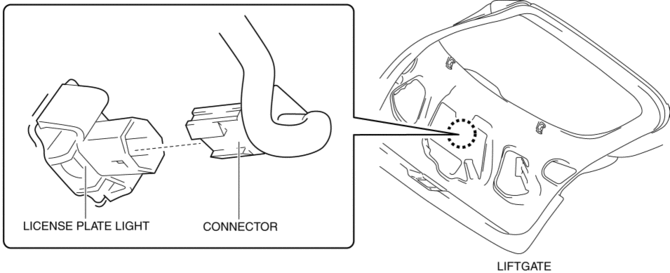
3. Disconnect the connector.
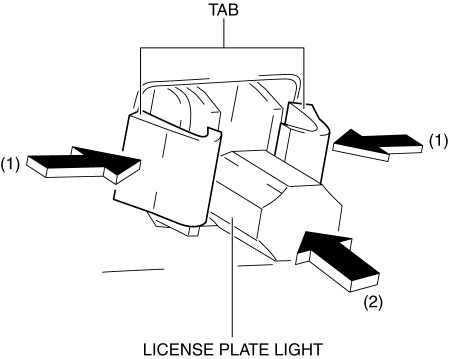
4. While pressing the license plate light tab in the direction of arrow (1) shown in the figure, press the license plate light in the direction of arrow (2) to detach the license plate light tab and liftgate.
CAUTION:
-
If the license plate light is removed from the liftgate, the license plate light may fall off and be damaged. When removing the license plate light from the liftgate, hold the license plate light on lens side with a hand during servicing.
5. Remove the license plate light.
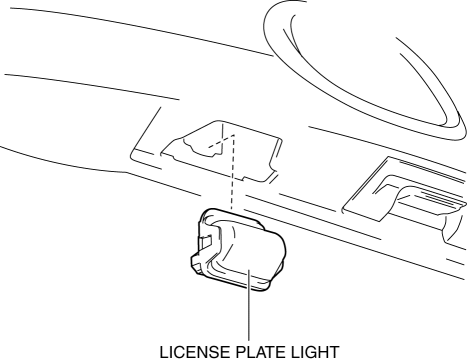
6. Install in the reverse order of removal.
 License Plate Light Bulb Removal/Installation
1. Disconnect the negative battery cable..
2. Insert a tape-wrapped flathead screwdriver into the clearance between the
lens and license plate light shown in the figure.
3. Move the flathead ...
 PID/Data Monitor Inspection [Adaptive Front Lighting System (Afs)]
1. Connect the M-MDS to the DLC-2.
2. After the vehicle is identified, select the following items from the initialization
screen of the M-MDS.
a. Select “DataLogger”.
b. Select “Modulesâ ...
Other materials:
Flywheel Inspection [C66 M R]
1. Remove the flywheel..
2. Perform the following procedures to inspect the flywheel.
If there is any malfunction or it exceeds the maximum specification, replace
the flywheel..
a. Inspect the surface that contacts the clutch disc for scratches, nicks, and
discoloration.
...
Charcoal Canister Inspection
U.S.A. And CANADA
Leakage inspection
1. Perform the following procedures:
Do not operate CV solenoid valve.
Assemble the hose used for inspection to port A.
Cover ports B and C with the caps.
CAUTION:
Do not apply a pressure 20 kPa {150 mmHg, 5.91 inHg} o ...
Sas Control Module Configuration (Using Read/Write Function) [Standard Deployment
Control System]
NOTE:
When performing configuration, it is necessary to read the vehicle specification
information from the SAS control module before replacing it. Connect the M-MDS
to the vehicle and perform vehicle identification before removing the SAS control
module. The vehicle specification i ...
