
Mazda CX-5 Service & Repair Manual: License Plate Light Bulb Removal/Installation
1. Disconnect the negative battery cable..
2. Insert a tape-wrapped flathead screwdriver into the clearance between the lens and license plate light shown in the figure.
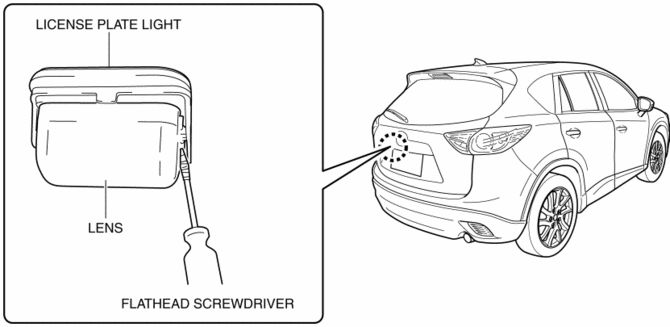
3. Move the flathead screwdriver in the direction of the arrow shown in the figure, pull out the lens from the license plate light, and detach the lens tab and license plate light.
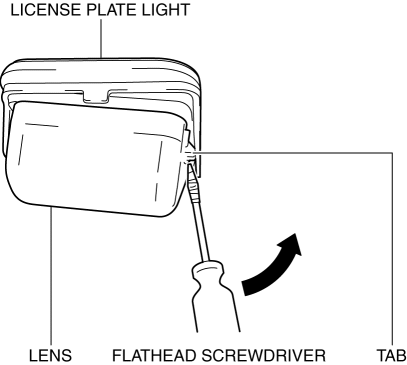
4. Remove the lens.
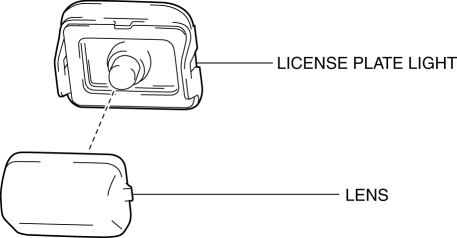
5. Remove the license plate light bulb.
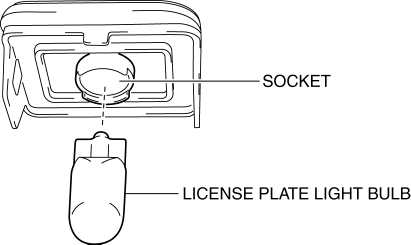
6. Install in the reverse order of removal.
 License Plate Light
Purpose
The license plate lights shine light on the license plate during nighttime
driving.
Function
The license plate lights illuminate in conjunction with the operation of
...
 License Plate Light Removal/Installation
1. Disconnect the negative battery cable..
2. Remove the following parts:
a. Liftgate upper trim.
b. Liftgate side trim.
c. Liftgate lower trim.
3. Disconnect the connector.
4. While p ...
Other materials:
Front ABS Wheel Speed Sensor Removal/Installation
1. Remove the mudguard..
2. Remove in the order indicated in the table.
3. Install in the reverse order of removal.
4. After installation, verify that there is no twisting in the front ABS wheel-speed
sensor.
1
Connector
2
Bolt
...
Corner Junction Installation [Panel Replacement]
Symbol Mark
Installation Procedure
1. When installing new parts, measure and adjust the body as necessary to conform
with standard dimensions.
2. Drill holes for the plug welding before installing the new parts.
3. After temporarily installing new parts, make sure the related parts fit p ...
Engine Oil Solenoid Valve Inspection
Engine Oil Solenoid Valve Operation Inspection
1. Remove the engine oil solenoid valve..
2. Verify that the battery is fully charged.
3. Connect the battery to the engine oil solenoid valve connector (2 terminals)
as shown in the figure.
4. Verify that there is an operation sound from t ...
