
Mazda CX-5 Service & Repair Manual: Front Power Window Regulator Removal/Installation
1. Perform the front door glass preparation..
2. Disconnect the negative battery cable..
3. Remove the following parts:
a. Inner garnish.
b. Front door trim.
c. Front door glass.
d. Front door speaker.
e. Front power window motor.
4. Remove bolt A.
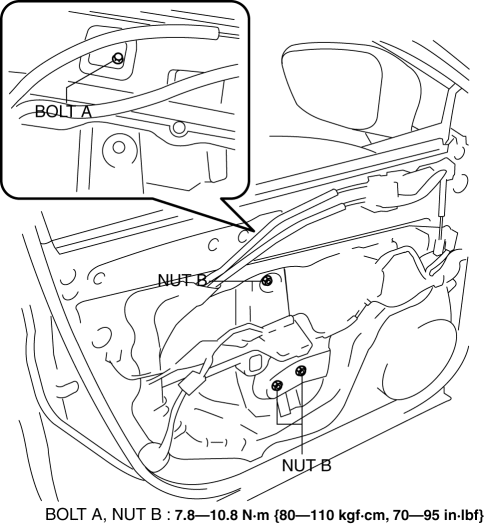
5. Remove nuts B.
6. Insert a hand through the speaker installation hole, rotate the drum housing in the direction shown in the figure to detach tabs from the front door module panel.
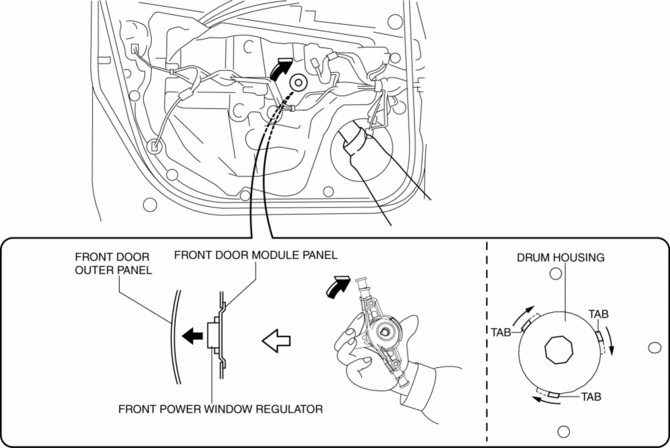
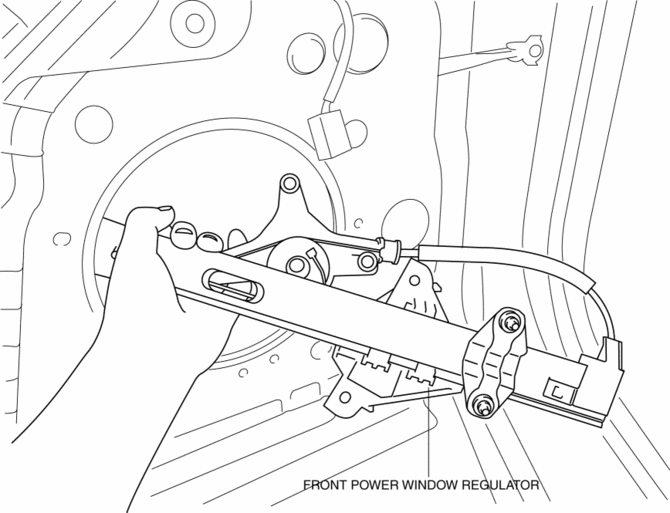
7. Remove the front power window regulator through the speaker installation hole.
CAUTION:
-
When removing the front power window regulator, the front power window regulator may contact the front door speaker installation hole, and the coating film of the front door inner panel and the front power window regulator could be damaged. Remove the front power window regulator while verifying that the front power window regulator and the front door speaker installation hole do not contact each other.
8. Install in the reverse order of removal.
 Front Door Glass Removal/Installation
1. Perform the front door glass preparation..
NOTE:
Before removing the front door glass, the removal procedure for the front
door glass installation bolt can be facilitated by adjusting ...
 Glass Antenna
Purpose, Function
The RDS (Radio Data System) converts radio broadcast waves to electric signals
and sends the signals to the audio unit.
Construction
An antenna with excellent ...
Other materials:
Electric Power Steering System
Outline
A column assist type EPS has been adopted for all models.
EPS provides smooth handling from low to high speeds as a result of the excellent
steering feel provided by the electronic control and the vehicle-speed responsive
control.
EPS does not require a power ste ...
Propeller Shaft On Vehicle Inspection
Joint Area Excessive Play Inspection
1. Shake the universal joint by hand and verify that there is no excessive play.
2. If there is any excessive play, replace the propeller shaft..
Propeller Shaft Runout Inspection
CAUTION:
Do not rotate the propeller shaft using engine force wh ...
Rear Drive Shaft Removal/Installation
CAUTION:
Performing the following procedures without first removing the ABS wheel?speed
sensor may possibly cause an open circuit in the harness if it is pulled by
mistake. Before performing the following procedures, remove the ABS wheel?speed
sensor (wheel side) and fix it to an ap ...
