
Mazda CX-5 Service & Repair Manual: Door Ajar Warning Light
Purpose
-
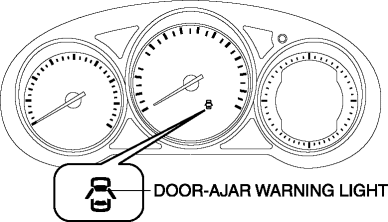
The door-ajar warning light notifies the driver that any door or the liftgate is open.
Function
-
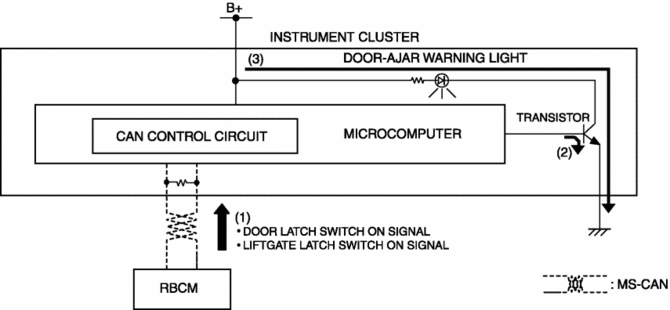
When the instrument cluster receives any of the following signals sent from the rear body control module (RBCM) via the CAN signal, the door-ajar warning light illuminates.
-
Door latch switch ON signal (door open)
-
Liftgate latch switch ON signal (liftgate open)
Construction
-
The instrument cluster controls illumination on/off of the door-ajar warning light using the instrument cluster microcomputer based on the door latch or liftgate latch position signal from the rear body control module (RBCM).
-
The door-ajar warning light is set in the instrument cluster.
Operation
1. The instrument cluster receives (1) the door latch switch ON signal or liftgate latch switch ON signal from the rear body control module (RBCM).
2. The instrument cluster microcomputer turns the transistor on (2) based on each signal.
3. When the transistor turns on, a ground circuit with the door-ajar warning light is established and the door-ajar warning light illuminates (3).
Fail-safe
-
Function not equipped.
 Cruise Set Indicator Light (Green)
Purpose/Function
Illuminates during the cruise control system operation to inform the driver
that the cruise control system is operating.
Construction
Built into the instrument ...
 Engine Oil Pressure Warning Light
Purpose
The engine oil pressure warning light warns the driver that the engine oil
level is insufficient.
Function
When the instrument cluster receives the engine oil pressure w ...
Other materials:
Cooling System Service Warnings
WARNING:
Never remove the cooling system cap or loosen the radiator drain plug while
the engine is running, or when the engine and radiator are hot. Scalding engine
coolant and steam may shoot out and cause serious injury. It may also damage
the engine and cooling system.
Tu ...
Vent Operation
Adjusting the Vents
Directing airflow
To adjust the direction of airflow, move the adjustment knob.
NOTE
hen using the air conditioner under humid ambient temperature conditions,
the system may blow fog from the vents. This is not a sign of trouble but a result
of humid air being suddenly co ...
Assist Handle Removal/Installation
Removal
1. Insert a tape-wrapped flathead screwdriver into the service hole and remove
the assist handle covers.
2. Remove the assist handle in the direction of the arrow (1) and (2), while
detach clips.
NOTE:
Remove the assist handle by shaking it up and down.
Install ...
