
Mazda CX-5 Service & Repair Manual: Decoration Panel Removal/Installation
CAUTION:
-
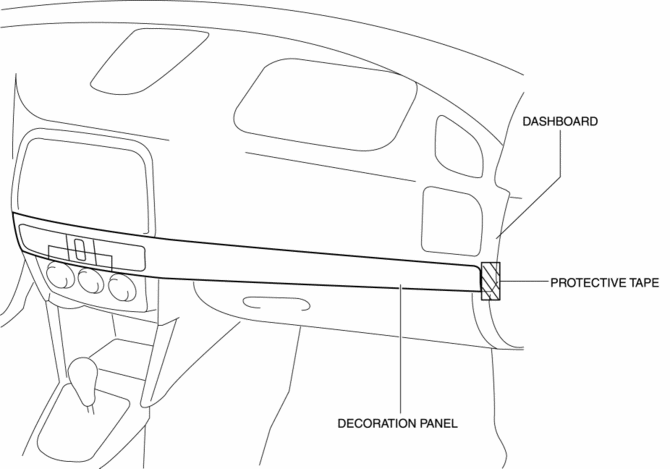
Affix protective tape to the position shown in the figure.
1. Disconnect the negative battery cable..
2. Open the glove compartment.
3. Insert a tape-wrapped flathead screwdriver in the position indicated by the arrow (1) in the figure and detach clip A.
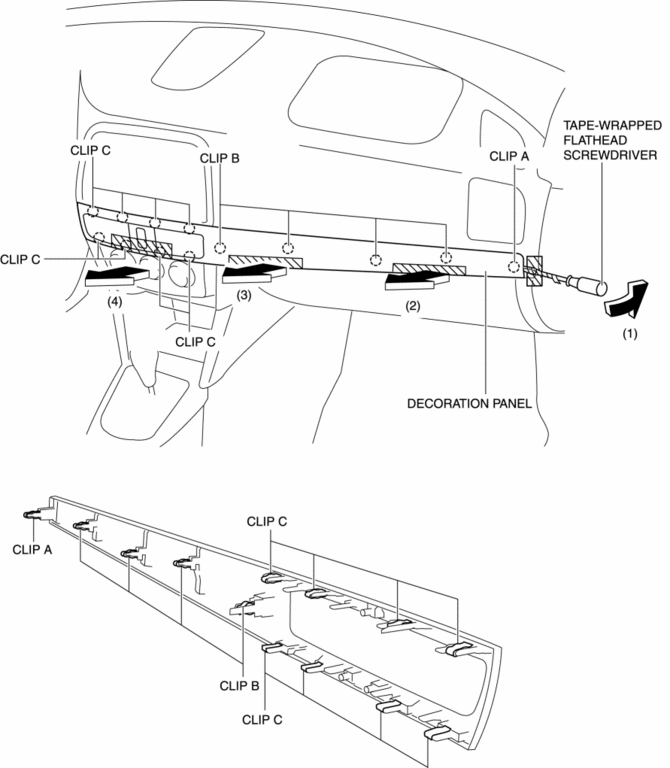
4. Take the shaded area shown in the figure, and remove the decoration panel in the direction of the arrow in the order of (2), (3), (4) while detaching clips B, clips C.
5. Disconnect the hazard switch connector.
6. Install in the reverse order of removal.
 Dashboard Under Cover Removal/Installation
1. Detach hooks A in the direction of arrow (1) shown in the figure.
2. Pull the dashboard under cover in the direction of arrow (2) while detaching
pins B.
3. Remove the dashboard under cov ...
 Floor Covering Removal/Installation
1. Disconnect the negative battery cable..
2. Remove the following parts:
a. Front scuff plate.
b. Front side trim.
c. Rear scuff plate.
d. B-pillar lower trim.
e. Rear seat cushion.
f. ...
Other materials:
Keyless Antenna [Advanced Keyless Entry System]
Purpose
Outputs a request signal and specifies the remote transmitter location.
Function
The keyless antenna outputs request signals to the inside and outside of
the vehicle based on the signals from the LF control unit.
Construction, Operation
The antennas for re ...
Differential [Fw6 A EL, Fw6 Ax EL]
Purpose/Function
The differential absorbs the difference in the rotation speed between the
left and right driving wheels so that the vehicle drives smoothly when differences
occur due to cornering or driving on rough roads.
Construction
The differential consists of the ring ...
Power Windows
The ignition must be switched ON for the power windows to operate.
WARNING
Make sure the opening is clear before closing a window:
Closing power windows are dangerous. A person's hands, head, or even neck could
be caught by the window and result in serious injury or even death. This warning ...
