
Mazda CX-5 Service & Repair Manual: Dashboard Under Cover Removal/Installation
1. Detach hooks A in the direction of arrow (1) shown in the figure.
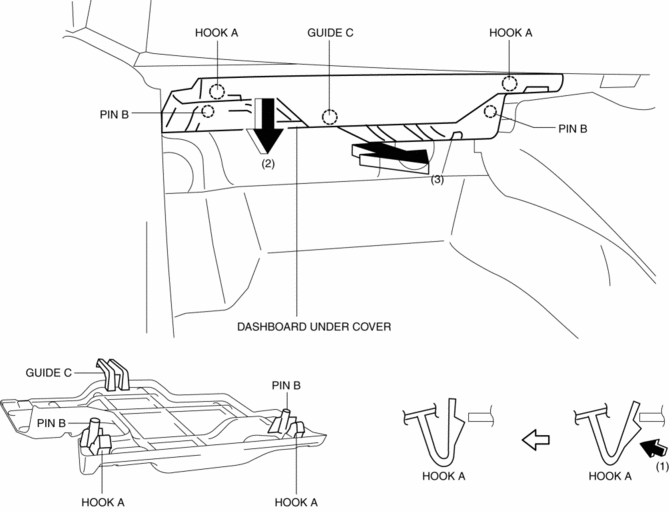
2. Pull the dashboard under cover in the direction of arrow (2) while detaching pins B.
3. Remove the dashboard under cover in the direction of the arrow (3) shown in the figure while detaching the guide C.
CAUTION:
-
If hooks A and pins B is removed forcefully, guide C may be damaged. Carefully remove hooks A and pins B so as not to damage guide C.
4. Install in the reverse order of removal.
 Dashboard Removal/Installation
1. Disconnect the negative battery cable..
2. Remove the following parts:
a. Windshield wiper arm and blade.
b. Cowl grille.
c. Windshield wiper motor.
d. Front scuff plate.
e. Front side ...
 Decoration Panel Removal/Installation
CAUTION:
Affix protective tape to the position shown in the figure.
1. Disconnect the negative battery cable..
2. Open the glove compartment.
3. Insert a tape-wrapped flathead ...
Other materials:
Clutch Fluid Leakage Inspection [C66 M R]
CAUTION:
Do not allow clutch fluid to get on a painted surface. Clutch fluid contains
properties which can dissolve the paint. If clutch fluid gets on a painted surface,
wash it off with water immediately and wipe the area off completely.
1. Verify reserve tank cap is on tight.
...
Ion Sensor Inspection
DTC Inspection
1. Connect the M-MDS to the DLC?2.
2. Perform the DTC inspection using the M-MDS..
If any DTC related to the ignition coil/ion sensor is present, repair the
malfunctioning location according to the applicable DTC troubleshooting..
Visual Inspection
NOTE:
B ...
Instrumentation/Driver Info. Personalization
A personalization function has been adopted which enables the instrument
cluster settings to be changed.
The Mazda Modular Diagnostic System (M-MDS) is required to perform the setting.
Refer to the Workshop Manual for the detailed setting procedure.
Instrument cluster
...
