
Mazda CX-5 Owners Manual: Child-Restraint System Installation
Child-Restraint System Types
In this owner's manual, explanation of child-restraint systems is provided for the following three types of popular childrestraint systems: infant seat, child seat, booster seat.
NOTE
• Installation position is determined by the type of child-restraint system. Always read the manufacturer's instructions and this owner's manual carefully.
• Due to variations in the design of childrestraint systems, vehicle seats and seat belts, all child-restraint systems may not fit all seating positions. Before purchasing a child-restraint system, it should be tested in the specific vehicle seating position (or positions) where it is intended to be used. If a previously purchased child-restraint system does not fit, you may need to purchase a different one that will.
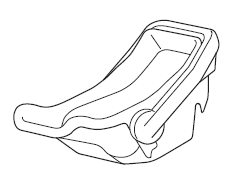
Infant seat
An infant seat provides restraint by bracing the infant's head, neck and back against the seating surface.
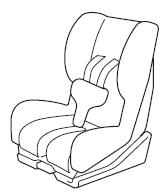
Child seat
A child seat restrains a child's body using the harness.
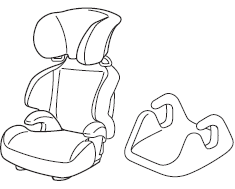
Booster seat
A booster seat is a child restraint accessory designed to improve the fit of the seat belt system around the child's body.
 Child Restraint Precautions
Mazda strongly urges the use of child-restraint systems for children small enough
to use them.
You are required by law to use a child-restraint system for children in the U.S.
and Canada.
Check ...
 Installing Child-Restraint Systems
Accident statistics reveal that a child is safer in the rear seat. The front
passenger's seat is clearly the worst choice for any child under 12, and with rear-facing
childrestraint systems it ...
Other materials:
Engine Oil Level Inspection
1. Position the vehicle on level ground.
2. Warm up the engine.
3. Stop the engine and allow at least 5 min before continuing.
4. Remove the dipstick, wipe it cleanly, and reinstall it fully.
5. Remove the dipstick and verify that the oil level is between the F and L marks
on the dipstick. ...
Windshield Wiper Arm And Blade Adjustment
1. Switch the ignition ON (engine off or on).
2. Operate the windshield wiper at low speed.
3. Verify that the windshield wiper operates at low speed and stop the windshield
wiper.
4. Verify that the windshield wiper stops at the auto-stop position.
5. Remove the windshield wiper arm and b ...
PID/Data Monitor Inspection [Start Stop Unit]
1. Connect the M-MDS to the DLC?2.
2. After the vehicle is identified, select the following items from the initialization
screen of the M-MDS.
Select “DataLogger”.
Select “Modules”.
Select “SSU”.
3. Select the applicable PID from the PID table.
4. Veri ...
