
Mazda CX-5 Service & Repair Manual: Blower Motor [Full Auto Air Conditioner]
Purpose
-
The blower motor sends airflow into the cabin.
Function
-
The blower motor rotates the blower fan to create airflow and sends out the airflow in the blower unit and A/C unit.
Construction
-
The blower motor is installed to the blower unit.
-
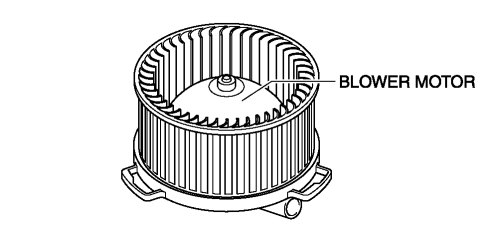
The blower motor consists of the blower fan and motor.
-
A sirocco fan has been adopted for the blower fan.
Operation
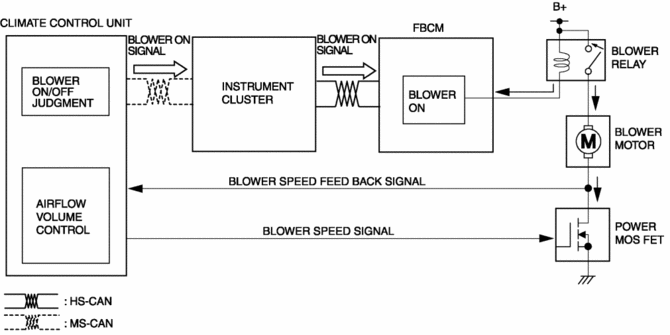
1. The front body control module (FBCM) turns on the blower relay based on the blower ON signal sent from the climate control unit.
2. When the blower relay turns on, the blower motor fan rotates.
3. The rotation speed of the blower fan is determined by the transistor in the power MOS FET. If the current value flowing through the transistor is high, the rotation speed increases, if the current value is low, the speed decreases.
Fail-safe
-
Function not equipped.
 Blower Motor Removal/Installation [Manual Air Conditioner]
1. Disconnect the negative battery cable..
2. Remove the dashboard under cover..
3. Disconnect the connector.
4. Remove the screws.
5. Remove the blower motor.
6. Install in the reve ...
 Blower Motor [Manual Air Conditioner]
Purpose
The blower motor sends airflow into the cabin.
Function
The blower motor rotates the blower fan to create airflow and sends out the
airflow in the blower unit and A/C un ...
Other materials:
Electric Power Steering (Eps) Control Module
Purpose/ Function
The EPS control module (CM) calculates the optimum assist current based on
the steering torque signal from the torque sensor installed to the steering
column and the vehicle speed signal sent via CAN transmission from the PCM.
The EPS CM controls the following ...
Power Seat Switch Inspection
WARNING:
Handling a side air bag improperly can accidentally operate (deploy) the
air bag, which may seriously injure you. Read the service warnings/cautions
in the Workshop Manual before handling the front seat (side air bag integrated)..
1. Switch the ignition off (LOCK).
2. ...
Meters and Gauges
1 Speedometer
2 Odometer, Trip Meter and Trip Meter Selector
3 Tachometer
4 Fuel Gauge
5 Dashboard Illumination
6 Outside Temperature Display
7 Trip Computer and INFO Switch
Speedometer
The speedometer indicates the speed of the vehicle.
Odometer, Trip Meter and Trip Meter Selector
...
