
Mazda CX-5 Service & Repair Manual: Blind Spot Monitoring (Bsm) Off Switch Inspection
1. Disconnect the negative battery cable..
2. Remove the BSM OFF switch..
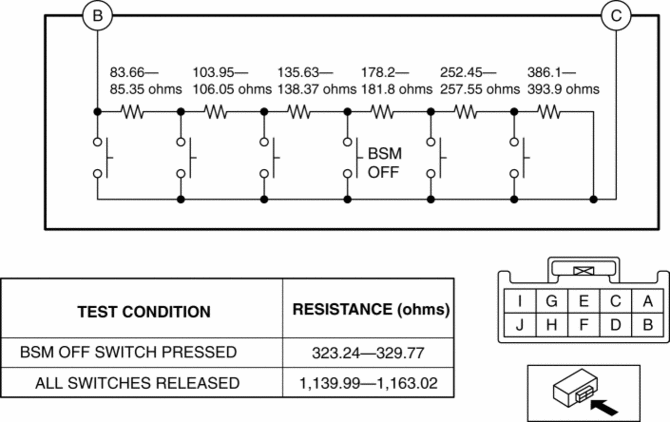
3. Verify that the resistance between BSM OFF switches B and C is as indicated in the table.
-
If the resistance cannot be verified as indicated in the table, replace the cluster switch.
4. Apply battery positive voltage to BSM OFF switch terminal J, and connect terminal I to ground.
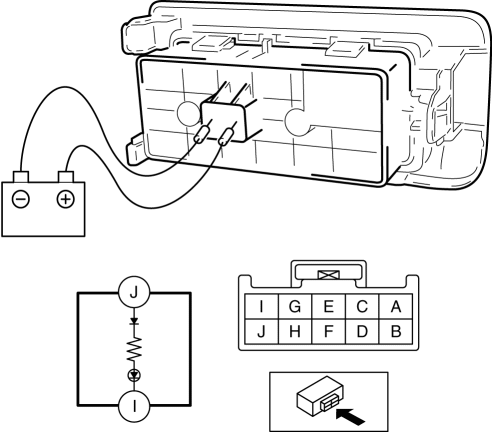
5. Verify that the LED illuminates.
-
If there is any malfunction, replace the cluster switch.
 Blind Spot Monitoring (Bsm) Off Switch
Purpose
The blind spot monitoring (BSM) system can be turned on or off optionally
by the driver.
Function
The switch operation signal is sent to the instrument cluster.
Co ...
 Blind Spot Monitoring (Bsm) System
Outline
The blind spot monitoring (BSM) system detects vehicles approaching from
the rear blind spots, and illuminates the BSM indicator light on the outer mirror
glass. When the BSM indi ...
Other materials:
Front Seat Belt Pretensioner and Load Limiting Systems
For optimum protection, the driver and front passenger seat belts are equipped
with pretensioner and load limiting systems. For both these systems to work properly
you must wear the seat belt properly.
Pretensioners:
In moderate or severe frontal or nearfrontal accidents, the front air bag and ...
TCM [Fw6 A EL, Fw6 Ax EL]
Purpose/Function
The TCM detects the vehicle conditions and performs calculations and processing
based on input information from each type of sensor and switch.
Outputs control signals to each solenoid valve so that each type of control
is optimally implemented according to the ...
Discharge Headlight System Inspection
WARNING:
Incorrect servicing of the discharge headlights could result in electrical
shock. Before servicing the discharge headlights, always refer to the service
warnings..
Terminal layout
Inspection procedure
Step
Inspection
Actio ...
