
Mazda CX-5 Service & Repair Manual: Accelerator Pedal, Kickdown Switch
Purpose, Function
-
The driver's intentions are transmitted to the PCM via the accelerator pedal.
-
Kickdown switch (ATX) (Applied VIN (assumed): JM3 KE2*E*D# 148107?)
-
If the accelerator pedal is depressed carelessly, kickdown control will be implemented based on the accelerator pedal being determined as fully open, and vehicle shock will occur. A kickdown switch has been adopted so that it can be determined that the accelerator pedal is fully open based on the driver’s intention of depressing the accelerator pedal for kickdown.
Construction
-
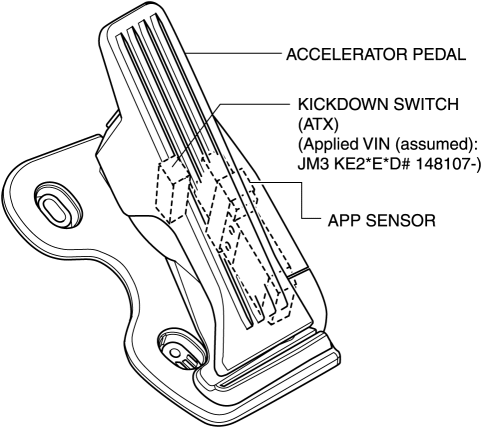
The accelerator pedal has a built-in APP sensor and kickdown switch (ATX).
-
For the APP sensor, refer to CONTROL SYSTEM..
Kickdown Switch (ATX) (Applied VIN (assumed): JM3 KE2*E*D# 148107?)
-
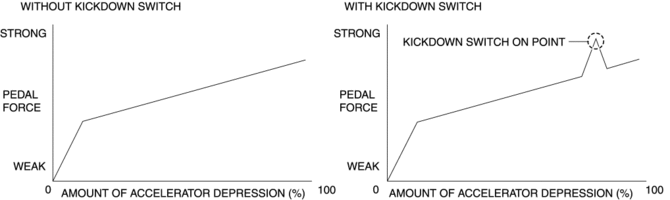
A load can be felt while the accelerator pedal is being depressed and when it is further depressed the kickdown switch turns on.
-
The driver can control the kickdown by knowing the amount of accelerator depression.
-
The kickdown switch is only a measure of the kickdown. An electrical signal is not transmitted by the kickdown switch turning on/off, and vehicle control is not affected.
 Accelerator Pedal Removal/Installation
1. Disconnect the negative battery cable..
2. Remove in the order indicated in the table.
1
APP sensor connector
2
Accelerator pedal
...
 Air Bag Module And Pre Tensioner Seat Belt Deployment Procedures [Standard Deployment
Control System]
Air Bag Module And Pre Tensioner Seat Belt Deployment Procedures [Standard Deployment
Control System]
WARNING:
A live (undeployed) air bag module or pre-tensioner seat belt may accidentally
operate (deploy) when it is disposed of and cause serious injury. Do not dispose
of a live (undepl ...
Other materials:
Procedure [Plastic Body Parts]
Repair of polypropylene bumpers having damage that has reached the surface of
the polypropylene and are too serious to be restored by painting only.
1. Cut the rough edges around the damage with a knife to make it smooth. Sand
the area with a sander to make an angle of about 45°.
2. ...
Differential Oil Temperature Sensor Inspection
WARNING:
Hot differential oil may cause severe burns. Do not perform maintenance while
differential oil is hot.
1. Disconnect the negative battery cable.
2. Disconnect the differential oil temperature sensor connector and remove the
differential oil temperature sensor.
3. Wrap ...
Steering Shaft Inspection
1. Inspect the steering column for excessive play and damage.
2. Verify that the clearance between the projection on the steering column shown
in the figure and the bracket is less than 2.0 mm {0.079 in}.
If the clearance between the projection and bracket is 2.0 mm {0.079 in}
or ...
