
Mazda CX-5 Service & Repair Manual: Airflow Mode Actuator [Full Auto Air Conditioner]
Purpose
-
The airflow mode actuator moves the mode door in the A/C unit to switch the air vent.
Function
Door open/close function
-
The airflow mode actuator drives the motor based on the signal from the climate control unit and moves the mode door to the VENT, BI-LEVEL, HEAT, DEF/HEAT, or DEFROSTER position.
Door position detection function
-
The airflow mode actuator detects the changes in the mode door position using the potentiometer in conjunction with the motor drive and gives feedback to the climate control unit based on the electric signals.
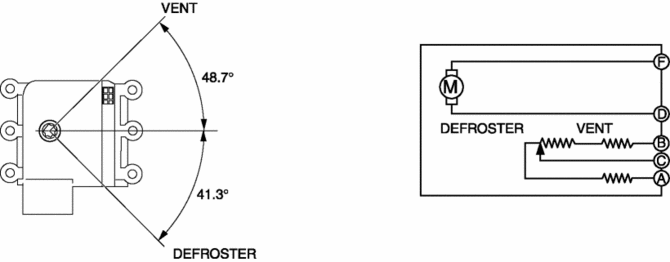
Construction
-
A potentiometer-type airflow mode actuator has been adopted.
-
The airflow mode actuator is installed to the passenger's side in the A/C unit.
Operation
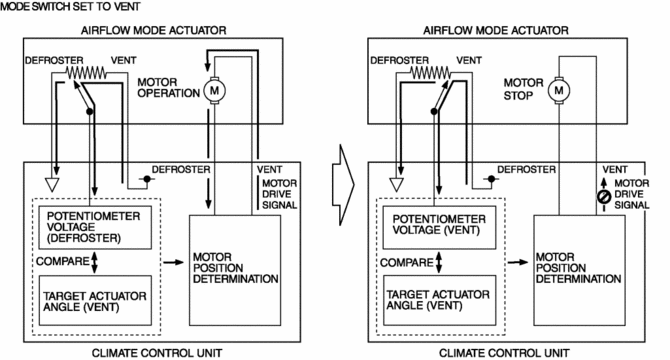
1. The climate control unit determines the airflow mode actuator target voltage based on the mode position determined by the airflow mode control.
2. The climate control unit compares the voltage detected by the potentiometer in the airflow mode actuator with the target voltage.
3. When the voltage detected by the potentiometer differs from the target voltage, the climate control unit outputs a motor drive signal.
4. When the voltage detected by the potentiometer is equal to the target voltage, the climate control unit stops the motor drive signal to the airflow mode actuator.
Fail-safe
-
Function not equipped.
 Airflow Mode Actuator Removal/Installation [Full Auto Air Conditioner]
1. Disconnect the negative battery cable..
2. Remove the following parts:
a. Dashboard under cover.
b. Glove compartment.
3. Disconnect the airflow mode actuator connector.
4. Remove the scr ...
 Airflow Mode Control [Full Auto Air Conditioner]
Purpose
The airflow mode control changes the airflow mode according to the vehicle
environment.
Function
The airflow mode control drives the airflow mode actuator according to t ...
Other materials:
Curtain Air Bag Module Removal/Installation [Standard Deployment Control System]
WARNING:
Handling the air bag module improperly can accidentally deploy the air bag
module, which may seriously injure you. Read the air bag system service warnings
and cautions before handling the air bag module..
1. Switch the ignition to off.
2. Disconnect the negative batte ...
Interior Equipment (View A)
1 Door-lock knob
2 TCS OFF switch
3 Tire pressure monitoring system set switch
4 Turn and lane-change signal
5 Lighting control
6 Instrument cluster
7 Dashboard illumination knob
8 Wiper and washer lever
9 Push button start
10 AFS OFF switch
11 BSM OFF switch
12 Outside mirror ...
Passenger Compartment Temperature Sensor Removal/Installation [Full Auto Air
Conditioner]
1. Disconnect the negative battery cable..
2. Remove the following parts:
a. Front scuff plate (driver-side).
b. Front side trim (driver-side).
c. Switch panel.
d. Decoration panel.
e. Shift lever knob (MTX).
f. Front console box.
g. Shift panel.
h. Upper panel.
i. Rear console. ...
