
Mazda CX-5 Service & Repair Manual: Air Intake Actuator [Manual Air Conditioner]
Purpose
-
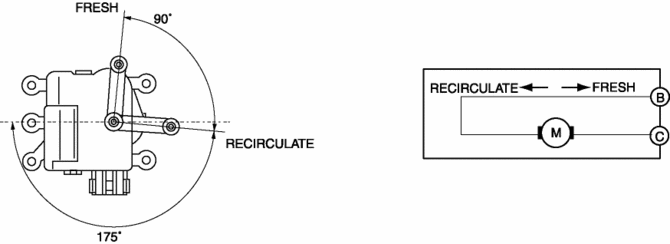
The air intake actuator moves the air intake door in the blower unit to switch the air intake port.
Function
-
The air intake actuator drives the motor based on the signal from the climate control unit and moves the air intake door to the FRESH or REC position.
Construction
-
A mechanical lock-type air intake actuator has been adopted.
-
The air intake actuator is installed to the blower unit.
Operation
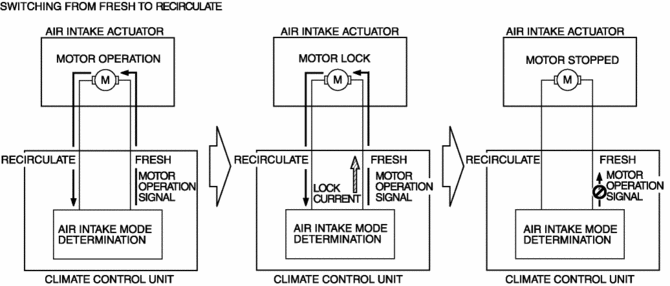
1. The climate control unit outputs a motor drive signal to the air intake actuator based on the air intake mode determined by the air intake control.
2. When the air intake actuator moves to FRESH or REC, the motor locks.
3. When the motor locks and is under excessive load, the current value flowing from the climate control unit increases more than the specification (lock current).
4. When the lock current is detected, the climate control unit stops the motor drive signal to the air intake actuator.
Fail-safe
-
Function not equipped.
 Air Intake Actuator [Full Auto Air Conditioner]
Purpose
The air intake actuator moves the air intake door in the blower unit to switch
the air intake port.
Function
The air intake actuator drives the motor based on the signal ...
 Air Intake Control [Full Auto Air Conditioner]
Purpose
The air intake control switches the air intake port (FRESH/REC) according
to the vehicle environment.
Function
The air intake control drives the air intake actuator and ...
Other materials:
Theft-Deterrent System
If the theft deterrent system detects an inappropriate entry into the vehicle,
which could result in the vehicle or its contents being stolen, the alarm alerts
the surrounding area of an abnormality by sounding the horn and flashing the hazard
warning lights.
The system will not function unle ...
Assist Handle Removal/Installation
Removal
1. Insert a tape-wrapped flathead screwdriver into the service hole and remove
the assist handle covers.
2. Remove the assist handle in the direction of the arrow (1) and (2), while
detach clips.
NOTE:
Remove the assist handle by shaking it up and down.
Install ...
Dashboard Disassembly/Assembly
1. Disassemble in the order indicated in the table.
1
Wiring harness
2
Screw A
3
Screw B
4
Dashboard member
5
Screw C
6
Duct No.1
...
