
Mazda CX-5 Service & Repair Manual: Seat Track Position Sensor [Two Step Deployment Control System]
Purpose
-
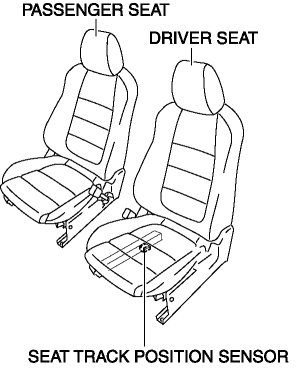
The seat track position sensor detects the front and back positions of the driver seat.
Function
-
The seat track position sensor converts the seat position into an electrical signal and sends it to the SAS control module.
Construction
-
The seat track position sensor consists of a hall element (semi-conductor) and a magnet. The sensor converts the effect of the magnetic flux (produced by the magnet) on the hall element, into an electrical signal.
-
The seat track position sensor installed on the driver-side seat rail.
Operation
-
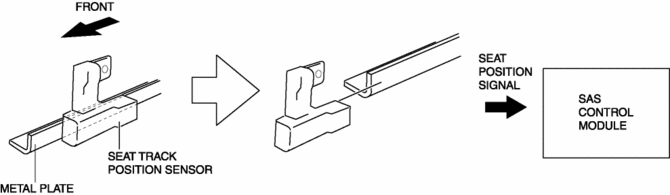
If the driver’s seat is slid forward, the seat track position sensor will separate from the metal plate installed to the seat slider.
-
When this occurs the magnetic flux of the sensor changes and that change is sent as an electrical signal to the SAS control module.
-
The SAS control module receives this signal and determines that the driver’s seat has been moved to a forward position.
Fail-safe
-
Function not equipped.
 Seat Track Position Sensor Removal/Installation [Two Step Deployment Control
System]
Seat Track Position Sensor Removal/Installation [Two Step Deployment Control
System]
1. Switch the ignition to off.
2. Disconnect the negative battery cable and wait for 1min or more..
3. Remove the front driver’s seat..
4. Disconnect the connector from the seat track positio ...
 Seat Warmer Control Unit Inspection
WARNING:
Handling a front seat (with built-in side air bag) improperly can accidentally
operate (deploy) the air bag, which may seriously injure you. Read the service
warnings/cautions b ...
Other materials:
Overheating
Overheating
If the High engine coolant temperature warning light illuminates, the vehicle
loses power, or you hear a loud knocking or pinging noise, the engine is probably
too hot.
WARNING
Switch the ignition to off and make sure the fan is not running before attempting
to work near the c ...
Clutch Disc Inspection [C66 M R]
Operation Inspection
1. Inspect the lining surface for discoloration and grease adhesion.
2. Inspect the torsion spring for weakness and the rivets for looseness.
3. Using a vernier caliper, measure the depth between the lining surface and
the rivet head.
Minimum clutch disc thicknes ...
Differential Oil Temperature Sensor Removal/Installation
WARNING:
Hot differential oil may cause severe burns. Do not perform maintenance while
differential oil is hot.
1. Disconnect the negative battery cable.
2. Disconnect the differential oil temperature sensor connector.
3. Remove the differential oil temperature sensor.
4. ...
