
Mazda CX-5 Service & Repair Manual: Seat Belt Warning Light
Purpose
-
The seat belt warning light warns the driver that a seat belt is not fastened.
Function
-
The instrument cluster flashes/illuminates the seat belt warning light based on the following CAN signals:
-
Vehicle speed signal sent from PCM
-
Driver/passenger buckle switch signal, occupancy detection sensor signal sent from SAS control module
Driver/passenger seat belt warning light display function
-
The driver/passenger seat belt warning light has a warning for when the vehicle is stopped, while the vehicle is being driven, and subsequent warnings while the vehicle is being driven.
-
When all of the following conditions are met, it flashes/illuminates.
-
Ignition switch ON (engine off or on)
-
Driver/passenger buckle switch on signal (seat belt unfastened) is detected
-
Occupancy sensor on signal (occupant in passenger seat) is detected (passenger seat belt warning light only)
-
The driver/passenger seat belt warning flash/illumination pattern is as shown in the figure.
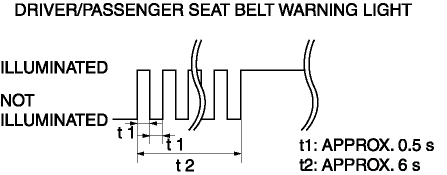
-
When all of the following conditions are met, it flashes/illuminates
-
Vehicle speed is approx. 20 km/h {12 mph} or more
-
Driver/passenger buckle switch on signal (seat belt unfastened) is detected
-
Occupancy sensor on signal (occupant in passenger seat) is detected (passenger seat belt warning light only)
-
The driver/passenger seat belt warning flash/illumination pattern is as shown in the figure.
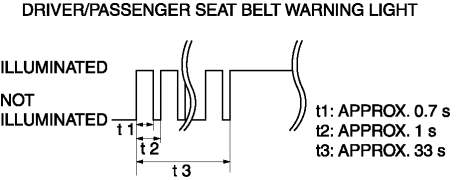
-
When all of the following conditions are met, it flashes/illuminates
-
Vehicle speed is approx. 20 km/h {12 mph} or more
-
Occupancy sensor on signal (occupant in passenger seat) is detected (passenger seat belt warning light only)
-
After warning while vehicle is being driven operates, buckle switch off signal (seat belt fastened) to on signal (seat belt unfastened) is detected
-
The driver/passenger seat belt warning flash/illumination pattern is as shown in the figure.
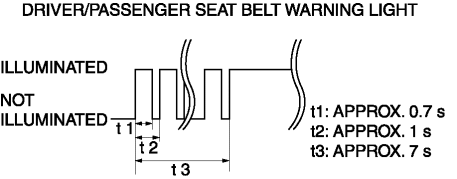
-
Warning when vehicle is stopped
-
Warning while vehicle is driven
-
Subsequent warning while vehicle is driven
Construction
-
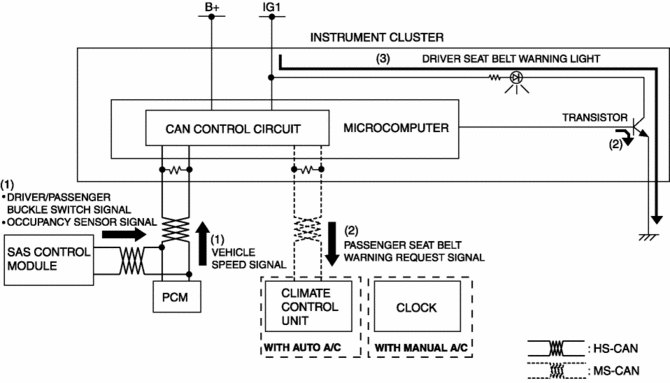
The microcomputer in the instrument cluster controls the illumination/flashing/turning off of the seat belt warning light based on the driver/passenger buckle switch signal and occupancy sensor signal from the SAS control module, and the vehicle speed signal from the PCM.
-
The driver seat belt warning light is set in the instrument cluster.
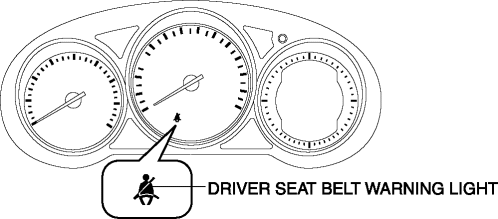
-
The passenger seat belt warning light are set in the clock (with manual A/C)/climate control unit (with auto A/C). For details on the passenger seat belt warning light, refer to CLOCK (with manual A/C)/CLIMATE CONTROL UNIT [FULL-AUTO AIR CONDITIONER] (with auto A/C).
Operation
1. The instrument cluster receives (1) a vehicle speed signal from the PCM, and a driver/passenger seat buckle switch signal and occupancy sensor signal from the SAS control module.
2. The instrument cluster microcomputer turns the transistor on (2) intermittently for flashing and continuously for illumination based on the each signal. In addition, it sends a driver/passenger seat belt warning request signal to the clock (with manual A/C)/climate control unit (with auto A/C).
3. When the transistor turns on intermittently, the driver seat belt warning light flashes (3), when it turns on continuously, the driver seat belt warning light illuminates (3).
Fail-safe
-
Function not equipped.
 Seat Belt Warning Alarm
Purpose
The seat belt warning alarm warns occupants that a seat belt is not fastened.
Function
The instrument cluster sounds the seat belt warning alarm based on the following
C ...
 Security Indicator Light
Purpose
Notifies the driver that the immobilizer system is operating.
Function
If a malfunction is detected in the immobilizer system, the DTC can be verified
by the flashing pa ...
Other materials:
PCM Inspection
Without Using the M-MDS
NOTE:
Because the PCM uses a waterproof connector, the inspection for the voltage/wave
pattern cannot be performed. The following values are for reference.
Terminal voltage table (Reference)
Terminal
Signal
C ...
Front Door Glass Removal/Installation
1. Perform the front door glass preparation..
NOTE:
Before removing the front door glass, the removal procedure for the front
door glass installation bolt can be facilitated by adjusting the top of the
front door glass to the position approx. 90 mm {3.5 in} away from the
upper par ...
On/Off Solenoid [Fw6 A EL, Fw6 Ax EL]
Purpose/Function
The on/off solenoid performs switching of the shift valve in the control
valve body according to the vehicle conditions.
Construction
The on/off solenoid is installed to the solenoid control valve body.
The on/off solenoid is a normal open-type on/off ...
