
Mazda CX-5 Service & Repair Manual: Relay And Fuse Block Disassembly/Assembly
1. Insert a tape-wrapped flathead screwdriver into the service hole in the position shown in the figure.
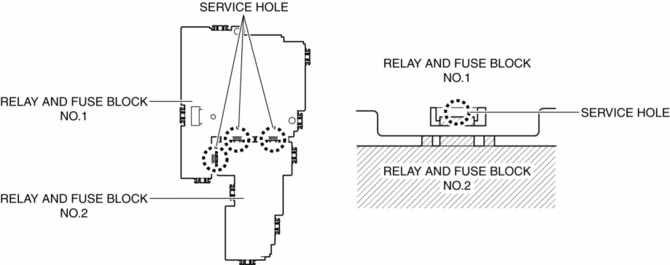
2. Move the flathead screwdriver in the direction of the arrow (1) shown in the figure, pull up relay and fuse block No.1 in the direction of the arrow (2) shown in the figure, and detach the relay and fuse block No.2 tab from relay and fuse block No.1.
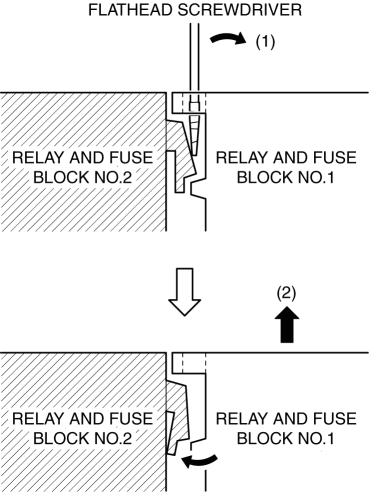
3. Detach all the relay and fuse block No.2 tabs from relay and fuse block No.1, and remove relay and fuse block No.1 from relay and fuse block No.2.
4. Assemble in the reverse order of disassembly.
 Relay And Fuse Block
Purpose
Relays and fuses used by each system are grouped and housed together for
smooth inspection and replacement servicing.
Function
Relays and fuses used by each system are g ...
 Relay And Fuse Block Middle Cover Disassembly/Assembly
1. Insert a tape-wrapped flathead screwdriver into the service hole in the position
shown in the figure.
2. While pressing the relay and fuse block middle cover tab in the direction
of arrow ...
Other materials:
Rear Pillar (Outer) Installation [Panel Replacement]
Symbol Mark
Installation Procedure
1. When installing new parts, measure and adjust the body as necessary to conform
with standard dimensions.
2. Drill holes for the plug welding before installing the new parts.
3. After temporarily installing new parts, make sure the related parts fit p ...
Fuel Gauge Sender Unit Inspection [Awd]
Fuel gauge sender unit (main)
NOTE:
For the fuel gauge sender unit removal/installation, refer to the fuel pump
removal/installation because the fuel gauge sender unit is integrated with the
fuel pump..
1. Verify that the resistance at fuel gauge sender unit (main) terminals D a ...
Coupler Component Removal/Installation [Fw6 A EL, Fw6 Ax EL]
WARNING:
A hot transaxle and ATF can cause severe burns. Turn off the engine and wait
until they are cool.
Always wear protective eye wear when using the air compressor. If the air
compressor is used, any particles of dirt or soiling could spatter and get into
the eyes.
...
