
Mazda CX-5 Service & Repair Manual: Rear Turn Light Bulb Removal/Installation
1. Disconnect the negative battery cable..
2. Insert a tape-wrapped flathead screwdriver into the service hole in the position shown in the figure.
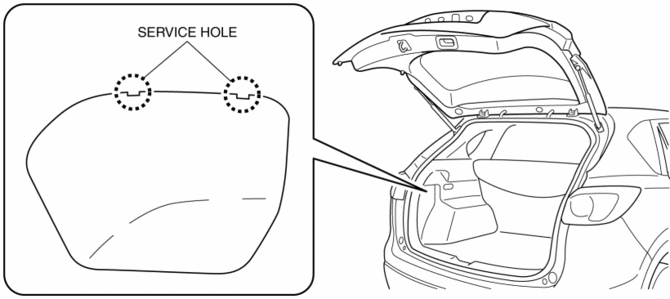
3. Move the flathead screwdriver in the direction of the arrow (1) shown in the figure, pull out the service hole cover, and detach the service hole cover tab and trunk side trim.
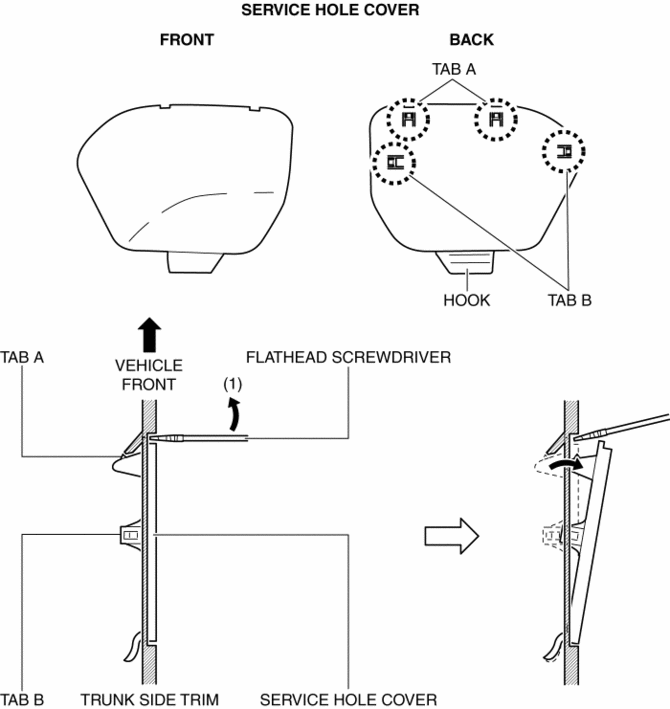
4. Pull out the service hole cover in the direction of the arrow (2) shown in the figure and pull out the service hole cover hook from the trunk side trim.
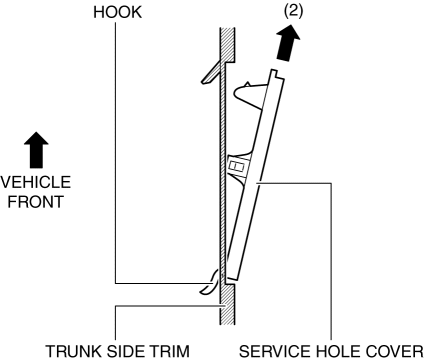
5. Remove the service hole cover.
6. Rotate the socket in the direction of the arrow (3) shown in the figure and remove it from the rear combination light in the direction of the arrow (4) shown in the figure.
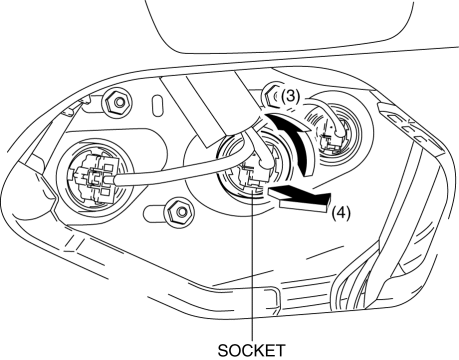
7. Remove the rear turn light bulb.
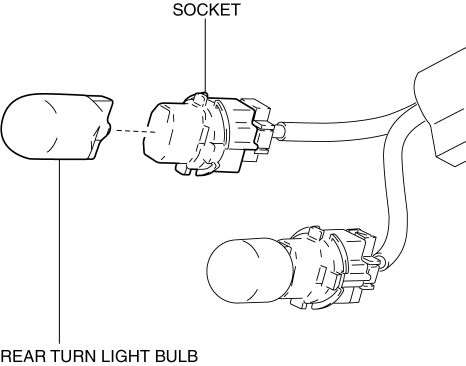
8. Install in the reverse order of removal.
 Parking/Front Turn Light Bulb Removal/Installation
Halogen Type
1. Disconnect the negative battery cable..
2. Rotate the socket in the direction of the arrow (1) shown in the figure and
remove it from the front combination light in the direction ...
 Side Turn Light
Purpose
The side turn lights are used to signal vehicles/people at the side of the
vehicle that the vehicle is going to make a right or left turn.
Function
The side turn lights ...
Other materials:
Headlight Auto Leveling System
Outline
Automatically adjusts the headlight optical axis in response to changes in
load and passenger conditions to prevent blinding of oncoming vehicles from
headlight glare and to assure a range of visibility.
The AFS control module performs headlight auto leveling system fail ...
Rear Console Disassembly/Assembly
1. Disassemble in the order indicated in the table.
1
Screw A
2
Rear console bracket
3
Screw B
4
Side panel
5
Rear console box
6
U ...
Headliner
Purpose/Function
The headliner is equipped with a shock absorbing pad for driver's head protection
during a collision.
Construction
The front and rear side of the headliner is equipped with a shock absorbing
pad with a plastic rib-pad structure.
...
