
Mazda CX-5 Service & Repair Manual: Rear Stabilizer Removal/Installation [2 Wd]
WARNING:
-
Verify that the rear crossmember is securely supported by a jack. If the rear crossmember falls off, it can cause serious injury or death, and damage to the vehicle.
CAUTION:
-
Performing the following procedures without first removing the rear ABS wheel-speed sensor may possibly cause an open circuit in the harness if it is pulled by mistake. Before performing the following procedures, disconnect the rear ABS wheel-speed sensor (axle side) and fix it to an appropriate place where the sensor will not be pulled by mistake while servicing the vehicle.
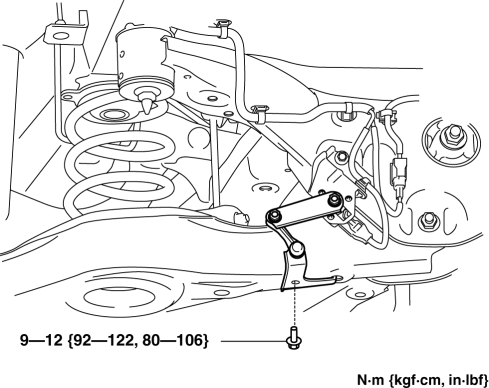
1. Disconnect the auto leveling sensor link. (With auto leveling sensor).
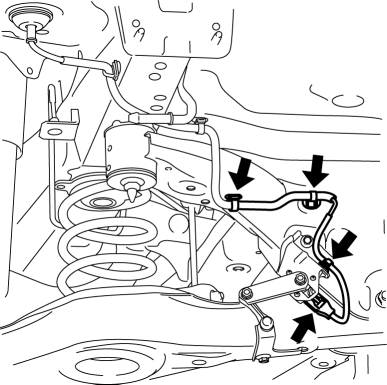
2. Disconnect the wiring harness clips and connector installed to the rear crossmember. (With auto leveling sensor)
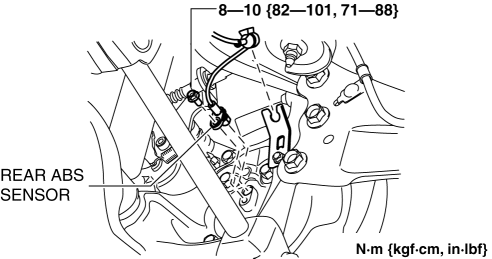
3. Disconnect the rear ABS wheel-speed sensor wiring harness installed to the hub support and set it aside. (See REAR ABS WHEEL-SPEED SENSOR REMOVAL/INSTALLATION.
4. Remove the TWC..
5. Remove the rear coil spring..
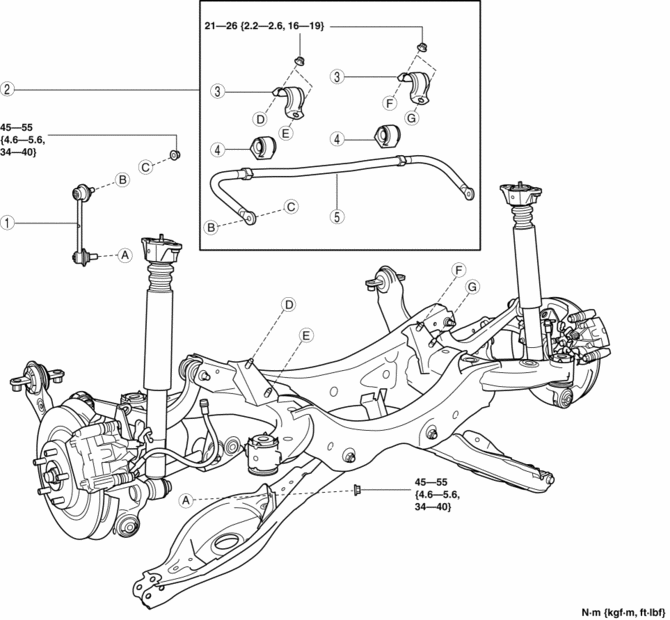
6. Remove in the order indicated in the table.
7. Install in the reverse order of removal.
8. Inspect the wheel alignment and adjust it if necessary..
|
1 |
Rear stabilizer control link |
|
2 |
Rear stabilizer component (See Rear Stabilizer Component Removal Note.) (See Rear Stabilizer Component Installation Note) |
|
3 |
Rear stabilizer bracket (See Rear Stabilizer Component Installation Note.) |
|
4 |
Rear stabilizer bushing (See Rear Stabilizer Component Installation Note.) |
|
5 |
Rear stabilizer |
Rear Stabilizer Component Removal Note
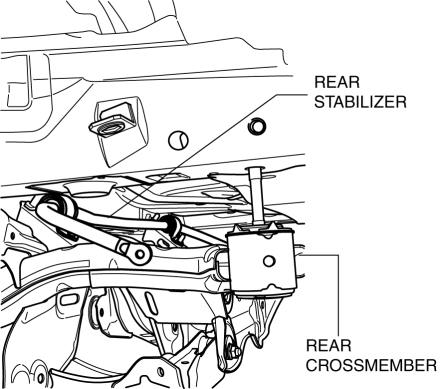
1. Support the rear crossmember component with a jack and remove the rear crossmember installation nuts.
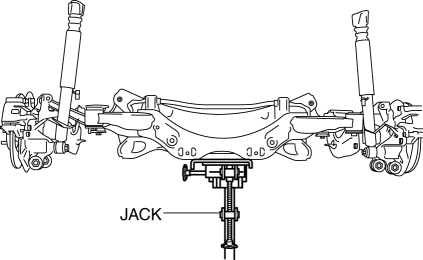
2. Press down on the rear crossmember component until the rear stabilizer component can be removed from the vehicle using a jack.
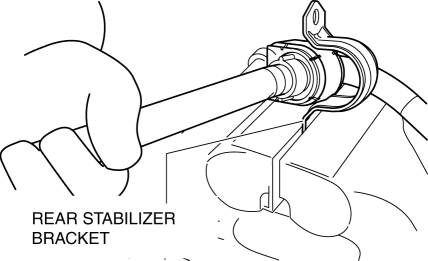
Rear Stabilizer Bracket Removal Note
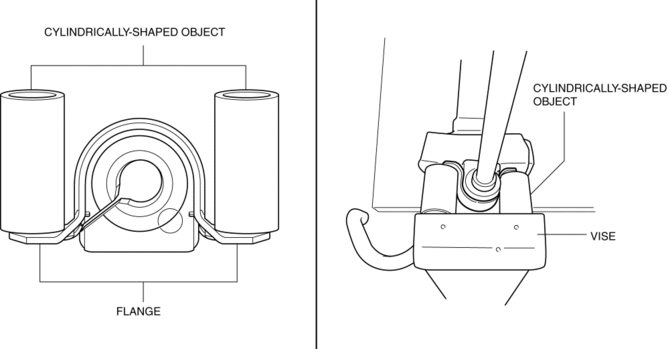
1. Secure the rear stabilizer bracket flange using a vise.
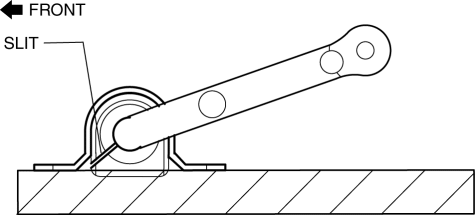
Rear Stabilizer Bushing, Rear Stabilizer Bracket Installation Note
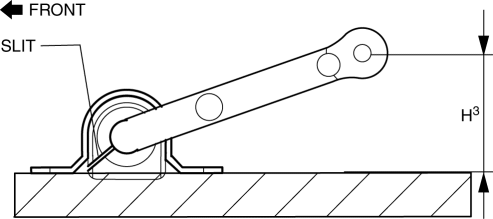
1. Install the rear stabilizer bushing with the slit pointing toward the front of the vehicle.
2. Install the rear stabilizer bracket to the front stabilizer bushing by hand using the following procedure.
3. If the rear stabilizer bracket cannot be installed by hand, install it using a vice.
CAUTION:
-
If the rear stabilizer bracket is installed using a vice, it could be deformed.
-
Set a cylindrically-shaped object as shown in the figure so that pressure is applied to the raer stabilizer bracket flange, and install the raer stabilizer bracket to the raer stabilizer bushing.
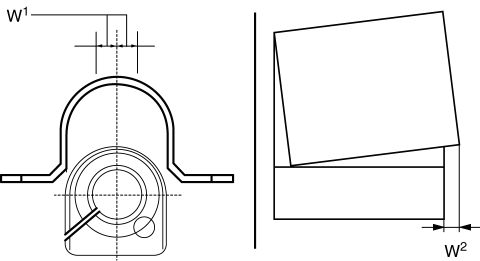
4. During rear stabilizer bracket installation, keep the deviation in the positions of the rear stabilizer bracket and the rear stabilizer bushing within the range shown in the figure.
-
W1: 0.5 mm {0.21 in} max.
-
W2: 2 mm {0.08 in} max.
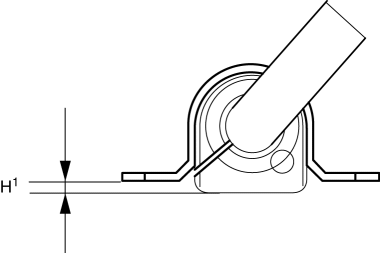
5. After installing the rear stabilizer bracket, verify that the positions of the rear stabilizer bracket and the rear stabilizer bushing are within the range shown in the figure.
-
H1: 13 mm {0.51 in} max.
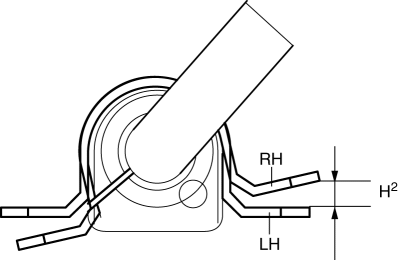
6. After installing the rear stabilizer bracket, verify that the right and left-side positions of the rear stabilizer bracket are within the range shown in the figure.
-
H2: 3 mm {0.1 in} max.
7. Place the rear stabilizer component on a level workbench, and verify that it is within the range shown in the figure.
-
H3: 66.5—76.5 mm {2.62—3.01 in}
Rear Stabilizer Component Installation Note
1. Temporarily tighten bolts A and B shown in the figure.
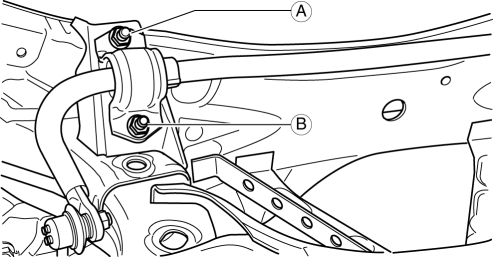
2. Tighten bolt A.
-
Tightening torque
-
21—26 N·m {9.3—11 kgf·m, 16—19 ft·lbf}
3. Tighten bolt B.
-
Tightening torque
-
21—26 N·m {9.3—11 kgf·m, 16—19 ft·lbf}
4. Tighten bolt A.
-
Tightening torque
-
21—26 N·m {9.3—11 kgf·m, 16—19 ft·lbf}
5. Lift up the rear crossmember component using a jack and install the rear crossmember installation nuts.
-
Tightening torque
-
91—111 N·m {9.3—11 kgf·m, 68—81 ft·lbf}
 Rear Stabilizer Control Link Inspection
1. Remove the rear stabilizer control link..
2. Inspect for bending or damage. If there is any malfunction, replace the rear
stabilizer control link.
3. Rotate the ball joint stud 10 times and s ...
 Rear Stabilizer Removal/Installation [Awd]
WARNING:
Verify that the rear crossmember is securely supported by a jack. If the
rear crossmember falls off, it can cause serious injury or death, and damage
to the vehicle.
C ...
Other materials:
Fuel Gauge Sender Unit Removal/Installation [2 Wd]
WARNING:
Always keep sparks and flames away from fuel when servicing the fuel system.
Fuel can be easily ignited which could cause serious injury or death, and damage
to equipment.
Fuel line spills and leakage from the pressurized fuel system are dangerous.
Fuel can ignite a ...
Inspection Of SST (Deployment Tool) [Two Step Deployment Control System]
1. Before using the SST (49 H066 002), inspect its operation.
Inspection Procedure
1. Follow the steps below to inspect the SST (49 H066 002).
If not as indicated in the table, replace the SST (49 H066 002) because
it has a malfunction.
WARNING:
Do not use a malfu ...
Clock Spring Removal/Installation [Standard Deployment Control System]
CAUTION:
If the disc on the combination switch is deformed or has foreign material
adhering to it, performance of the steering angle sensor may be reduced, causing
abnormal operation. When handling the clock spring, be careful not to deform
the disc and make sure there is no foreign ...
