
Mazda CX-5 Service & Repair Manual: Rear Mount Camera Removal/Installation
CAUTION:
-
The audio unit communicates with the rear mount camera and records the presence/non-presence of the rear mount camera when the ignition is switched to ACC or ON (engine off or on) after connecting the negative battery cable.
-
If the commander switch is installed with the negative battery cable connected when the audio unit records that there is no rear mount camera, the rear mount camera does not operate.
-
For the rear mount camera installation/removal, disconnect the negative battery cable, switch the ignition to ACC or ON (engine off or on) after the servicing is completed, and the audio unit records the presence/non-presence of the rear mount camera.
1. Disconnect the negative battery cable..
2. Remove the following parts:
a. Liftgate upper trim.
b. Liftgate side trim.
c. Liftgate recess.
d. Liftgate lower trim.
e. Liftgate garnish.
3. Press the back monitor camera tabs in the direction of the arrows (1) shown in the figure, pull the back monitor camera in the direction of the arrow (2) shown in the figure, and disengage the back monitor camera tabs from the liftgate garnish.
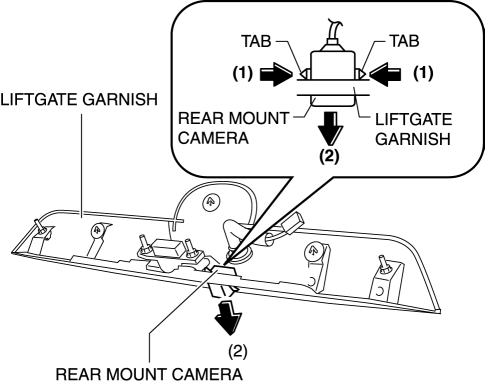
4. Remove the rear mount camera.
5. Install in the reverse order of removal.
 Rear Mount Camera Inspection
1. Disconnect the negative battery cable..
2. Remove the following parts:
a. Liftgate upper trim.
b. Liftgate side trim.
c. Liftgate lower trim.
d. Liftgate garnish.
e. Rear mount camera. ...
 Sirius Satellite Radio Unit
Purpose
Satellite radio programming can be listened to.
Function
The voltage signal sent from the center roof antenna (SIRIUS satellite radio
antenna) is output to the audio uni ...
Other materials:
Igniter Removal/Installation
WARNING:
Incorrect servicing of the discharge headlights could result in electrical
shock. Before servicing the discharge headlights, always refer to the service
warnings..
Igniter (LH)
1. Disconnect the negative battery cable..
2. Remove the air cleaner cover..
3. Remove th ...
Powertrain System [C66 M R]
Purpose, Function
The powertrain mechanism changes the gear combination by engaging or releasing
the clutch hub and gear, and changes the power transmission route. Because of
the change in the power transmission route, the drive force (speed, torque,
rotation direction) input from th ...
Heater, Ventilation And Air Conditioning
Abbreviation
AAS
Active Adaptive Shift
ABS
Antilock Brake System
ABDC
After Bottom Dead Center
ACC
Accessories
AFS
Adaptive Front Lighting System
...
