
Mazda CX-5 Service & Repair Manual: Rear Mount Camera Inspection
1. Disconnect the negative battery cable..
2. Remove the following parts:
a. Liftgate upper trim.
b. Liftgate side trim.
c. Liftgate lower trim.
d. Liftgate garnish.
e. Rear mount camera.
3. Prepare four dry cell batteries (1.5 V)
4. Connect the four dry cell batteries in a series.
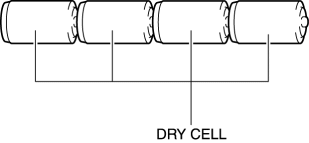
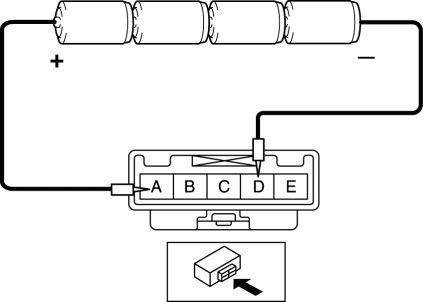
5. Connect the positive pole of the dry cell battery to rear mount camera terminal A, and the negative pole to terminal D.
6. With the cell batteries being connected, measure the waveform between rear mount camera terminal C and body ground.
7. Verify that the waveform is displayed as shown in the figure.
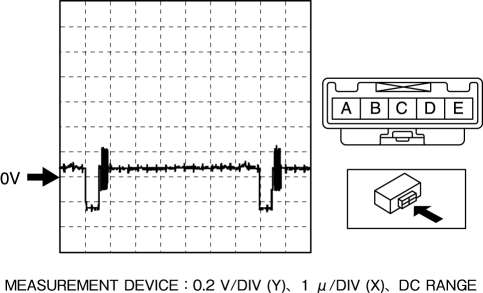
8. If the voltage is not as shown in the figure, replace the rear mount camera.
 Rear Mount Camera
Purpose, Function
The rear mount camera shoots the conditions at the rear of the vehicle in
color, and after converting the video signal, it outputs the signal to the audio
unit. (with co ...
 Rear Mount Camera Removal/Installation
CAUTION:
The audio unit communicates with the rear mount camera and records the presence/non-presence
of the rear mount camera when the ignition is switched to ACC or ON (engine
off or o ...
Other materials:
Rear Drive Shaft Removal/Installation
CAUTION:
Performing the following procedures without first removing the ABS wheel?speed
sensor may possibly cause an open circuit in the harness if it is pulled by
mistake. Before performing the following procedures, remove the ABS wheel?speed
sensor (wheel side) and fix it to an ...
Automatic Transaxle Controls
Various Lockouts:
NOTE
The Sport AT has an option that is not included in the traditional automatic
transaxle giving the driver the option of selecting each gear instead of leaving
it to the transaxle to shift gears. Even if you intend to use the automatic transaxle
functions as a tradit ...
Auto Light System
Outline
The auto light system automatically turns the TNS and headlights on/off according
to the illumination level above and in front of the vehicle.
The auto light system is controlled by the front body control module (FBCM).
The front body control module (FBCM) performs ...
