
Mazda CX-5 Service & Repair Manual: Rear Map Light
Purpose
-
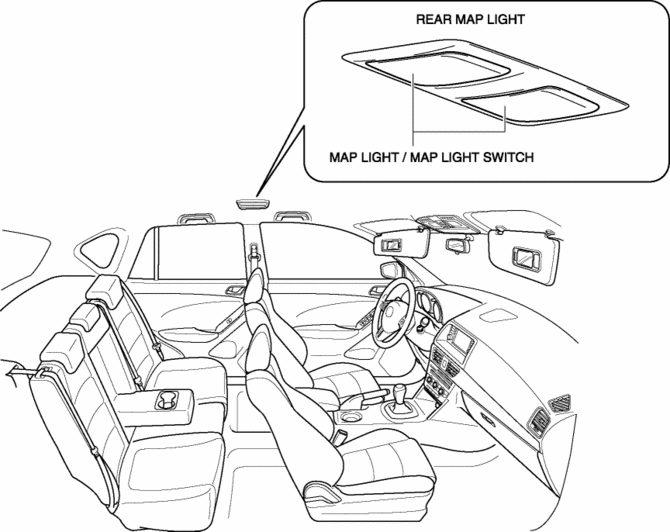
The rear map lights shine light at the center of the vehicle interior.
Function
-
The rear map lights illuminate when the interior light switch is in the ON position or the map light switch is turned on.
-
The rear map lights illuminate according to the lock condition of the driver's door and open/close conditions of the doors under the rear body control module (RBCM) control when the interior light switch for front map lights is in the DOOR position.
Construction
-
The rear map lights are assembled to the headliner.
Operation
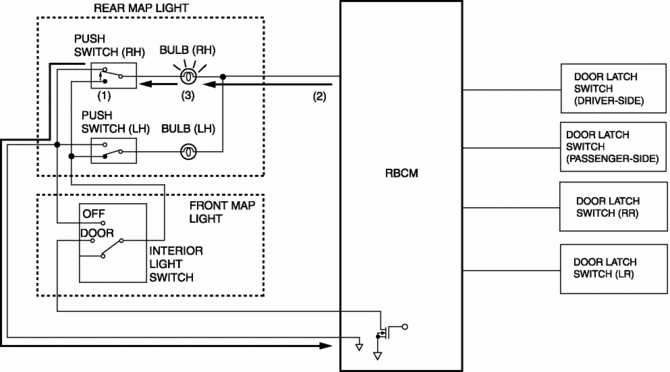
Map light switch operation
1. The map light switch is on.
2. The battery current flows to the map light bulb from the rear body control module (RBCM).
3. The map light illuminates.
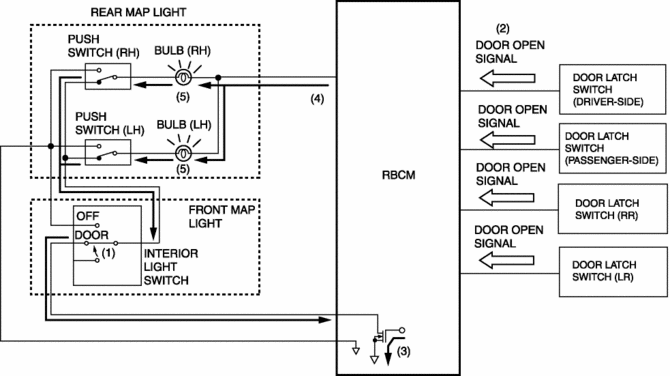
Interior light switch for front map lights operation
1. Interior light switch for the front map lights is in the DOOR position.
2. When any door is opened, the door open signal is input to the rear body control module (RBCM).
3. When the rear body control module (RBCM) receives the door-open signal, it turns on the transistor.
4. When the transistor turns on, the battery current flows to the map light bulb from the rear body control module (RBCM).
5. The map light illuminates.
NOTE:
-
When the interior light switch is in the DOOR position, the map light illumination on/off timing is controlled by the interior light control system. For details, refer to the interior light control system..
Fail-safe
-
Function not equipped.
 Map Light Removal/Installation
Front Map Light
1. Disconnect the negative battery cable..
2. Open the sunglasses holder.
3. Remove the screws from the front map light.
4. Move the front map light in the direction of the ...
 Room Light Control System
Outline
The room light control system changes the illumination condition and illumination
level of the interior lights (door position) according to whether the doors
are opened/closed and ...
Other materials:
Side Garnish Removal
Front
1. Insert a tape-wrapped flathead screwdriver in the position shown in the figure,
move it in the direction of the arrow (1) to remove the clip A.
2. Slide the side garnish in the direction of the arrow (2) shown in the figure
and remove clips B from side garnish.
3. Remove clips ...
Mass Air Flow (MAF) Sensor/Intake Air Temperature (Iat) Sensor No.1 Removal/Installation
NOTE:
Because the IAT sensor No.1 is integrated in the MAF sensor, replacing the
IAT sensor No.1 includes replacement of the MAF sensor/IAT sensor No.1.
1. Disconnect the negative battery cable..
2. Disconnect the MAF sensor/IAT sensor No.1 connector.
3. Remove the MAF sensor/IA ...
Bluetooth®
Bluetooth® Hands-Free
When a Bluetooth® device (mobile phone) is connected to the vehicle's Hands-Free
unit via radio wave transmission, a call can be made or received by pressing the
talk button, pick-up button, hang-up button, or voice command on the steering wheel,
or by operating t ...
