
Mazda CX-5 Service & Repair Manual: Rear Heat Duct Removal/Installation
1. Disconnect the negative battery cable..
2. Remove the following parts:
a. Decoration panel.
b. Shift lever knob (MTX).
c. Front console box.
d. Shift panel.
e. Upper panel.
f. Rear console.
g. Side wall.
h. Front console.
i. Front scuff plate.
j. Front side trim.
k. Joint cover.
3. Turn the floor covering over.
4. Remove in the order indicated in the table.
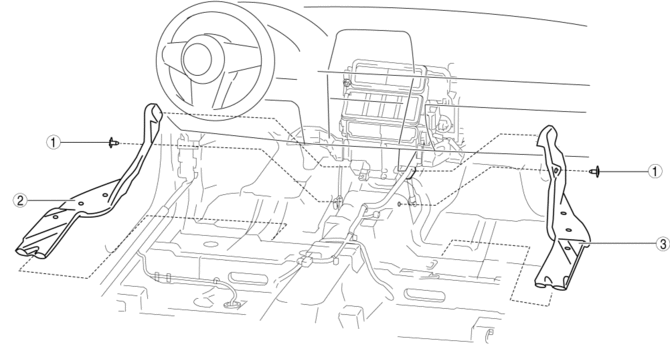
|
1 |
Fastener |
|
2 |
Rear heat duct (1) |
|
3 |
Rear heat duct (2) |
5. Install in the reverse order of removal.
 Heater Hose Removal/Installation
With Water Temperature Sensor
1. Remove the battery..
2. Drain the engine coolant..
3. Remove the insulator.
4. Remove the clips and remove the heater hose.
5. Remove the heat ...
 Rear Window Defroster/Outer Mirror Heater
Outline
Fogging is cleared from the rear window and outer mirror glass by heating
of the filament.
Structural view
System wiring diagram
Vehicles with full-auto air conditioner s ...
Other materials:
Intake Manifold Vacuum Inspection
1. Disconnect the evaporative hose No.3 (purge solenoid valve side) and install
the vacuum gauge..
2. Verify that the intake air hoses are installed securely.
3. Warm up the engine.
4. Measure the intake manifold vacuum while idling (no load) using the vacuum
gauge.
If not within t ...
Air Bag System Service Warnings [Standard Deployment Control System]
Air Bag Module Inspection
Inspecting an air bag module using a tester can operate (deploy) the air
bag module, which may cause serious injury. Do not use a tester to inspect an
air bag module. Always use the on-board diagnostic function to diagnose the
air bag module for malfunctions ...
Selector Lever Inspection
1. Switch the ignition ON (engine off or on).
2. Perform the following procedures to inspect the selector lever.
If there is any malfunction, adjust the selector cable..
a. Verify that the selector lever can be operated as shown in the figure.
b. Verify that the selector lever ...
