
Mazda CX-5 Service & Repair Manual: Rear Brake (Disc) Removal/Installation
1. Loosen the adjusting nut..
2. Remove in the order indicated in the table.
3. Install in the reverse order of removal.
4. After installation, add brake fluid, bleed the air, and inspect for fluid leakage..
5. Pump the brake pedal a few times and inspect the following:
-
The disc pad projection is securely installed to the piston groove
-
Parking brake lever stroke
-
Brake drag
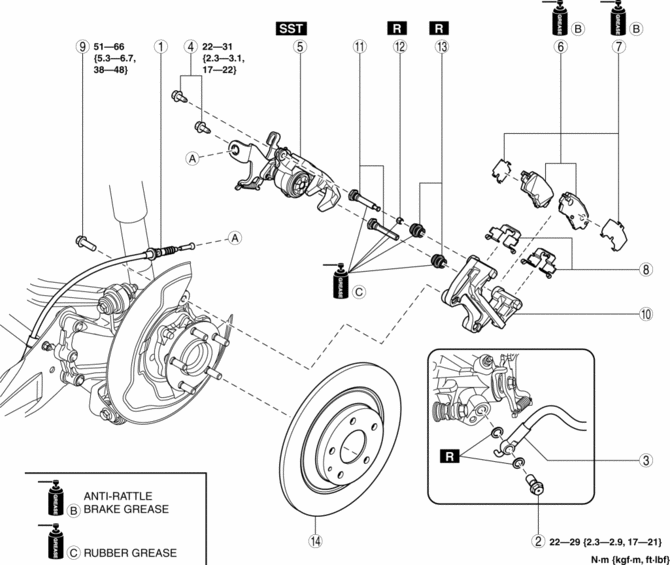
|
1 |
Rear parking brake cable (See Rear Parking Brake Cable Installation Note.) |
|
2 |
Bolt |
|
3 |
Brake hose |
|
4 |
Bolt |
|
5 |
Caliper (See Caliper Installation Note.) |
|
6 |
Disc pad |
|
7 |
Shim |
|
8 |
Guide plate |
|
9 |
Bolt |
|
10 |
Mounting support |
|
11 |
Slide pin |
|
12 |
Bushing |
|
13 |
Dust boot |
|
14 |
Disc plate |
Caliper Installation Note
1. Clean the exposed area of the piston.
2. Rotate the piston clockwise slowly using the SST and push the piston completely until the piston grooves are in the position shown in the figure.
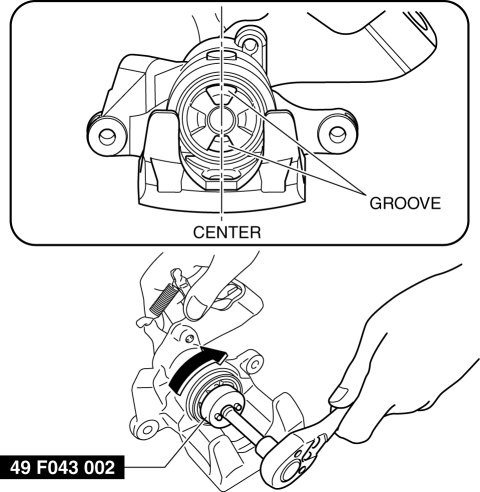
3. Install the caliper.
Rear Parking Brake Cable Installation Note
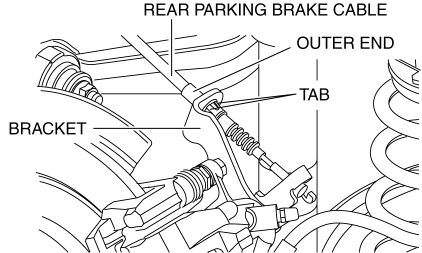
1. Install the rear parking brake cable to the rear caliper.
2. Verify that the outer end tabs of the rear parking brake cable is securely engaged with the bracket.
 Rear Brake (Disc) Inspection
Brake Judder Repair Hints
Description
1. Brake judder concern has the following 3 characteristics:
Steering wheel vibration
1. The steering wheel vibrates in the rotation direction. This characte ...
 Parking Brake
...
Other materials:
Antenna Feeder No.1 Inspection
With audio system
1. Disconnect the negative battery cable..
2. Remove the following parts:
a. A-pillar trim (RH).
b. Decoration panel.
c. Audio unit.
3. Disconnect antenna feeder No.2.
4. Verify that the continuity between antenna feeder No.1 terminals is as indicated
in the tabl ...
Back Up Light Bulb Removal/Installation
1. Disconnect the negative battery cable..
2. Insert a tape-wrapped flathead screwdriver into the service hole in the position
shown in the figure.
3. Move the flathead screwdriver in the direction of the arrow (1) shown in the
figure, pull out the service hole cover from the liftgate, a ...
PID/Data Monitor Inspection [Rear Body Control Module (Rbcm)]
1. Connect the M-MDS to the DLC-2.
2. After the vehicle is identified, select the following items from the initialization
screen of the M-MDS.
a. Select “DataLogger”.
b. Select “Modules”.
c. Select “R_BCM”.
3. Select the applicable PID from the PID table.
4. Verify the PID ...
