
Mazda CX-5 Service & Repair Manual: Propeller Shaft Removal/Installation
CAUTION:
-
If the constant velocity joint is bent during propeller shaft removal/installation or transportation after servicing, the constant velocity joint boot may contact the metallic cover and the boot may be damaged. Insert a rag between the boot and the metallic cover before servicing to protect the boot
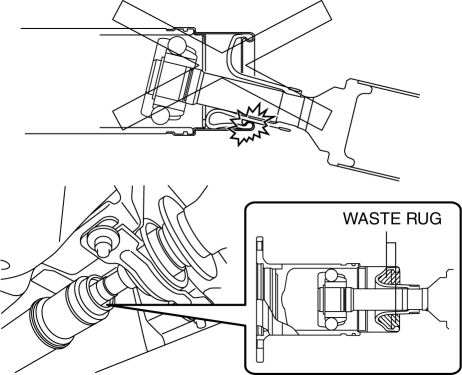
1. Remove the floor under cover..
2. Remove the center under cover..
3. Remove the insulator (exhaust system)..
4. Remove the tunnel member..
5. Remove the brace bar..
6. Remove in the order indicated in the figure.
7. Install in the reverse order of removal.
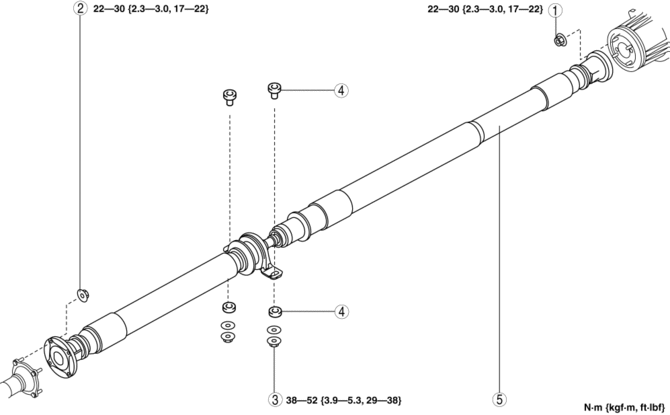
|
1 |
Nut (rear) |
|
2 |
Nut (front) |
|
3 |
Nut (center bearing support) |
|
4 |
Bush, spacer |
|
5 |
Propeller shaft (SeePropeller Shaft Installation Note.) |
Propeller Shaft Removal Note
CAUTION:
-
Do not mark with a punch to prevent imbalance.
1. Before removing the nut, place alignment marks on the companion flange (front) and constant velocity joint, and on the coupling component (rear) and yoke.
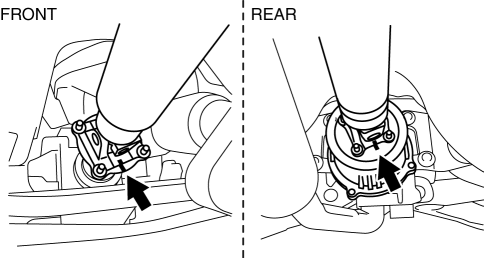
2. Loosen the nuts (front, rear, center bearing support).
3. Remove the front and rear nuts.
CAUTION:
-
Propeller shaft is attached to the stud.
4. Press the propeller shaft and remove it from the rear side.
CAUTION:
-
Do not bend the propeller shaft to the extent that it interferes with the boot.
5. Remove the center bearing support nut, then remove the propeller shaft
Propeller Shaft Installation Note
CAUTION:
-
If the nuts are loosened, verify that the stud bolt tightening torque against the coupling is 6.4 N {0.65 kgf, 1.4 lbf} or more. If the tightening torque is less than 6.4 N·m {65 kgf·cm, 57 in·lbf}, tighten the stud bolt with 6.4—9.6 N·m {66—97 kgf·cm, 57—84 in·lbf}.
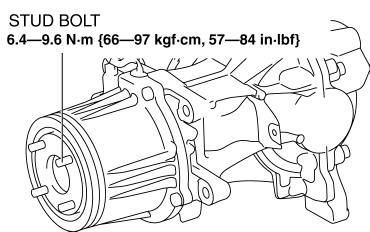
-
When loosening the nut, if a nut is stuck to a stud bolt, replace the stud bolt with a new one.
-
When replacing the stud bolts, clean off oil and foreign matter on the bolts and coupling installation areas in advance.
NOTE:
-
The stud bolts are entirely threaded with no front/rear distinction.
1. Degrease the tightening area.
2. Align the alignment marks, and temporarily install the nuts (front, rear, center bearing support).
CAUTION:
-
Do not bend the propeller shaft to the extent that it interferes with the boot.
3. Tighten the nut (front) with specified torque first, and then install the other nuts.
4. Perform a road test and verify that there is no abnormal vibration or noise.
 Propeller Shaft On Vehicle Inspection
Joint Area Excessive Play Inspection
1. Shake the universal joint by hand and verify that there is no excessive play.
2. If there is any excessive play, replace the propeller shaft..
Propell ...
 Rear Drive Shaft
Purpose, Function
Engine noise and vibration have been reduced due to adoption of a bell joint
on the wheel side of the constant velocity joint.
A low noise and vibration double offs ...
Other materials:
Quarter Window Glass Installation
WARNING:
Using a razor with bare hands can cause injury. Always wear gloves when using
a razor.
CAUTION:
If a door is opened or closed when all the window glass is closed, the resulting
change in air pressure could cause the sealant to crack preventing the proper
insta ...
Washer Fluid
InspectingWasher Fluid Level
WARNING
Use only windshield washer fluid or plain water in the reservoir:
Using radiator antifreeze as washer fluid is dangerous. If sprayed on the windshield,
it will dirty the windshield, affect your visibility, and could result in an accident.
Using Washer Fluid ...
Oil Seal (Control Valve Body) Replacement [Fw6 A EL, Fw6 Ax EL]
1. Disconnect the negative battery cable..
2. Remove the air cleaner component..
3. Disconnect the control valve body connector.
CAUTION:
Make sure that your hand does not touch the terminal as the connector terminal
could be damaged.
Water or foreign objects entering th ...
