
Mazda CX-5 Service & Repair Manual: Pressure Sensor [Two Step Deployment Control System]
Purpose
-
The pressure sensor determines at an earlier stage whether to detonate the air bag on the side of the vehicle (around front door) receiving an impact. This is for improved accuracy of the side air bag operation (deployment).
Function
-
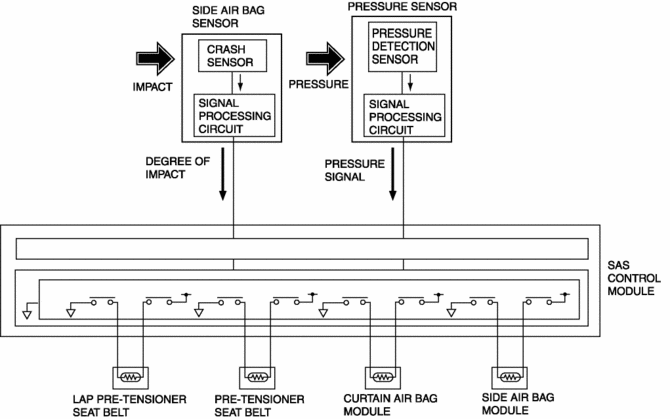
When the vehicle is involved in a side-impact collision, the pressure sensor detects air pressure applied to the internal front door and sends an air bag deployment signal to the SAS control module.
Construction
-
A pressure detection sensor is built into the pressure sensor.
-
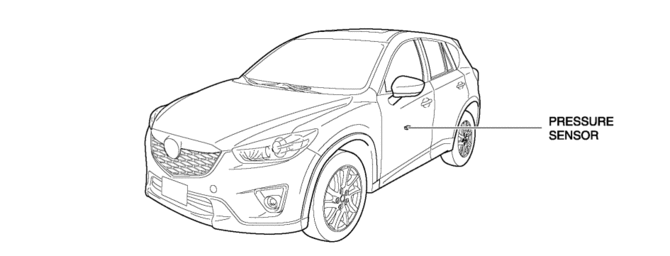
Located inside the center of the front doors.
Operation
1. If the vehicle is involved in a side-impact collision, air pressure is generated in the sealed front door and applied to the pressure sensor.
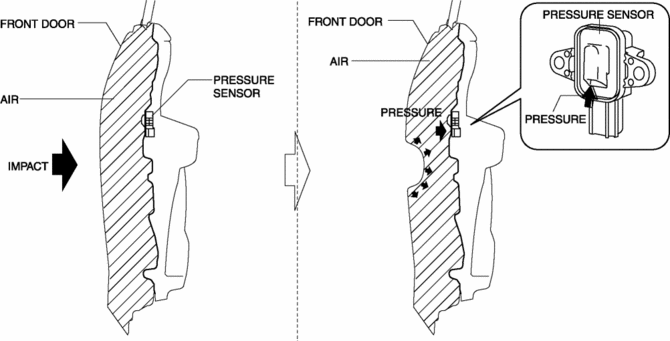
2. The pressure detection sensor built into the pressure sensor detects the pressure and converts the pressure into an electrical signal at the signal processing circuit.
3. The pressure signal, which is converted to an electrical signal, is sent to the SAS control module.
Fail-safe
-
Function not equipped.
 Pressure Sensor Removal/Installation [Two Step Deployment Control System]
WARNING:
Handling the pressure sensor improperly can accidentally operate (deploy)
the air bag module, which may seriously injure you. Read the air bag system
service warnings and cautio ...
 Refrigerant Pressure Sensor Inspection [Full Auto Air Conditioner]
1. Install the manifold gauge.
2. Verify the high-pressure side reading of the manifold gauge.
3. Measure the terminal voltage at PCM terminal 2BB, 2AX and 2AJ
4. Using the graph below, measure ...
Other materials:
Clock Spring Adjustment [Two Step Deployment Control System]
1. Set the front wheels straight ahead.
CAUTION:
The clock spring will break if over?wound. Do not forcibly turn the clock
spring.
2. Turn the clock spring clockwise until it stops.
3. Turn the clock spring counterclockwise approx. 2 turns.
4. Align the mark on the clo ...
Main Relay [Skyactiv G 2.0]
Purpose/Function
Supplies power to each part.
Supplies battery voltage to each part based on the signals from the PCM even
though the ignition is switched on or off.
Construction
Installed to the relay and fuse block.
Operation
After the contact poin ...
Brake System/ABS Warning Light
Purpose/Function
The brake system/ABS warning light is built into the instrument cluster.
If a malfunction is detected in the system with the parking brake released,
the warning light illuminates to notify the driver.
Construction/Operation
When the DSC system and CAN l ...
